Need Zoho information or help due to COVID-19? Let us know.

Search results for : zoho app

Marketing Automation & Social Integration

Do you really need Marketing Automation and Social Integration in order to excel in business?

marketing automation social integration

Chances are if you’re reading this blog post, the answer in your mind is a resounding yes.  But, the answer isn’t as intuitive to everyone. That includes owners of very small companies, very traditionally sales-oriented companies, and others who have simply never known the power of CRM automation.  And, I write this in hopes that someone reading this gains a bit of insight.

I decided to write this as a followup to a prior post where we compared Zoho CRM to Method:CRM.  The problem I noticed is that while Zoho CRM allows users to set up automated marketing and social media campaigns, Method:CRM doesn’t provide users a way to carry out those seemingly fundamental tasks.  And, I have a feeling it’s because of the mindset that marketing automation just doesn’t matter, or that a business can get by with a simple contact management system and an integration with QuickBooks.

So, for those skeptical folks among us, what does marketing automation do for you?  It’s more than meets the eye.

Increase engagement by promoting via email

marketing automation social integration

Obviously, drumming up business is never a bad thing.  So, what do you do when contacts and leads fall by the wayside and you haven’t reached out to them in months?

Just like in world of social interaction, engaging someone who’s gone cold can prove tricky.  But, you shouldn’t use that as an excuse not to try it.  Chances are if you got someone’s contact info, that someone was engaged enough at one point and just got sidetracked.  Or you got too busy, or life just happened, as it often does.

With marketing automation, you have the opportunity to re-engage that person – and perhaps countless others.  You could even land a big deal that was a long time coming. Use anything of these excuses to send a message:

  1. A change of seasons
  2. The beginning of the month
  3. An approaching holiday
  4. Anything else you can think of!

Note that no one ever gets 100% engagement in an email campaign.  But, if the product you pitch generates enough revenue, you’ll win with just one sale anyway.

Does chat really help?

marketing automation social integration

When thinking about whether or not installing a chat box on your website will really help customer engagement, it’s easy to think of it as too invasive.  For example, just think of that annoying kid who comes up to you in Target when you’re just trying to find anything.  No, of course you don’t need any help!  But, being accosted in a department store is much different than receiving a chat message from someone when you’re on an unfamiliar site, perhaps unsure of how to proceed after landing on the home page…  You could be under a tremendous time crunch and need help finding information quickly.  Or, you may not even know if you’ve hit the right site at all.

The truth is chat really does help.  People who you engage via chat are more likely to trust you.  This makes them more likely to buy from you in the long run.  By communicating with visitors on your website, you’re able to find out a good deal about them: why they’re visiting, what their respective companies do, their level of authority…as well as more personal things, as often happens over chat.  You can use the information you get from your prospects to simply follow up with them in the future, or even research them more in depth later.  But, no matter what, you’ll have them in your own CRM in a flash.  And, that’s miles better than either double-entering the lead into your database manually or not having the lead to begin with.

marketing automation social integration

What are you missing without marketing and social automation?

Well…kind of a lot.

Without marketing automation, you probably have a way to contact your leads through your CRM… But, you likely have a limited number of email templates to choose from.  And, you definitely won’t have any way of keeping track of who actually opens and clicks on your emails.

One of the greatest things about a social plugin for your website is the notion that visitors have a way of reaching you from the comfort of their chairs.  This means no picking up a phone or even using their voices!  By using chat, you’ll engage people whose attention you simply may never have garnered before. This leads to sales you never would have had, and relationships that never could have been possible.

And, another thing: chat makes users more likely to engage you themselves.  On a website with chat enabled, customers or prospects usually face three possible contact options:

  1. Send an email (and, it could take hours or even days to get a response)
  2. Pick up the phone (where you could get a voicemail or thrown on hold indefinitely)
  3. Chat (where you know someone’s waiting at their desk to service your request)

It’s easy to see why someone might pick the chat option.  No long wait time, no pressure to articulate thoughts correctly the first time (because of your backspace key).  And, of course, the knowledge that someone is waiting to help you.  (As long as the box says they’re available, of course.)

Without chat, you’re quite limited.  Customers and potential customers can only reach you if they pick up the phone, send you an email, or fill out a form.  And, some of your potential customers will certainly do that.  But, I would guess many more will opt for chat for the reasons aforementioned.

Zoho gives you an edge with marketing automation and social integrations
zoho marketing automation social integration

Zoho has a good deal of clout just from its CRM, but the addition of marketing and social apps like Zoho Campaigns and Zoho Social make its offering of apps much more enticing.  SalesIQ rounds it out with a great website chat feature, too.  All of their social and marketing apps integrate with the CRM, so you won’t need to manually copy information from app to app.  And, the addition of Zoho MarketingHub to its arsenal further expands Zoho’s marketing sphere, putting it in the same realm as a HubSpot or Salesforce Marketing Cloud.  Futhermore, all of these apps are available in Zoho One, which is Zoho’s entire family of apps bundled together for a fairly low price.  With that kind of offering, there’s never been a better time to take your first steps into Zoho.

This post is admittedly lengthy, but, I hope you gain at least one bit of valuable knowledge from it.  Marketing automation and social integration really do help boost overall engagement by giving you insight into your customers’ behavior patterns.  And, if you have a choice between picking a CRM with marketing tools and one without…go with the one that includes them!
How Competitive Gap Analysis Can Help You Maximize Your Business Potential

gap analysis

Gap Analysis for Businesses

If you’re like most business owners, you’ve probably spent a long time getting your business systems in place. You’ve developed the perfect combination of procedures and programs to achieve your business’ goals, and have trained your team on those systems.  Sometimes, you happen upon the perfect systemic combination. Other times…you don’t. That’s called a gap between expectation and reality in your systems’ collective performance, hence the expression gap analysis.

Can you recognize when you don’t have a perfect combination of programs and systems – and, if so, what to do about it?

This is where ZBrains can help.

Start Your Gap Analysis Consulting


Here’s How Gap Analysis Works

The term gap analysis from a business standpoint really just means taking an in-depth look at your business’ procedures and systems. Followed by an examination of their purposes, then identifying any weaknesses. That is, find the places where the results fall short of your desire – and determine a way (or ways) to fix them.

Gap Analysis Example

For simplicity’s sake, let’s say you own a toy store you’re certain needs some gap analysis.  You’d go through similar steps in order to determine what to do to improve your business:

  1. Identify the current process: Sell toys at the brick-and-mortar store
  2. Identify the current outcome: Sell 20 toys per day
  3. Select a goal you hope to achieve: Sell 100 toys per day
  4. Define a new process that would help reach that goal: Implement or improve the toy store’s website to be more customer-friendly, or implement paid search results, or…
  5. Identify the gap…

Undoubtedly, your own processes are much more complex than simply selling toys (without regard to the kind of toy, your stock of toys on hand, your website’s performance, and other such variables).  This is where ZBrains gap analysis experts can come and do the heavy lifting for you.

Call our consultancy line at (888) 207-4111 if this is the type of gap analysis you need for your business, or if you have any questions about how our analysis process works.

Let Us Answer Your Questions About Zoho Consulting


gap analysis

Gap Analysis to compare two sets of business processes

Another way to use this kind of analysis is to compare two sets of your own business’ processes.

For example, say you have a set of computer systems that perform tasks A, B, C, and D.  You’ve just bought another, more comprehensive system that can perform tasks A, B, and C…but, not D.  (And, in reality, there would likely be other tasks the two opposing programs would perform, and in different ways, requiring a sub-analysis to account for those).

Our gap analysis experts scrutinize and compare your two systems’ capabilities. We determine where their true differences lie, and in turn answer the question of whether or not it benefits you, or is possible, to:

  • Delegate a task previously fulfilled by your old system to the new one
  • Improve the old system so as to render the new one obsolete
  • Adopt an entirely new system
  • Fuse bits of systems 1 and 2 to create something new

It’s our expertise, and we’d love to connect and determine if a gap analysis can help streamline new aspects of your business.

Call (888) 207-4111 if this is the type of Gap Analysis you need for your business, or if you have any questions about how our own analysis process works.

Get Zoho Consulting

Moving off Spreadsheets and onto a CRM

The Benefits of Switching from Spreadsheets to CRM for Your Business

There comes a time in every person’s life when he must abandon his training wheels and go forth into the night on just two of them.

zoho crm

As a very young person, you may have thought this was absolutely ludicrous.  Why abandon the safety of the training wheels?  (Maybe you saw a sibling get into an accident and it scarred you for a while.)  Whatever the reason, you may have held out for a while, but, when you finally got up the nerve to go out on two wheels – or, into the pool without water wings – or, onto the street in your car without a supportive parent in the passenger seat – it probably felt much better than you thought it would.  Much more freedom!  Many more possibilities.

And, so it is with your business.

For years, you may have been dealing with your customers in a very simple way, just keeping track of them on a spreadsheet you periodically update.  Maybe that’s just the way it’s always been.  Maybe you tried learning a different way of managing your contacts before, and it didn’t take for one reason or another.  But, that’s the way it is for now.

What if there was a better, more streamlined way of reaching out to and keeping track of your customers and prospects, though?  The very possibility of this can be a lot to take in, especially for someone who’s used to doing the same thing day in and day out.  But, the fact that you’re reading a tech blog – and, this blog post – means you’re probably open to the idea of it.

What does a spreadsheet do?

[caption id="attachment_723" align="alignleft" width="350"]zoho crm (other than cramp your style, obviously)[/caption]

The thing about spreadsheets is they’re very passive.  If you want a spreadsheet to tell you a piece of information, you have to pull a few strings, write a few formulas, and make it happen yourself.  Your record-keeping must be very precise, and, the spreadsheet probably demands a lot of your attention, and will keep on doing so in higher quantities as your business expands.

Moving through a sales cycle is a tedious, manual process, comprised of many copy+pastes and cross-references with other documents (or programs, if you use an inventory management system or QuickBooks).  Calling customers is completely manual, and, taking notes can be quite messy.  When it comes time to email those customers, you’d better have a special folder set up for correspondence, too, or else say goodbye to ever finding customer records without knowing what you talked about before – so you can enter search terms into your email client.

In short, spreadsheets are great if you’re keeping track of just a little data, not needing to modify it or move it very much…

zoho crm

But, is your business small and simple?

If you’re reading this, I have a hunch it isn’t, or, it’s reached the point where it’s about to break out…with a little help from a customer relationship management system – a CRM.

What does a CRM do?

Essentially, a CRM is like a spreadsheet in that it can certainly list all of your contacts, leads, and other records; however, it’s equipped to help you manage all sorts of business scenarios with a little more finesse.  For example, filtering certain leads or contacts (so, for example, you’re only looking at clients who have birthdays this month), which is impossible with a spreadsheet, is easy with a CRM.

Want to move someone from one category to another in your database?  It’s as easy as clicking a button, or, selecting an option from a drop-down menu.

zoho crm

Keeping track of past correspondence with customers, one of the best parts of having a CRM at your disposal, is suddenly second-nature, as all your notes appear on the same page as your contact, complete with dates, a sales history, and, of course, all the requisite contact info.  With a CRM, taking notes is as easy as typing what you want and pressing OK.

Even the act of calling customers itself, historically a manual task, can become nearly automatic with calendar reminders and integrated calling features within a CRM, as well.

Data security is much better with CRM, as opposed to spreadsheets

Have you ever been entering information in your spreadsheet, when suddenly – poof – a column disappears?  Or, it disappeared minutes ago and you aren’t sure when, and you don’t know how many CTRL+Zs it will take to get anything back?  With spreadsheets, being vigilant is a constant struggle.  One great thing about CRM is fields are protected, and you have to verify info before saving it.  This means there’s virtually no chance of accidentally mass-deleting 1000 phone numbers.  Sure, this may not be a problem if you’re a super-human, methodical worker.  But, most people aren’t perfect.  And, people tend to become less perfect as their workloads increase.  Which is what you’re trying to do with your business, hopefully.  So, why not use something that in essence catches your mistakes?

CRM improves security in another way too, however, by restricting or granting access to certain data modules (tables) or fields based on permission level.  Of course, you can solve this problem in spreadsheets by simply creating multiple sheets.  But, like all things related to using spreadsheets, it simply isn’t a sustainable solution in the long run.  It’s better to have a system that allows for creating system users that can be added or deactivated at will, and whose permissions can be changed easily, with just a few clicks.

[caption id="attachment_3553" align="alignright" width="300"]spreadsheet vs crm wheel spokes Just like this![/caption]

You can use CRM as your hub, and connect different spokes at will

Everything else notwithstanding, one of the best parts of having a CRM is the ability to connect other apps to it, hands down.  There’s only so much you can reasonably track in a CRM itself – and, there’s only so much you’ll want to give your sales staff access to.  But, with other apps to track things like customer orders and invoices, project statuses, and the like, you can give yourself and your sales team a 360-degree view of any given customer, so they know just how to react whenever that person gives you a call.  And, they’ll know just how to market to that person when it comes time to do so.

With great spreadsheets come great paper waste

Well, maybe not all the time.  But, if you’re using a spreadsheet – something that inherently doesn’t connect to anything else in the business – you’re probably making some kind of waste.  It’s likely you’re either sending loads of emails back and forth, or you’re printing out physical documents to send to accounting.  Having a CRM eliminates the need for any of that.  Of course, sometimes printing physical documents is harder to avoid, like in the case of warehouse pick sheets when employees don’t have access to mobile devices – but, in most cases, CRM drastically helps in this area.

Are you ready to do away with the training wheels?

The first step to eliminating a problem is at least admitting the existence of one.  You may be satisfied with your way of contacting clients at the moment.  But, can you imagine the difference without being encumbered by the manual labor of a spreadsheet?

Take off those extra wheels and explore the two-wheeled world – by taking a look at some CRMs!  You’ll probably find it’s a lot easier to get around, you can go a lot faster, and, you get a lot more done at the end of the day.

As Zoho consultants, we’re happy to give you a training of Zoho CRM, an intuitive, simple CRM solution, as it applies to your style of business – with all the Zoho support you need, to boot.  If you’d like to explore apps other than Zoho CRM, too, that’s no problem.  Zoho One is packed full of apps aside from the CRM, and they are all related or integrated to each other.

How EBizCharge enables businesses to accept payments in Zoho CRM, Books, Inventory, and Invoice

In the ever-changing digital payments landscape, businesses must constantly use innovative and efficient software solutions to keep up with competitors and yield long-term success. 

Fortunately, EBizCharge and Zoho provide two powerful systems with robust A/R options for businesses to streamline their payment processing and stay at the forefront of their industry.

What is EBizCharge?

EBizCharge is an all-in-one payment platform equipped with a payment gateway, software integrations, and merchant services, so businesses can securely accept various forms of payments like credit cards, debit cards, and ACH payments. 

With EBizCharge, businesses can take advantage of these features, including:

  • Seamless payment processing
  • Real-time transaction reporting
  • Recurring billing options
  • Level 3 payment processing 
  • Secure tokenization and encryption for enhanced data security
  • 24/7, in-house customer support

In addition to the Zoho suite, EBizCharge integrates with over 100 other accounting, ERP, CRM, and eCommerce software systems, including QuickBooks, Salesforce, Sage, and Magento.

EBizCharge’s Integrations with Zoho

EBizCharge’s integrations with various Zoho apps greatly simplify how businesses handle payment processing and customer relationship management. 

EBizCharge’s integration into Zoho CRM allows sales teams to easily accept customer payments on sales calls, directly inside the Zoho CRM software. 

EBizCharge provides three separate integrations with the Zoho Finance platform: Zoho Books, Zoho Inventory, and even Zoho Invoice.  These integrations allow for finance and fulfillment staff to collect and process payments at any point in your process.

With these integrations, merchants can quickly process transactions, allow customers to pay by email, automate payment collections, and more. 

EBizCharge’s Zoho integrations allow businesses the flexibility to enhance their operations to promote more cash flow and long-term success. 

Aside from the features mentioned in this section, EBizCharge and Zoho provide innovative software that significantly benefits merchants.

What problems do these integrations solve?  3 benefits of integrating EBizCharge with Zoho

The integration between your business software and payment processing system eliminates double-entry, but it also brings departments closer together by speeding operations, and even improves customer service:

  • Improved customer experience. EBizCharge allows Zoho users to provide their customers with a secure and user-friendly online payment portal. Customers can easily pay invoices, view their transaction history, and manage billing preferences, leading to a positive and convenient payment experience.
  • Enhanced payment reconciliation. EBizCharge and Zoho automate the payment reconciliation process by automatically matching payments with corresponding invoices, reducing human error and discrepancies.
  • Increased efficiency. EBizCharge for Zoho eliminates manual data entry and repetitive tasks, saving time and effort for business teams. This increased efficiency allows them to focus on core business activities.

Streamline your business with EBizCharge and Zoho

Integrating EBizCharge with Zoho provides a robust payment solution for merchants to stay ahead of the competition and meet the evolving demands of their customers. 

If you want to alleviate the stress felt from tedious financial tasks, increase overall efficiency, and even make your customers happier, integrating EBizCharge with Zoho will help save you time, energy, and valuable resources.

Measure Lead Response Time Extension

Introduction

Thank you for choosing the “Measure Lead Response Time” extension for Zoho CRM. This powerful tool is designed to help you accurately track and measure the response time for leads in your CRM system. By monitoring your team’s response time, you can improve customer satisfaction, streamline sales processes, and enhance overall efficiency. This help document will guide you through the installation, configuration, and usage of the extension.

1. Installation

1.1 Prerequisites

Before installing the “Measure Lead Response Time” extension, ensure that you meet the following requirements:

  • Active Zoho CRM subscription.
  • Administrative access to your Zoho CRM account.
  • Supported web browser (Chrome, Firefox, or Safari).

1.2 Installing the Extension

To install the extension, follow these steps:

  1. Log in to your Zoho CRM account.
  2. Navigate to the Zoho Marketplace at https://www.zoho.com/marketplace.
  3. Search for “Measure Lead Response Time” in the marketplace search bar.
  4. Locate the extension and click on it to view the details.
  5. Click on the “Install Now” button.
  6. Review the permissions requested by the extension and click “Accept.”
  7. The extension will be installed in your Zoho CRM account.

2. Configuration

2.1 Accessing Extension Settings

To access the settings of the “Measure Lead Response Time” extension, follow these steps:

  1. Log in to your Zoho CRM account.
  2. Navigate to the CRM home page.
  3. Click on the gear icon in the top-right corner to access the settings menu.
  4. From the dropdown menu, select “Setup” to open the Zoho CRM setup page.
  5. In the setup page, locate and click on the “Extensions & Customizations” section.
  6. Under the “Extensions” tab, find and select “Measure Lead Response Time.”

2.2 Setting Response Time Criteria

Within the extension settings, you can define the response time criteria based on your business requirements. Follow these steps to configure the response time criteria:

  1. Access the extension settings using the instructions provided in section 2.1.
  2. In the “Response Time Criteria” section, click on the “Add Criteria” button.
  3. Specify the criteria details, such as the response time limit, measurement units, and notification preferences.
  4. Save the settings to apply the response time criteria.

3. Usage

3.1 Monitoring Lead Response Time

The “Measure Lead Response Time” extension provides real-time monitoring of lead response time. To track the lead response time, follow these steps:

  1. Log in to your Zoho CRM account.
  2. Navigate to the CRM home page.
  3. Locate and click on the “Leads” module in the left sidebar.
  4. Within the Leads module, you will find a new column labeled “Response Time.”
  5. The “Response Time” column displays the time elapsed since the lead was assigned or created.
  6. You can sort the leads based on response time to prioritize follow-ups.

3.2 Generating Reports

The extension allows you to generate reports on lead response time for better analysis and performance tracking. To generate reports, follow these steps:

  1. Log in to your Zoho CRM account.
  2. Navigate to the CRM home page.
  3. Click on the “Reports” tab in the top navigation menu.
  4. Select the “Lead Response Time” report category.
  5. Choose the desired report type, such as summary or detailed.
  6. Customize the report filters and date range as needed.
  7. Click on the “Generate Report” button to generate the lead response time report.
  8. The report will be displayed, and you can export it in various formats for further analysis.

4. Troubleshooting

4.1 Common Issues

Issue: Extension not visible in the Zoho CRM setup page.

  • Ensure that the extension installation was successful. Check the installation steps in section 1.2.
  • If the extension is installed but not visible, try clearing your browser cache and refreshing the page.

Issue: Incorrect response time calculations.

  • Double-check the response time criteria configured in the extension settings.
  • Verify that the lead creation/assignment timestamps are accurate in your CRM system.

4.2 FAQs

Q: Can I customize the response time criteria for different lead types? A: Yes, the extension allows you to set specific response time criteria based on lead types. Refer to section 2.2 for instructions on configuring criteria.

Q: Can I receive notifications for leads that exceed the response time limit? A: Yes, you can set up email notifications for leads that exceed the response time limit. In the extension settings, specify the email addresses to receive notifications.

Understanding Distribution Data Flow Systems by ZBrains

DISTRIBUTION DATA FLOW

Zoho helps you streamline and automate tasks in your business. ZBrains will show you how to get to the next level to with a digital transformation with Zoho!

Tech & SaaS Data Flow

TECH & SaaS DATA FLOW

Zoho helps you streamline and automate tasks in your business. We’ll show you how to get to the next level to with a digital transformation with Zoho!

SmartScheduler™ & Google Maps

How to Create Your
Google Maps API for SmartScheduler Integration

SmartScheduler extension for Zoho CRM allows for easy appointment-setting, dispositioning, and route optimization, all while writing everything back to your CRM. This integration with Google Maps allows you to schedule and perform routing tasks with ease.

Due to changes within Google, it is now required for ZBrains clients to provide the API key for this integration to us. Please see this video and written instructions below for a quick and straightforward how-to.

How To Generate Google Map API key

Step 1 :

1a. Go To – https://console.cloud.google.com/

Step 2:

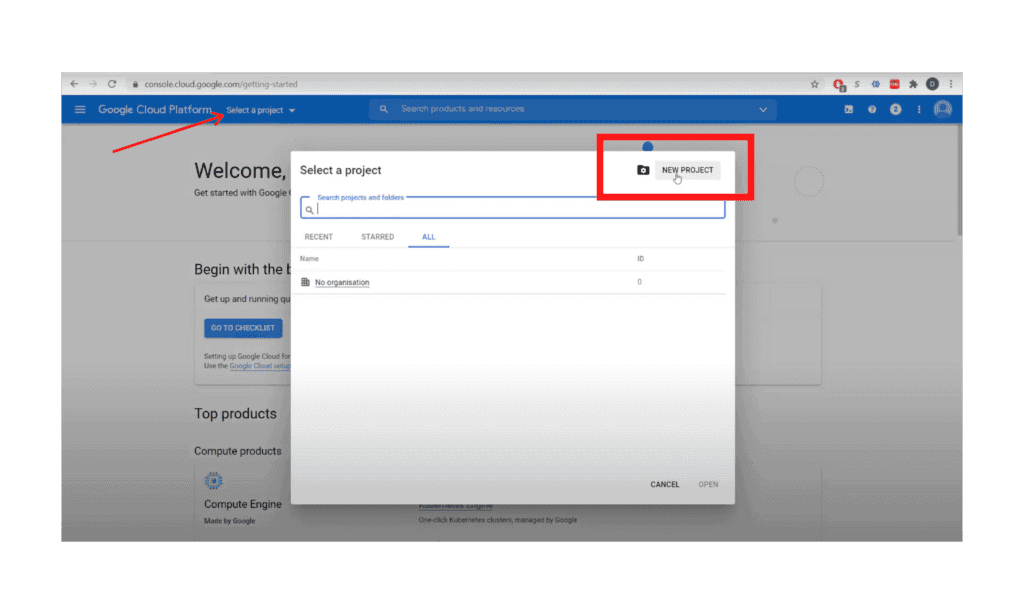
2a. Create a Project. 

2b. From “Select a Project” dropdown, click “New Project”

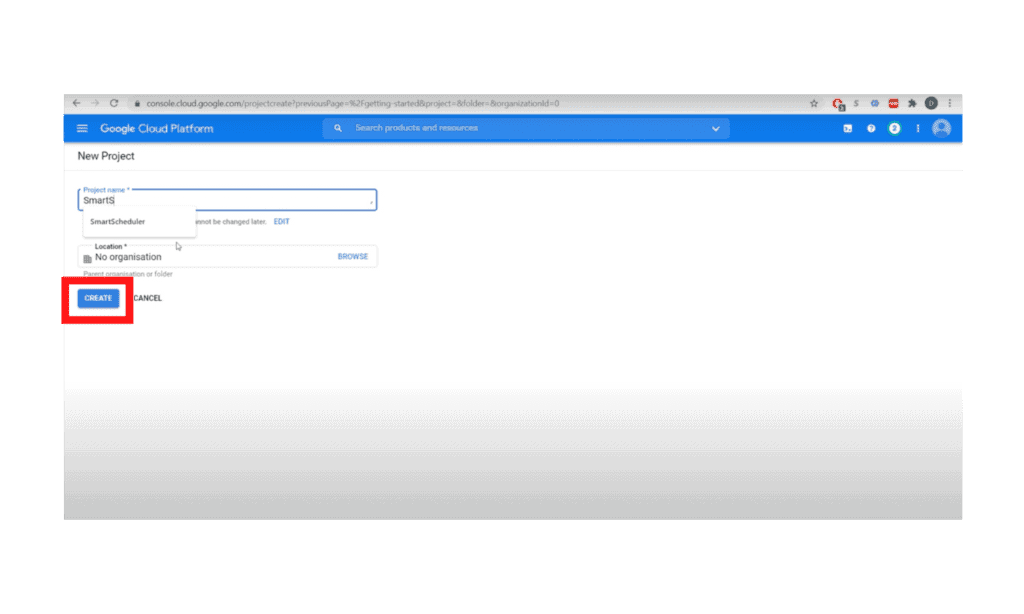
2c. Name it “SmartScheduler,” click “Create”

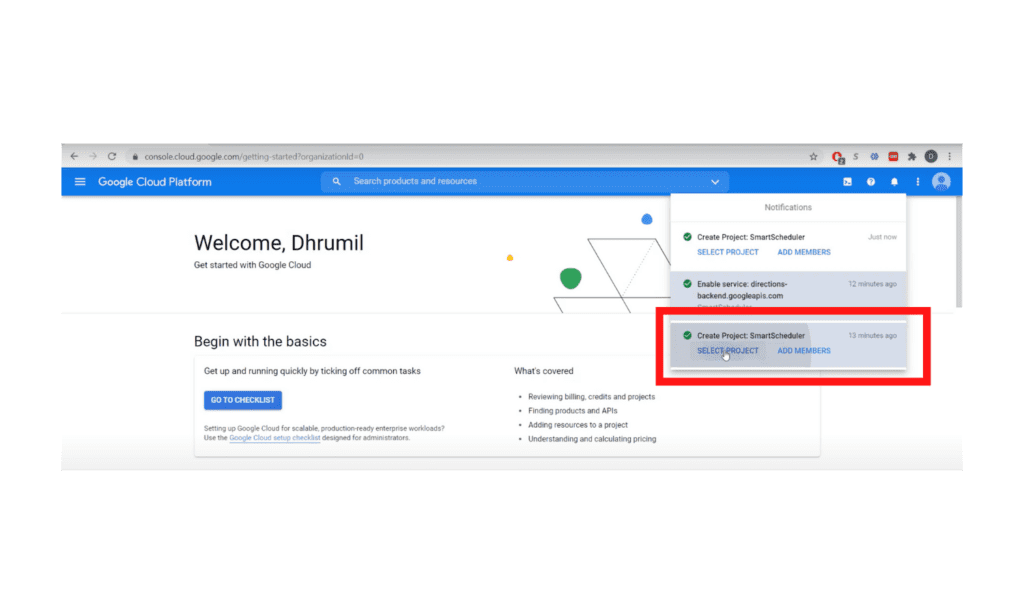
2d. Wait for the project to be created, then select the project from “Notifications”

Step 3:

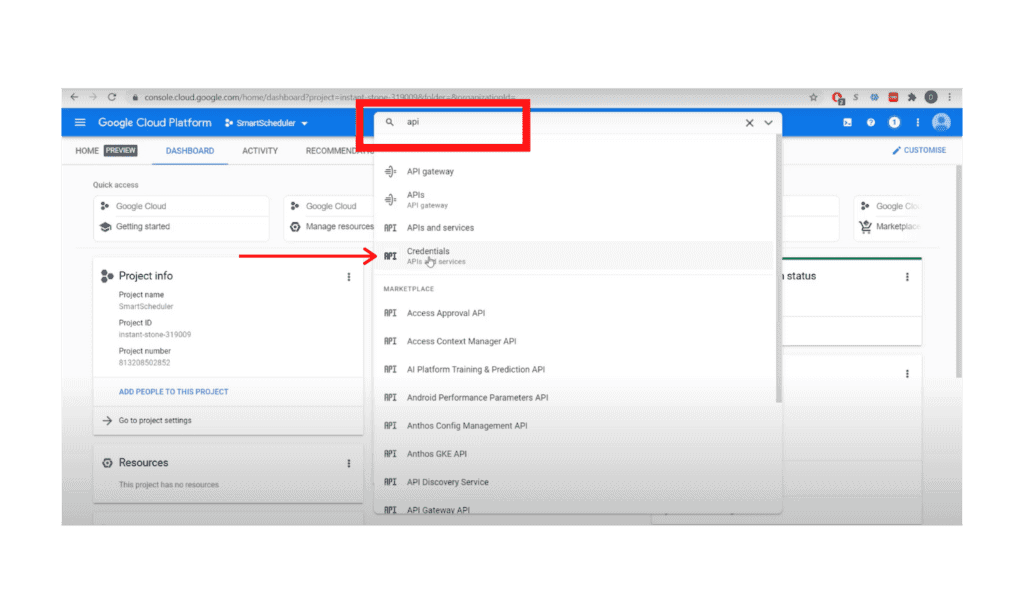
3a. Then select your recently created project from the “Select a Project” list

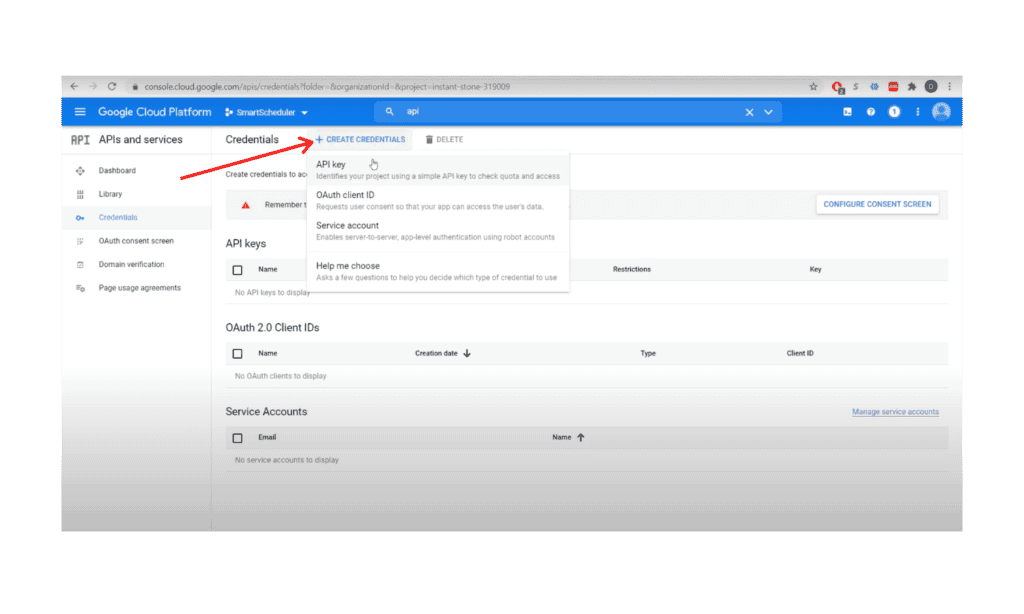
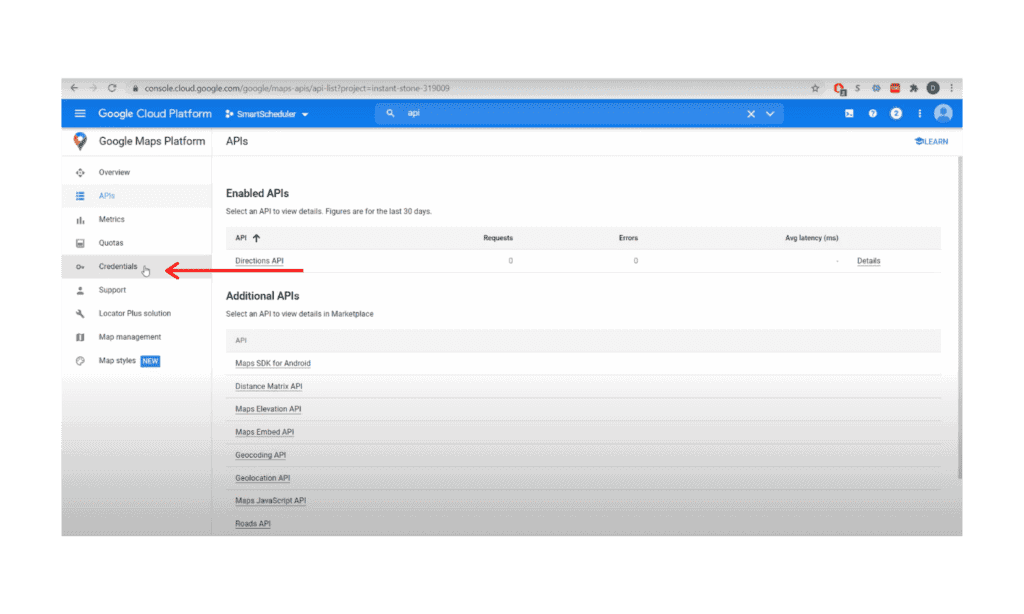
3b. Search for “API” and click on “Credentials”

3c. In Credentials, Click on “+ New Credential” and Create API Key

3d. Then close the API Key window

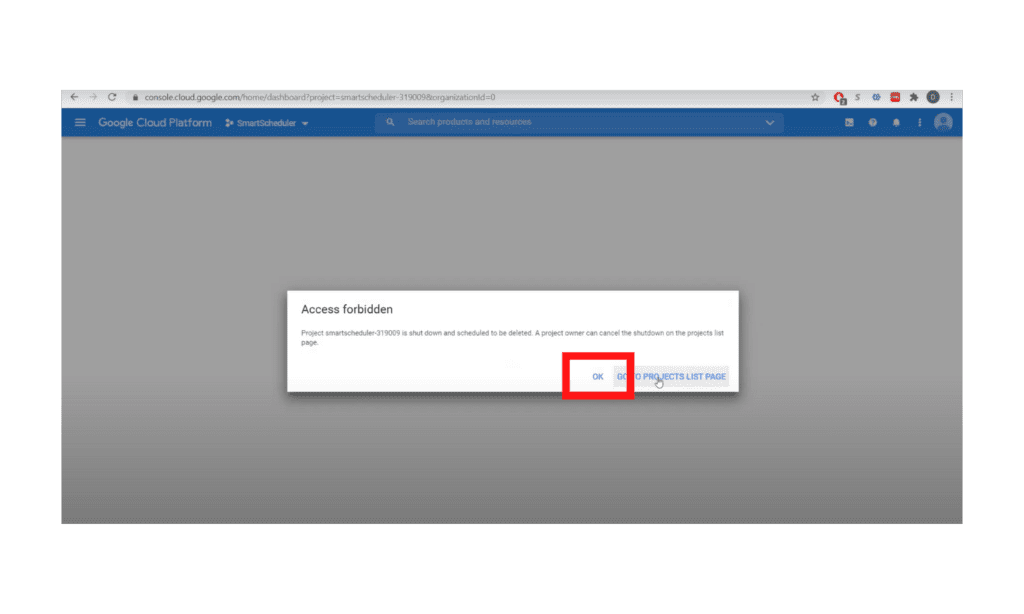
 3e. *click OK if you see Access Forbidden message

Step 4:

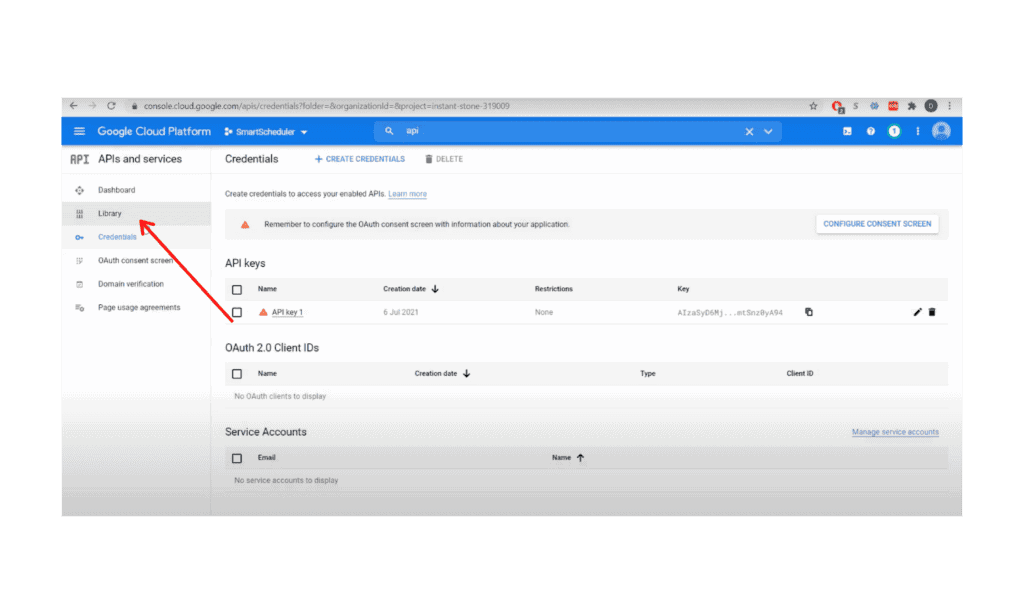
4a. Go to the Library 

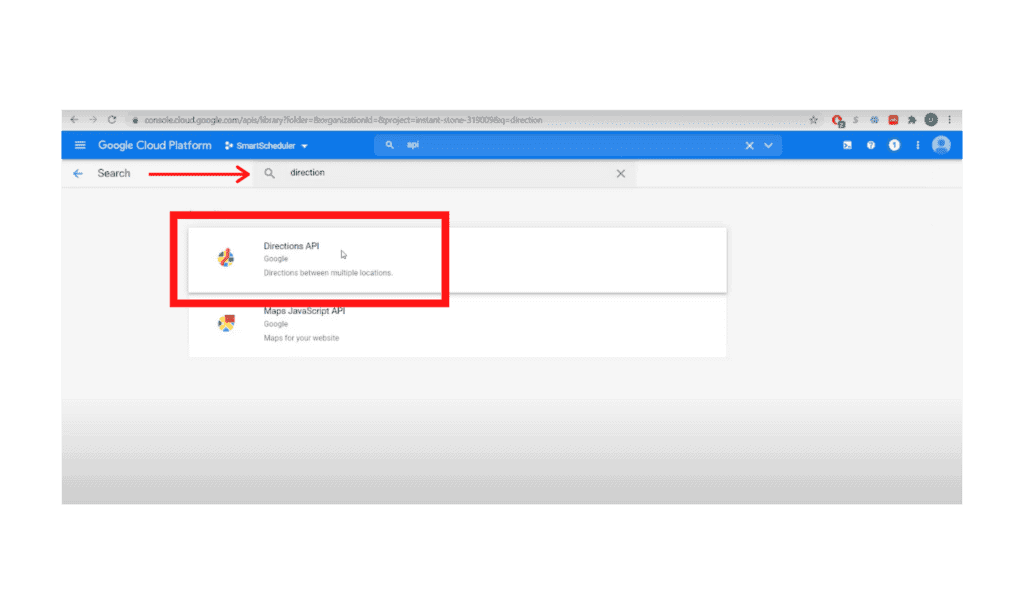
4b. Search for “Direction”

4c. Click “Directions API” and Enable

Step 5:

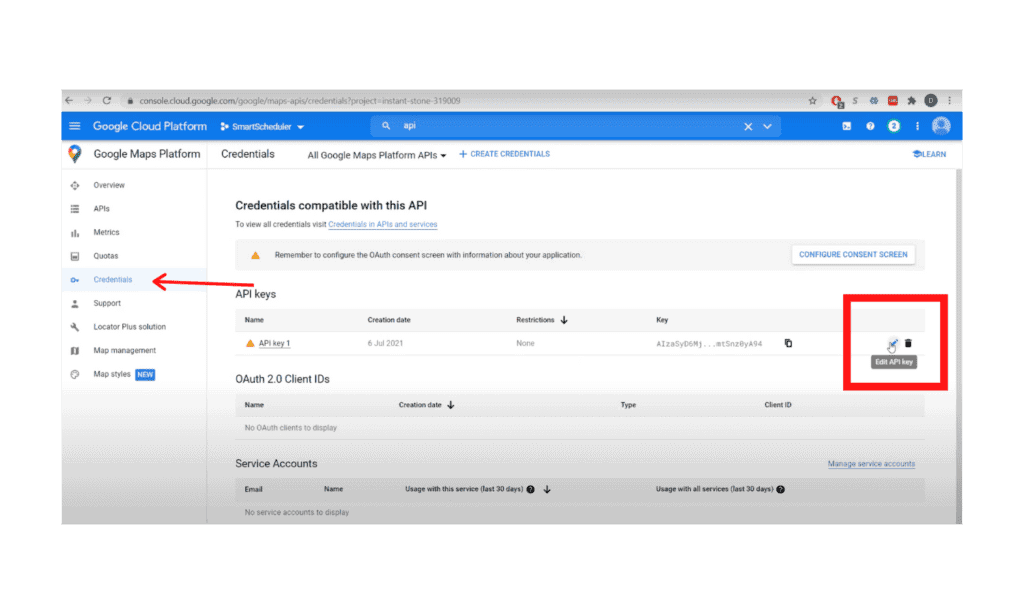
5a. Go to Credentials

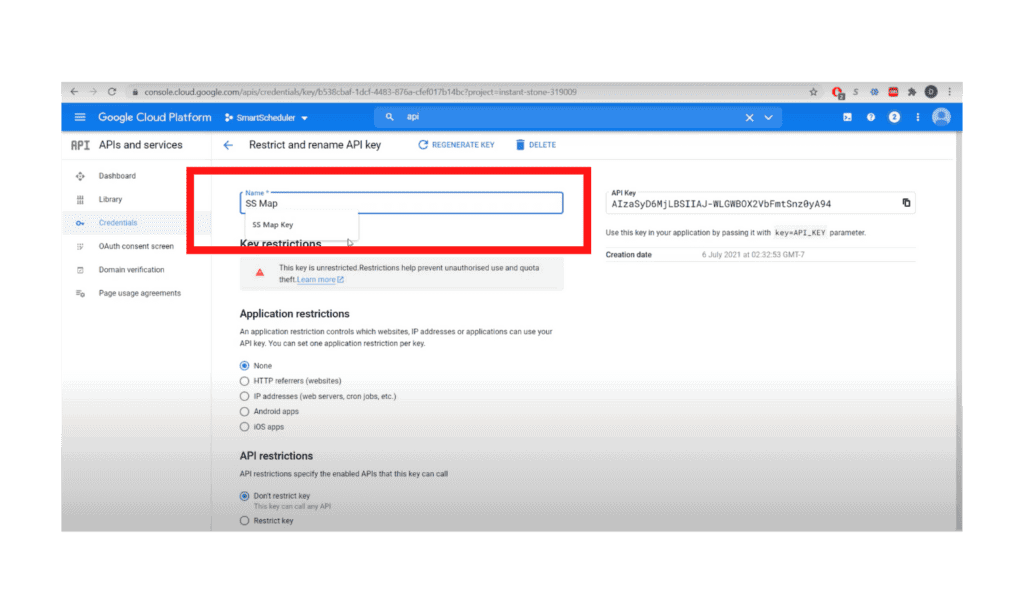
5b. Select edit, then rename API name to”SS Map Key”

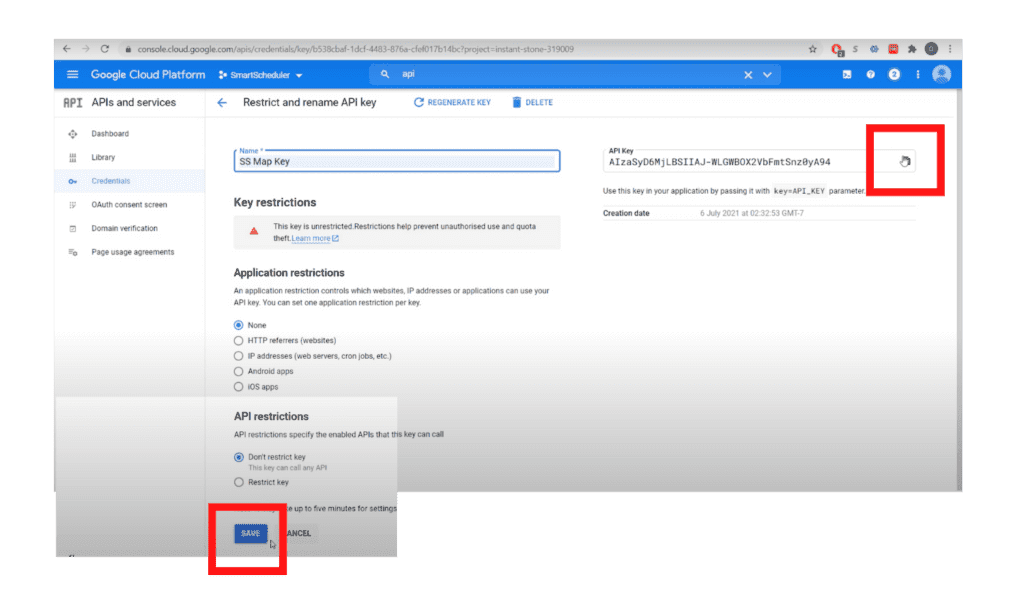
5c. Copy key and click Save

End

For additional documentation, please see the Using API Keys article from Google


Other questions? Give us a call at (888) 207-4111 or contact us.

Contact Us


SmartScheduler™

from

zoho smartscheduler

Free Guide to Zoho CRM Implementation

Free Guide to Zoho CRM Implementation

In this info-packed guide, you’ll find a full spectrum of our advice from the point of researching a new Zoho CRM implementation, through planning and selecting a vendor, all the way through to implementation support options.

ZBrains has been building end-to-end solutions using Zoho since 2012, and today we’re one of Zoho’s top Premium Partners. Now you can get our advice for free!

Request our comprehensive guide to CRM implementations!