Need Zoho information or help due to COVID-19? Let us know.

Search results for : zoho app

Manufacturing & Distribution: Quoting Tool for Zoho

Land More Small Business Manufacturing and Distribution Deals with this built-in Quoting Tool for Zoho

zoho quoting tool

In the fast-paced world of manufacturing and distribution, you don’t have the luxury of waiting weeks on end for your clients to return signed quotes. Competition is fierce when it comes to providing small businesses with outsourced manufacturing and distribution of their products.  In order to close the deal, you must be prepared to quote anywhere and at any time – and, the Zoho Quoting Tool is a perfect, customized way of doing just that.

Is your current quoting process flawed?

Are potential manufacturing and distribution deals slipping through your fingers? Perplexed as to what part of your system is failing you? Solve your quote nightmare with the Quote Calculator for Zoho.

What is the Quoting Tool for Zoho and how can it help?

We developed this Quoting Tool for Zoho to complement your existing system.  That means it can plug into your Zoho CRM or Zoho Books by itself, but it can also function within a whole Zoho ERP suite if needed.

zoho quoting tool

3 key elements needed to close any deal: Speed, Accuracy and Convenience

1. Speed: When was the last time you were able to provide a potential customer a detailed and accurate quote in minutes? The Zoho Quoting Tool makes the daunting task of providing a well thought out detailed quote, possible.

Traditional quotes for manufacturing and distribution deals can require hours to go through existing inventory, itemize inventory to ensure you can meet the agreed upon deliverables within the outlined time frame. Not only is this a laborious process, it also impacts the number of quotes you are able to make. The fewer quotes you give, the more business you are inadvertently giving to your direct competitors because you didn’t get in the game.

2. Accuracy: A quote isn’t worth the paper it’s printed on if it isn’t accurate. Inaccurate quotes can result in manufacturing and distribution deals falling through, or countless dollars lost as your profit margins plummet. Providing inaccurate quotes can also damage your reputation because small businesses make manufacturing and distribution decisions based on the quote information that you are providing them with. Your company must be able to count on the accuracy of your quote when making informed decisions about who to do business with.

zoho quoting tool

The Quoting Tool for Zoho allows you to quote on demand. It maintains your inventory within your CRM (or Books) and can apply tax to your quote. The ability to customize the Quote Calculator to suit your business ensures that you can produce accurate quotes that your customers can rely on.

3. Convenience: Zoho Quoting Tool allows you to quote from wherever you choose. You are no longer tied to your computer. This is a huge advantage and one area that can set you apart from your competition.

Want to make potential customers stop and take notice? Use the Zoho Quoting Tool to provide quick, accurate and convenient quotes for your manufacturing and distribution services.

Part of an entire suite of Zoho ERP software: FieldTech

zoho smartscheduler

It could be you only need this Zoho quoting tool to complete your business suite.  However, you may also need much more.  Often, businesses will fall into this category–quoting is great, but it isn’t the entire picture.  To that end, we’ve made it easy to use this tool in tandem with a suite of other Zoho ERP apps called FieldTech.  FieldTech, built on Zoho Creator, expands the functionality of standard Zoho apps, and connects to them.

Aside from this quoting tool, FieldTech gives manufacturers the ability to:

  1. Manage inventory in an advanced way, with the help of MRP and RMA modules
  2. Manage production orders and see the efficiency of individual work centers
  3. Connect directly to the Zoho Finance platform

Simplify your process – Get started today!

We would love to help you use Zoho in the very best way possible.  To learn more about how this Quoting Tool can benefit your manufacturing and distribution company, just give us a call or submit your information here.  Our experts will be happy to assist you with any questions you may have.
Boost Team Motivation and Productivity with Zoho CRM Plus & Motivator

Looking at Zoho CRM Plus?  Time to get Motivated!

zoho gamification

If you’ve been putting off buying a subscription to Zoho CRM Plus because it didn’t include Zoho Motivator, you just might be in luck very soon.

In the coming months, the powers that be at Zoho Corporation may be planning to lump the sales gamification app in with its CRMPlus package, which already includes a veritable boatload of apps and features – and, at no extra charge, either.

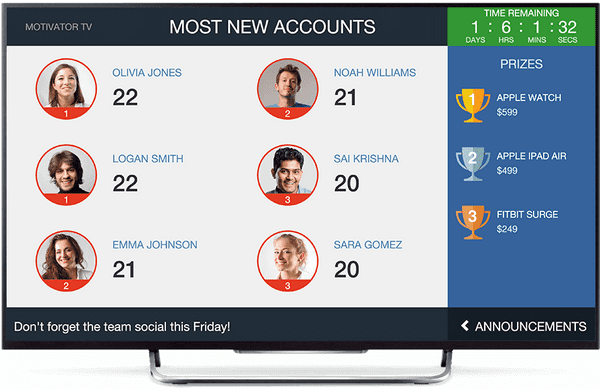
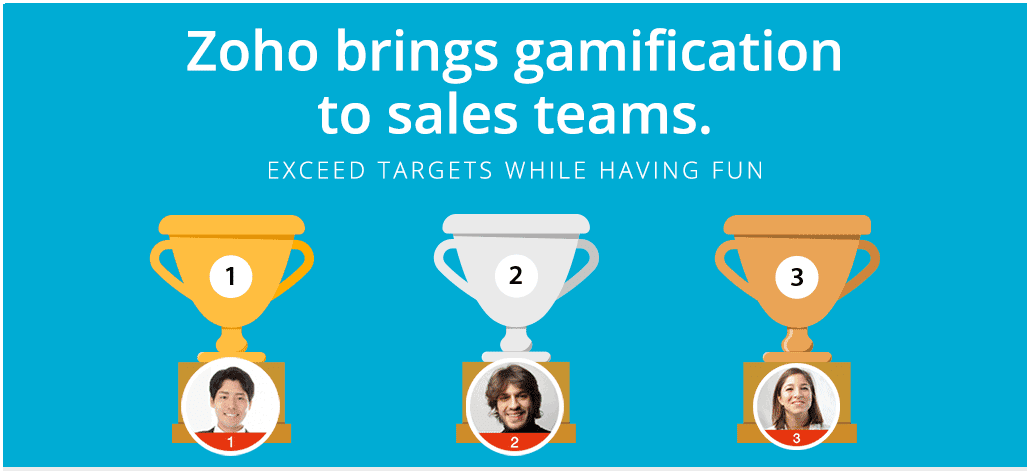
The cool thing about Zoho Motivator is that, whereas some Zoho apps included with CRMPlus are only good for specific kinds of businesses, Motivator will improve any business that has a sales team.  It broadcasts statistics and goals on a TV monitor (which isn’t included, unfortunately), letting you know who’s in the lead.  Encouraging a little friendly competition never hurt – and, if office morale is in a little slump, you’ll be shocked at how much this little tool helps boost productivity!

zoho crm plus

Wait – What’s in Zoho CRM Plus?

Currently, CRMPlus includes Zoho CRM, your powerhouse for storing client data, especially where everyone stands in your sales cycle, as well as these apps:

  1. Zoho Campaigns – For sending out mass emails, drip marketing campaigns, and tracking open rates.  A great tool for organizing mailing lists and sending targeted content.
  2. Zoho SalesIQ – This attaches a chat bubble to your website, so you can easily engage website visitors, or leave an open line of communication for them to ping you instead.  Totally invaluable for any website meant to sell a product or educate.
  3. Zoho Social – For your social media blasts.  Social connects to Twitter, LinkedIn, Facebook, and Google+, allowing you to blast out your social media posts on a whim, or use the calendar feature to plan ahead and “smart” post scheduler to blast at the best times for your readership.
  4. Zoho Support – Perfect for organizations that get a lot of, well, support requests.  Your clients can use a dedicated email address, and an administrator makes sure requests are routed to the most appropriate people on your staff.  Threads can be stored and transferred to a knowledge base that other customers can look at before they write in, too.
  5. Zoho Projects – For companies with complicated projects with lots of collaboration and individual tasks, Projects is the go-to.  Administrators can invite team members to different projects, create task lists, and ensure due dates are met.  The “feeds” feature allows team members to comment on each other’s work, which helps collaboration.  Pretty great tool for the job.
  6. Zoho Reports – Takes what’s possible with CRM Analytics and expands on them further.  Unlike CRM Analytics reports, Zoho Reports allows for 3rd party integrations and much more detailed reporting.  If custom reports are your game, you’ll enjoy this app.
  7. Zoho Survey – Fine tool for customer feedback.  Survey allows for custom surveys, reporting on results, and even integration with Zoho Campaigns for even easier reporting.

So, in other words, you’re already getting a ton of bang for your buck for $69/user/month (or $57/user/month if you pay annually)*. With the addition of Zoho Motivator potentially on the horizon, you’re essentially getting another Zoho app for free.  …And, in my humble opinion, it’s one of the more useful apps, so, again, if you’re one of those folks who put off buying CRMPlus licenses for your team because you thought adding Motivator would be too expensive, well…fret no more! *Prices updated June 2021

zoho gamification

Zoho Motivator’s new feature: Scorecard analytics means team building!

One thing that Zoho didn’t have to do but did with Motivator is add scorecard analytics to the mix.  Essentially, the scorecard analytics feature takes the salesperson’s activities and gauges what skills that person is best at – and, by also exposing team members who don’t excel at a particular skill, you can group team members whose skills need some work with team members who excel – according to real sales numbers! – and watch your whole team improve.

Even if you choose not to have team members work together in that fashion, it’s still good to know which people are good at which skills, as you never know when that information will come in handy:

Say you learn two of your team are great at following up with leads, and three others aren’t so great at calling, but they’re great at sending emails (and, you’ve checked metrics and see their emails get a lot of opens).  You now know who to put in the trenches when a business partner of yours shares a big lead list with you.  And, you also know who to utilize for an engaging email campaign!

zoho gamification

Now’s the time to motivate your team!

Nothing saps motivation like the heat of summer and the promise of vacation waiting just outside the door…and, conversely, nothing feeds it like the heat of competition and the promise of an awesome prize broadcast right on the office TV monitor.  You can breathe some life back into your team with Zoho Motivator and get a bargain on all your other Zoho apps with CRM Plus.  If you’re not signed up for Zoho CRM yet, give it a try for free here!

ZBrains – Your Trusted Zoho Premium Partner for Business Solutions

Who We Are

Our passion: Transforming organizations through technology.  Using technology to solve business problems.

Our niche: Building end-to-end solutions using Zoho.  Your Zoho Experience Begins With Us.

ZBrains, an all US-based firm and a division of AgileBTS,  is devoted to helping business people work with Zoho CRM in a variety of ways: implementation, customization, and consulting.  We started in 2012 and, since then, we’ve become one of Zoho’s top Premium Partners, a distinction given to Zoho partners who are responsible for a certain amount of Zoho Corporation’s revenue per year.

James Converse got his start in the B2B world as an inventory manager. Then moved onto ERP consulting. When faced with a choice to either continue consulting or begin his own venture, he chose the latter.

One of ZBrains’ first achievements as a company was building a Zoho QuickBooks integration.  At the time, Zoho themselves had their own QuickBooks integration, but the ZBrains version sported more customized data mapping and a specialized support team.  In spite of that, most Zoho users opted to use Zoho’s own integration, as it was included with the price of Zoho CRM.  ZBrains did catch a break, however, when Zoho chose to discontinue their own QuickBooks integration, and the momentum gained from that initial break hasn’t waned ever since.

Since then, ZBrains has expanded their suite of offerings to include not just consulting services, but a library of integration products, and even a vertical software solution built on Zoho Creator. And we’ve become one of the largest Zoho Partners in the U.S.

zbrains about us

Who We Work With

We serve companies of all industries and sizes.  That said, our solutions tend to work best for:

  1. Field Services & Construction companies, such as installers, cleaning companies, and delivery service businesses
  2. Manufacturing & Distribution companies, like metal, paper goods, and textiles manufacturers, as well as drop-shippers
  3. Technology & SaaS companies, such as IT companies, software vendors, and other managed service providers (MSPs)

Our Services & Products

A far cry from a “normal” Zoho consulting shop, we offer a variety of services and products at ZBrains:

  1. ZBrains: Our core brand.  We provide Zoho consulting, training, customization, development, and other professional services related to the Zoho suite of apps.
  2. FieldTech: Our complete vertical solution, designed especially for field services, manufacturing, and technology/SaaS companies, and built on Zoho Creator.
  3. AgilitySync: Our ETL (extract, transform, load) platform built to connect Zoho apps to third-party ERP apps.  We use this platform to connect Zoho CRM, Finance, and Creator to programs like QuickBooks, Sage 100 ERP, and many others.

The ZBrains Difference

the zbrains difference

Before we do business together, we’d like to get to know you and your business processes a little better.  As we like to say, we may be the Zoho experts, but you’re the expert of your business. So, any solution we recommend will make the most sense once we take the time to fully understand what you do and why you do it.

This is what separates us from other consultancies. They might offer a boilerplate solution without taking the time to really understand your needs first.  It also makes our solutions – and your business – much stronger going forward.

Usually, our clients will find themselves at one of these stages in their project when they first engage us.  Which one are you on?

  1. Assessment: ZBrains staff meets with you in order to understand your business and all its operations before recommending a solution to you.
  2. Planning: We provide a formal solution blueprint to you, something that will solve not only current problems, but will anticipate and solve for future problems that arise as your business scales.
  3. Deployment: We put the plan we proposed to you into action.  This includes deploying and customizing any apps, and training you on best practices to ensure a high adoption rate.
  4. Optimization: Once the system is put in place and you’ve had time to adopt it, ZBrains reviews the solution in place and listens for feedback, looking for ways to further optimize and improve things.

At ZBrains, Zoho isn’t just what we like – it’s a way of life.  And, we’ve educated ourselves on the best way to solve business problems with Zoho so you don’t have toContact us today and one of our Zoho consultants will respond to you within 24 hours.

Connect with Us

zoho construction field services

Zoho CRM for Field Services and Construction

Custom Zoho CRM for Field Services & Construction

…from the ground up

Out of the box, Zoho CRM has the potential to be a powerful CRM for service businesses or construction businesses, whether you manage a construction business or any other field services company.  With loads of customization options, including fields, screens, permissions, and workflow rules, you can use the language you want, separate your system into sectors, and perform tasks automatically to save time.

[caption id="attachment_1939" align="aligncenter" width="500"]zoho crm field services construction Is Zoho CRM the out-of-the-box solution your field services or construction company is looking for? Keep reading to learn more about its capabilities.[/caption]

But, all that said, it isn’t a perfect field service CRM, nor is it a perfect CRM for construction companies.

Potential and actual value are two different things in this case, and while Zoho CRM gives you the basic tools you need to operate your business, it isn’t a full, end-to-end field service management solution.

For that, many companies in your industry have been forced to use disparate systems to manage their data, potentially duplicating records, entering information incorrectly, and taking too much time to complete tasks that should be simple.

Have you experienced any of these common problems?

  1. Delivering a quote and collecting necessary signatures for a job takes forever because your SKUs aren’t organized, not all products have descriptions or pictures, and you don’t have a way for customers to approve estimates electronically.  You lose deals because of this quoting disconnect.
  2. Calculating and paying commissions is a hassle because of your structure; also, there’s no way for your employees to compare their earnings from month to month or even view statements without importing data to a separate program.  Your employees are unhappier not knowing how they’re doing, or receiving their commissions late. [caption id="attachment_1945” align=" align="aligncenter" width="450"]zoho crm field services construction Use Zoho to start solving common CRM problems like losing deals due to quoting disconnects and lost revenue from cancellations..[/caption]

  3. Processing and tracking electronic payments is a chore because you create orders inside the CRM but accept transactions in a virtual terminal or even a black box.  Your payment processing costs rise, and you’ll create more data entry work for yourself.
  4. Scheduling appointments takes forever because you have many team members to communicate with, each with different skills and territories.  You lose revenue from cancellations, and you don’t schedule as many appointments because of how long it takes to pencil in just one.
  5. Generating complex documents has always been a hassle because you simply can’t create the ones you need quickly enough.  You get payments later or even lose deals because of the labor needed to produce just one customized document.

It might not be the end of the world if you have one of these problems, but if you have two, three, or more?  You could be losing a significant amount of revenue every month, losing customers, and leaving your employees unhappy as well.

Can Zoho CRM bridge these gaps in field services or construction business processes?

In a word: yes.

Out of the box, Zoho CRM is a system waiting to be customized.  But, with a little work and customizations implemented, your CRM can be equipped to tackle all these common problems.

Zoho CRM customized for your construction or field service business can:

Assemble quotes with the click of a button using information stored in your CRM.  No more waiting on different departments to provide item details or photos, or even waiting to collect signatures – the Zoho quoting (CPQ) tool can integrate with the eSignature tool of your choice, too.

Calculate commissions for any structure automatically, with no extra work on your part.  Additionally, you can give your employees the payment statements they need. In addition to a customized commission portal to view their progress over time.  Employees using the Zoho Commission Calculator are happier workers.

Process credit card or ACH payments itself.  The eBizCharge payment gateway integrates with Zoho CRM and includes a custom Payments module, which acts like a virtual gateway inside your CRM.  If you create orders in Zoho CRM, the Zoho CRM Payments Integration is invaluable.

[caption id="attachment_1946" align="aligncenter" width="400"]zoho crm field services construction Using Zoho CRM in field services and construction means an opportunity to customize the applications to suit your unique operations![/caption]


Schedule appointments quickly and compensate for cancellations.  The Zoho Scheduling App allows for setting appointments based on sales rep calendar availability, location, skill level, or any other metric you define.  The app also recognizes cancellations and will suggest appointments to fill those gaps.  If you have a larger sales team, the Zoho Smart Scheduler can save lots of time every day.

Create complex documents practically on the fly.  A cut above Zoho Docs, the Zoho Document Generator can create custom, robust documents that you can store and send to your customers to sign.  It exports documents to PDF and even integrates with Microsoft Word for easy editing.  For lease agreements, loan amortization schedules, and the like, look no further than the Zoho Document Assembly engine.

Integrate your accounting system of choice.  If Zoho Books won’t work for your organization, you can integrate the accounting system you already use with Zoho CRM to retain the exact workflow you’re used to.  Sync essential modules like Customers/Accounts and Products/Items, as well as transactions like Orders, Invoices, and Quotes/Estimates.

Do even more than Zoho CRM for Construction Companies or Service Businesses: Use Zoho ERP

With the power of Zoho Creator, you can use your existing Zoho system to do things like:

  • Calculate service or construction job costs and forecast profitability on a job
  • Predict inventory reorder levels (MRP) and manage your supply chain by using current and past sales data
  • Manage field services or construction work orders: track time and material related to a job

Do more, now, with Zoho!

Give your services or construction company the boost it needs in this lightning-fast business environment

As a businessperson, you might have thought a molasses pace was just something that came with running a business. This can be especially true in a big company with lots of moving parts.  With Zoho CRM as your hub, this simply does not have to be the case.  Our assortment of field services-specific Zoho add-ons are a testament to that.

Use any of the links above to explore the apps of your choice, or, contact us today to learn more about a specific app from a Zoho certified consultant.  We look forward to working with you!

Connect with a Consultant

Zoho Docs Review: Effortless Document Generation with CRE Software

Effortless Document Generation with CRE Software

Our comprehensive Zoho Docs review highlights how this powerful tool simplifies the process of creating documents with CRE (Commercial Real Estate) software. With its user-friendly interface and advanced features, Zoho Docs streamlines document generation, allowing users to effortlessly create professional documents. From contracts and proposals to reports and presentations, Zoho Docs provides a seamless experience, saving time and enhancing productivity. Discover how Zoho Docs revolutionizes document creation with our in-depth review and unlock the full potential of this innovative software solution.

Create Professional Documents in Minutes with the Zoho Document Generator

zoho document generator

Many men and women choose to start their own businesses in the construction or field services industries because they enjoy building, designing, and creating.  Even when you’re using CRE software, the sheer volume of paperwork that comes with owning your own business can feel overwhelming.  Prioritizing administrative tasks and executing them efficiently is essential so that you aren’t cutting into the time you should be spending on job sites.

CRE software solutions are available to help with many aspects of project planning and management, however, they lacking in the area of document assembly.  The Zoho Document Generator add-on provides you with the ability to create complex documents in a matter of minutes, with just a few easy steps.

Customers often ask, “Isn’t the Zoho Document Generator add-on the same as Zoho Docs?”

zoho document generator

Zoho got a lot right when designing Zoho Docs to be sure, but it isn’t as robust an app as this one.  To share what makes the Zoho Document Assembly add-on unique from Zoho Docs, we created the following list:

5 Things Everyone Should Know About the Zoho Document Generator

  1. Customized templates – Tailored to the needs of your business. These templates make it easier than ever to generate professional quality, complex client documents.
  2. Retrieve data from your existing software programs – Many companies use multiple systems to record data in the form of spreadsheets, databases and word documents.  Collating information across sources can be time-consuming. With multiple windows open, you could make mistakes transferring data.  However, with the Zoho Document Generator engine, you can load the information directly into your customized templates from any format you want.
  3. Extracts information – Once you’ve decided what information you want to put into your template, it will be placed directly into your Zoho Document Generator template.  Just select the relevant information you want and you’re now ready to create your documents.
  4. Creates complex documents – Outsourcing your document work to graphic designers can be expensive.  This is a cost-effective option to produce your own professional documents in-house.
  5. Automated  The Zoho Document Generator add-on is fully automated and will walk you through the creation of your documents.  It’s like having your own personal consultant!

Now that you have your very own professional document that you created, but like any business owner you know the importance of checking your work before sending it out. No one wants to put out an incorrect quote or a document riddled with typos; it’s bad for business.

zoho document generator

How can I edit my document with the Zoho Document Assembly add-on?

Unlike many CRE software solutions, the Zoho Document Generator comes fully integrated with MS Word. You will be able to edit your documents directly on the templates prior to sending them out to your clients or prospective customers.

What about document storage?

The following storage options are available to meet the needs of your business:

  • Include an attachment in your email signature
  • Attach it directly to your email to forward to a client
  • Save a copy of the document directly to your Zoho CRM for future reference

Get Started with the Zoho Document Generator

When used concurrently, your existing CRE software solutions and Zoho Document Generator become an administrative dream team, and the key to producing the documents you need in minutes flat.  Click here to contact us about seeing a demo.

Simplify Transactions with CRE Software’s Zoho CRMPayment Integration

Process Payments in a Snap: Zoho CRM Payment Integration

zoho crm payment integration

Managing a field services or construction business requires you to collect payments diligently. Accurate record-keeping is essential to success.  Complementing your existing CRE software solutions, the Zoho CRM payment integration makes accepting payments from customers easier than ever before.

Is the Zoho CRM payment integration the same as Zoho Subscriptions, Books, and Invoice apps?

Although all three of Zoho CRM’s standard finance apps process payment, they do so outside of your Zoho CRM.  This requires you to juggle multiple windows for every transaction, adding time to your payment processing.  And, processing transactions in Zoho Books or Invoice means giving your salespeople access to an accounting system.  This is obviously not tenable for every business owner, or even most of them.

When you’re looking to process payment quickly and directly within your existing CRM, there’s no better option then the Zoho CRM Payment Integration.  All payments are processed in one window, ensuring accuracy and reducing time spent completing each transaction.

Let’s do a side by side comparison to see how they stack up.

Zoho Subscriptions Zoho Books Zoho Invoice Zoho CRM Payment Integration
  • Standard  Zoho CRM finance app
  • Monitors transactions
  • Keeps track of company revenue
  • Shows trends over time
  • Excellent option for when you do not require other Zoho CRM apps (i.e.: Subscription based businesses)
  • Processes payment outside of your CRM
  • Standard  Zoho CRM finance app
  • Creates Sales Orders
  • See invoices, estimates, etc.
  • Email function allows you to send your customers a copy of their completed transactions
  • Processes payment  outside of your CRM
  • Standard  Zoho CRM finance app
  • Creates your estimates and invoices with ease directly in your Zoho CRM
  • Processes payment outside of your CRM
  • Customized design by ZBrains
  • Processes credit card payment directly within your Zoho CRM
  • Century Business Solutions partnership
  • Process refunds and voids
  • Custom Payments Zoho module for viewing all transactions, just like your processing gateway
  • Sync to QuickBooks Desktop or Online

zoho payment integration

Custom solution built for your specific Zoho platform

Designed by ZBrains, the Zoho CRM payment integration offers you a completely customized, integrated tool that is personalized to your field services or construction business. It achieves faster payment collection by allowing you to safely store client credit card information.  And, it eliminates unnecessary steps in your payment process.  This means you get paid faster.

Interested in the Zoho CRM payment integration but not sure how this will work with your existing CRE software solutions?

Of course, you can continue to use your existing CRE software to oversee the day-to-day details of your business.  The Zoho credit card payment integration will work within your existing Zoho CRM software Sales Order and Invoice modules.  However, rather than passing payment requests to accounting, your salespeople will be able to complete transactions immediately, even on the same call.

zoho payment integration

3 Ways the Zoho CRM Payment Integration Will Improve Procedures:

  1. Faster payment processing: Credit card transactions are now processed directly within your Zoho CRM.  No more relying on your accounting team to process everything at the end of the day.
  2. Detailed payment logs make it faster than ever to search for past transactions, sales orders and invoices: This makes answering questions about payments a much more seamless process.  Simply use the search feature to locate the relevant payment.
  3. Digital receipts: No more printing off receipts and mailing them out to clients, or even manually emailing them PDFs.  Instead, the integration will send digital receipts to your customers with a single click. If a customer misplaces their receipt, no problem. Simply search for that transaction and email them another copy for their records.
  4. Happier salespeople: Nothing reassures a sales team more than quick payments.  So, when your salespeople themselves are accepting credit cards for payment, there’s nothing better than knowing that transaction counts toward their quota.

Get started!

Don’t wait around with your current payment acceptance process.  Enjoy all the benefits of the Zoho CRM payment integration, including peace of mind that you have the most well-oiled payment-taking machine in the business on your side.  Give us a call at (888) 207-4111 or use this form to contact us and we’ll show you a free demo.

CRE Software: Maximize Earnings with Zoho’s Commission Calculator

How to Acquire and Retain Top Sellers: Zoho Commission Calculator

zoho commission calculator salesman

Behind every successful field services and construction company is a hard-working and talented sales team.  A strong sales team working with CRE software solutions has the power to take cold leads and turns them red hot!

Closing deals in the competitive industry of field services and construction takes skill.  In many cases, your sales team is up against competitors who have been in business for generations – and, no amount of out-of-the-box CRE software trumps that kind of loyalty.

So, how can you compete, and not only attract but retain the top sellers in your industry? Simple: with this customized employee commission payments tool, built specifically for construction and field service companies.

We developed this tool to allow faster and more accurate calculation and payout of commissions. Further, we quickly identified an additional benefit of this software in the form of increased field services and construction sales and employee retention.

In the world of sales, the almighty commission is the star of the show.

How the Zoho Commission Calculator Answers 3 Key Questions Top Sellers Have:

Top Sellers’ Questions Zoho Commission Calculator
How much money can I make?

Automatic commission calculator that’s personalized to each of your employees negotiated contracts, sales targets, and goals

Flexible commission structure options:

  • Sliding scale
  • Split
  • Profit-based
  • Payment-based
  • Commission overrides for top performers

How am I getting paid?

Web-based employer approval makes it faster for you to approve your sales staff’s commission payouts.

Can I get a commission report with a record of my closed deals? Personalized commission statements are available and include a breakdown of closed deals.

zoho commission calculator

By implementing the Zoho Commission Calculator as a part of your CRE Software Solutions plan you will be able to attract and retain top sellers by providing them with the following:

  • A well defined and competitive sales commission structure
  • Clear communication of sales goals and targets
  • Accurate commission calculations
  • Increased motivation to attain and surpass their sales goals, perhaps to attain higher commission rates
  • Faster payout of earned commissions

Unlike out-of-the-box  CRE software, this Commission Calculator can be completely customized to your business!

zoho commission calculator checklist

Interested, but worried your business is too small or that the Zoho Commission Calculator may not be in your budget?

At ZBrains, we believe that everyone, regardless of the size of their field services business or budget, should have access to a tool like this.  With that in mind, we four different basic levels of service for the calculator.

Zoho Commission Calculator monthly plans feature the following:

  • Guided training – Our experts will walk you through all of the steps
  • Automatic commission calculation – Say goodbye to manual calculations!
  • Commission approvals – Web-based for greater convenience

Silver, Gold and Platinum Commission Calculators boast a customized commission portal.  Gold and Silver plans come with a payroll integration.

Any Zoho commission calculator can be integrated with Zoho Books for easy syncing.  You can also choose to view any related records directly from Zoho CRM.

zoho commission calculator money

Start Rewarding Your Employees

Simple appreciation for a job well done doesn’t pay the bills; hard work should be rewarded, and it shouldn’t be such a task to give it. The Zoho Commission Calculator is the competitive edge you need to attract and retain top sellers at your field services or construction company.  Submit your information here and we’ll be in touch.

Introducing Gamescope for Zoho Projects

zoho gamescope

These days especially, we live in a society of instant gratification.  The examples of this sort of culture are everywhere: paying for goods on credit because it’s faster and easier than cash, watching hours of videos instead of thumbing through bulky books, racing to the hobby shop to get the newest gadget ahead of your friends… But, rather than decry this movement like the majority of these kinds of articles, I’m here to endorse it.  For business, it really works.

Zoho is well aware of this and wants to help spread that idea.  And, to that end, they’ve decided to add a little gratification to your tedious days behind a computer completing tasks in Zoho Projects in the form of Gamescope.

zoho gamescope

The idea is this: the payoff that comes with completing a task is great, but some things simply can’t fall into the instant gratification bucket.  Things like taking care of customer support tickets, resolving bugs, prioritizing your list of tasks, and the like.  All tedious stuff!  So, how do you make it fun to do?

By making it into a contest, of course!

[caption id="attachment_1833" align="alignnone" width="635"]zoho gamescope chess Like this, only faster-paced and with a better plotline.[/caption]
Much like Zoho Motivator, Gamescope allows users to create contests out of normal workday scenarios, making the mundane not only more palatable, but even fun for you and your staff.  Whereas Motivator focuses on sales goals, Gamescope expands the playing field to engineers and other taskmasters, allowing for time-based awards (how quickly did you get through 5 tasks or solve 5 bugs?), activity-based awards (how many tasks did you complete today?  This week?), and even company-wide user profiles complete with badges, perfect for gloating about achievements with teammates.  I mean, coworkers.

Based on the kind of work you do, the number and types of games you can set in Gamescope is extensive, and employees don’t have to partake – although, as a team leader, I’m sure you can think of a good prize to go with the virtual badges (team members with the most badges gets free lunch!), or a good punishment for the day’s loser (maybe he has to buy pizza for the whole team!).  Hell, I’d even be okay with losing once in a while if pizza were part of the punishment.

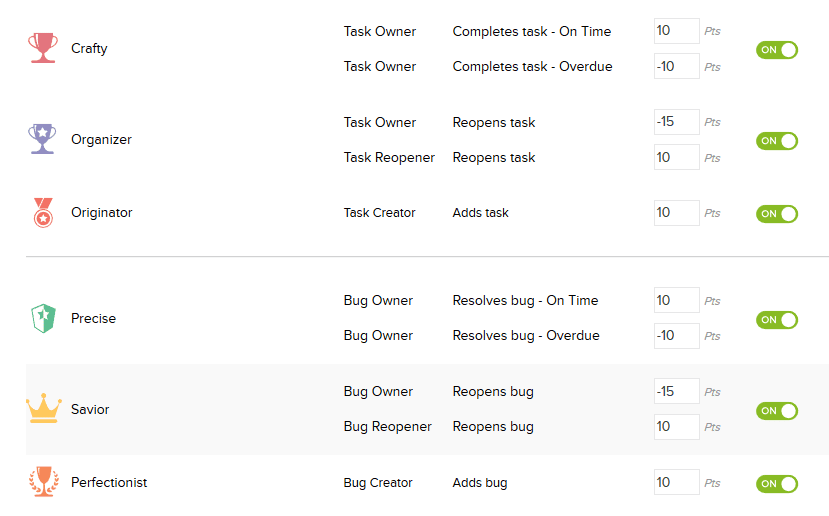
Here are a list of the trophies available with Gamescope:

zoho gamescope trophies

So, we see that there are respective trophies for task-masters and for bug-solvers.  Gamescope trophies are awarded for each time a team member does a number of different actions, such as add a task or bug, resolve a task or bug, re-open a task or bug…etc.  Everything can be scored, essentially, and games can be won based on total points or number of a certain type of trophy.  Of course, the Projects administrator can set the number of points available for each trophy, or whether a given trophy is turned on or off for a certain day – great for getting the team to focus on certain objectives and not others.

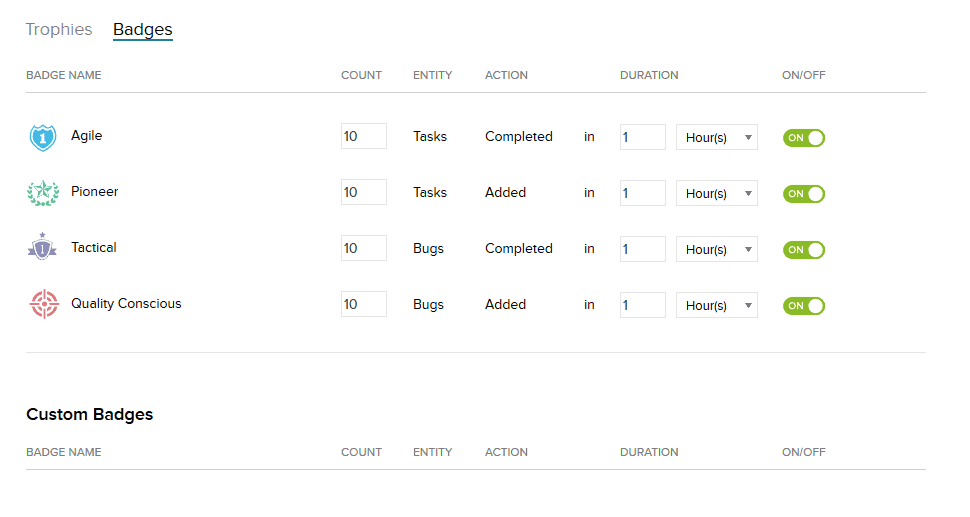
Along with trophies, team members can earn badges:

zoho gamescope badges

Badges are earned by completing broader, less immediate tasks (completing 10 tasks in a day, for example).  As team members earn these over longer periods of time, adding these up is great for determining the winner of a weekly, monthly, or even quarterly contest.  And, as with trophies, your administrator can turn badges on or off, or set the requirements for each Gamescope badge.

Custom badges are also available, and you can base awarding those on custom requirements, of course.

So, why use Gamescope?

Well, if the prospect of pizza wasn’t enough, I don’t know what’s going to sway you, but, here’s what I’ve come up with:

  • Increase office morale.  Even if you like your coworkers, nothing’s worse than coming in to the same battery of assignments or tickets day-in and day-out.  Adding the prospect of a reward for achievement to the mix with Gamescope will get people excited to do the tasks they once thought menial because of the potential payoff at the end of the road.
  • Increase camaraderie or competition – and fun.  Enjoying coming in to work is one thing; pitting your employees against each other (in good fun, of course) is another entirely!  With Gamescope, you can add an entire dimension of competition to your workplace by giving prizes only to the top daily or weekly task- or bug-closer.  (Scarcity makes us want prizes even more.)  Or, pit the taskmasters against the bugcatchers and see who comes out on top!
  • Increase productivity.  This should go without saying.  Adding a spirit of competition and fun to the workday at your office will make people want to do the tasks they’re supposed to do, whether it’s because they get to face off against their friends, help each other towards a common goal, or just earn a merit-based prize because they completed a number of tasks.  Either way, you win.
  • Increase correct Zoho Projects usage.  Often you’ll see that tasks are carried out and customers seem happy enough, but when you run the numbers they look absolutely terrible.  This can usually just be attributed to bad record keeping, but when your record keepers are your staff, it can be hard to get them to adopt your method of tracking things.  Rewarding your staff in Gamescope for doing things the way you want them to be done – assuming you like when tasks are completed and bugs are resolved, which is what Zoho Projects was meant to track – is a great way to increase correct Zoho Projects usage.

Time to get gaming!

In summary, if your engineers or project managers aren’t using Zoho Projects, go ahead and start!  It’s a great way to organize and prioritize tasks and keep everyone on the same page.  And now, with Gamescope for Zoho Projects, you have another way to keep your team members engaged and on task (in Zoho Projects and at work in general).

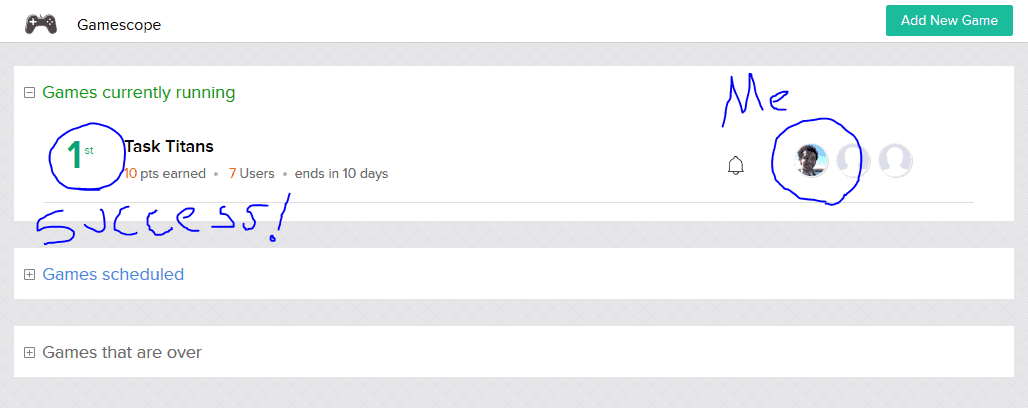
[caption id="attachment_1835" align="alignnone" width="1028"]zoho gamescope Already more engaged than my teammates.[/caption]
Zoho says they plan to roll Gamescope out in a few more of their apps in the future.  I’m thinking Zoho Support, SalesIQ, or even Zoho CRM in general would be good candidates, but we’ll see what they end up doing.

With that in mind, if you need help with Zoho Projects or want to know more about Gamescope, give us a call (888) 207-4111.  Or, just contact us and we’ll get back to you.

Cheers,

Jeremy

Zoho CRM Credit Card Processing

zoho crm credit card integrationEver wish you could use Zoho CRM to accept credit card payments?

…Your wish is our command!

Certain Zoho apps like Creator, Books, and Invoice have accepted credit card payments for some time.  But, it hasn’t been possible to process those transactions with a Zoho CRM credit card integration–until now.

We’ve teamed up with Century Business Solutions to bring you a solution that allows for credit card transactions right inside Zoho CRM – without the middleman.  The Zoho CRM credit card processing integration allows users to accept and process credit card transactions within Zoho CRM from the Sales Order or Invoice modules.

zoho crm credit card processing

How Does the Zoho Payment Gateway Work?

Zoho CRM’s credit card integration allows users to process transactions across multiple modules, including a custom Payments module:

Sales Order

  • Capture a preauthorized amount
  • Capture a deposit

Invoice

  • Capture a payment from Sales Order preauthorization
  • Charge a card to pay an Invoice directly
  • Import a deposit to an Invoice

Payments

  • Issue a refund

Other neat features

  1. Zoho CRM’s credit card integration stores data securely through tokenization for future use while maintaining top-notch security.
  2. You can email receipts for credit card transactions instantly from your payment screen.
  3. Zoho CRM’s custom Payments module enables users to access previous transactions and related invoices or sales orders.

zoho crm credit card integration

Why use this Zoho CRM credit card processing integration?

Despite being technologically savvy in most areas of business, most B2B companies accept credit cards as if they’re in a retail environment.  That is, they do it by punching numbers into a machine, printing a receipt, and saving all those receipts.  Those receipts, along with their associated invoices, go to an accountant’s desk at the end of the day for manual entry into another system.  It’s a tried-and-proven–and extremely time-consuming–process.

But, if you’re going to enter card information into Zoho CRM at the end of the day anyway, why not accept payments directly inside Zoho CRM with your very own Zoho payments integration?

Chances are you’re wasting time without even realizing it.

Here’s an easy way to tell whether or not you would benefit from this kind of Zoho payment gateway integration.

  1. Do your salespeople often have to transmit information from their desk to an accounting department to be entered into an ERP system later on?
  2. Do your salespeople have access to your sensitive financial data in your ERP system, all because one of their job responsibilities is entering credit card details directly into the system?
  3. Do you have an accounting person – or a team – that works into the night manually processing payments attached to invoices?

If you answered yes to any of these, know that you have other options.  Your salespeople don’t have to spend all day running back and forth between their desks and accounting.  They don’t need to access your ERP system every day just to enter payment details like an accountant.  And, you certainly don’t need to keep a team of accountants behind to process your payments.

Use the Zoho CRM credit card processing plugin to:

  • Accept or record credit card transactions inside of Zoho CRM
  • Accept credit card payments and then sync those with an ERP integration (for example, QuickBooks, or even an ERP module inside Zoho Creator
  • Keep a detailed payment log for your clients inside Zoho CRM
  • Save time with payment processing data entry each time you process a transaction
  • Increase your bottom line by using the time you’d normally spend entering data to do other tasks you’d been putting off

zoho payment gateway security

The Zoho Payment Gateway Protects Your Data

You can use this Zoho CRM payment gateway not only to save time with double-entry, but to become PCI compliant.  Businesses these days are trending towards digitization, and as more and more info heads to the cloud, it becomes even more important to protect your own and your clients’ payment information.

Now, rather than having payment info change multiple hands per day or be written down on physical pieces of paper, make it so your salespeople just enter it once – and be done with it.  You’ll sleep more soundly knowing your customers’ payment data is completely tokenized, and stored in the cloud, off your own servers.

Best of all, the integration costs nothing to use

For most other companies, adding an integration to accept credit card payments inside a CRM or ERP system costs thousands of dollars, not to mention recurring fees and other hidden charges.  It’s enough to make anyone reconsider switching processors.  But, we’re trying to buck that trend by offering this Zoho CRM credit card integration completely free of charge.  The only thing you have to pay are your regular credit card processing fees.  That’s no deployment fee at all.

FAQs about Zoho CRM Credit Card Processing

  1. What’s the procedure for Zoho CRM credit card processing?

 Businesses may safely handle credit card payments within their CRM system using Zoho CRM Credit Card Processing. By integrating with well-known payment gateways, it streamlines the payment collection process and makes it simple for businesses to receive payments from clients.

       2. What payment processors does Zoho CRM Credit Card Processing support? 

Leading payment gateways including Stripe, PayPal, Authorize.Net, and others are integrated with Zoho CRM. For organizations, these interfaces guarantee adaptability and compatibility with a variety of payment options.

       3. Is the credit card processing for Zoho CRM safe? 

Yes, data security is a priority for Zoho CRM. Customers’ credit card data is entered into the CRM system, where it is encrypted and safely kept. Compliance with industry-standard security protocols is ensured by the integration with reputable payment gateways.

        4. Can I use Zoho CRM Credit Card Processing to automate recurring payments? 

Yes, organizations may set up recurring payments for continuous client relationships or subscription-based services using Zoho CRM. By automating the payment collecting process, this tool helps businesses save time and effort.

        5. Reporting and analytics are offered by Zoho CRM Credit Card Processing

Yes, Zoho CRM provides complete reporting and analytics tools for accepting credit cards. To acquire insights into their company’s financial performance, users can follow payment transactions, examine sales trends, and create customized reports.

      6. What are the costs involved in processing credit cards using Zoho CRM? 

Depending on the chosen payment channel, different credit card processing costs apply in Zoho CRM. For accurate information, it’s crucial to analyze the costs and fees associated with the particular payment gateway coupled with Zoho CRM.


Want to see more? Use our brains – ZBrains! zoho crm credit card integration

What makes ZBrains a cut above the other Zoho consultants you might find around the web?  Well, custom enhancements like this one, for starters.  ZBrains is the only consultancy that offers an integrated credit card processing plugin for Zoho CRM.  This allows you to save time with data entry every time you process a credit card transaction.

All of our Zoho integrations are cut from a similar cloth, actually.  They’re designed to save you time you might otherwise spend entering data twice; they’re designed to make Zoho CRM easier to use overall.

Because of our variety of Zoho integrations, custom add-ons, and Premium Partnership with Zoho, we’re one of the most trusted sources of Zoho knowledge.  Whether you use us for consulting, support, or training, we’re here to show you the ropes so you can rest easy.

zoho crm credit card processing Start taking payments inside Zoho
Are you ready to roll?  Or, do you have a few questions about how the Zoho credit card processing integration works?  We know making a choice like this carries a lot of weight, so we’re happy to speak to you before you make any decisions.  We’ll even coordinate with our partners to show you a demo of the plugin.  Please use this form to contact us and we’ll be in touch with you to discuss your needs as quickly as possible.

Zoho Google Drive Integration

Google Drive Integration
Monthly & Yearly Pricing Plans

zoho google drive integration

[easy-pricing-table id="1824"]

Effortlessly manage files with Zoho Google Drive integration

Whether you’re putting together a complicated project for a client or you’re simply keeping track of all the scanned documents a given contact has sent you, it’s a big time drain to have to search through countless email threads looking for the attachments you need.  It would be great if there were a place to put all your attachments right in Zoho CRM – so, why not start with this one?  The Zoho Google Drive integration does this and more, making it easier than ever to access every document you need from one central location, your Zoho CRM.

How does this integration work?

The Zoho Google Drive integration links your company’s Google Drive account with your Zoho CRM, creating a folder or series of folders (depending on your needs) in the very familiar Google Drive, and automatically creating a hyperlink to that folder within a custom field in your Zoho CRM records of choice.

That means no more having to dig through hundreds of emails looking for attachments – in fact, no more navigating into your email client from your CRM.  You’ll be able to transfer all files into your specially-created Google Drive folders and then refer to them again whenever you want access to your files.  It’s that easy.

How is this better than storing files inside Zoho CRM?

  • Google Drive allows for storing much larger files than Zoho CRM does
  • Storing files in Google Drive means you can access them in Gmail too

zoho google drive integration

Potential use cases for a Zoho Google Drive integration

  • Linking project-related files to Zoho CRM Potentials or Opportunities, perfect for field services companies
  • Associating signed documents (NDAs, MSAs, and other legal documents) with particular CRM records
  • Storing copies of invoices for clients for later use

Want more?  Give us a buzz

Use the Contact button on the upper right side of this page to submit your information.  We’ll get back to you as quickly as possible.  Alternatively, please give us a call at (888) 207-4111 and we’ll be glad to talk to you.

zoho google drive integrationWhy go with ZBrains?

Well, that’s easy!  We know you have options when it comes to picking Zoho partners, but, not all Zoho partners are created equally.  Our Zoho Pemium Partner status means we’re equipped to build custom apps for Zoho, build integrations to third-party platforms like Google Drive, and offer consulting and sales for Zoho CRM and all its accompanying apps.

In addition to Google Drive, we can integrate Zoho with these platforms:

…as well as custom programs, as long as you provide the API.

We also offer a host of add-ons for Zoho, designed to augment your overall experience and reduce your reliance on outside programs.  These add-ons can really speed up your business’ workflows:

  • Commission Calculator, which automatically calculates commissions and gives your sales reps a portal to view their reports in
  • Quote Calculator (CPQ tool), which streamlines the quoting process and gives custom bundling options
  • Smart Scheduler, which suggests different appointment times automatically based on sales rep or technician location and availability

Zoho has a lot of partners, but not nearly as many Alliance Partners – and, only one Alliance Partner who can integrate to all these awesome platforms, and give you the custom add-ons that fit your exact business specifications and make Zoho even more powerful.

Do even more with the whole Zoho stack

Speaking of making Zoho even more powerful, do you ever get the feeling you’re under-utilizing Zoho?  Like maybe the software can do more for you?  Let us know what you’re feeling and we’ll offer you a solution that will help.  We work with not only the CRM, but Zoho Books, Projects, Desk, Campaigns, and many other apps in the Zoho One suite.

Start storing your files right inside Zoho CRM

Got any more questions?  We’d love to hear about your business, whether you just need a Google Drive integration or you need help that goes a little beyond that.  Contact us today for an introductory consultation.

How EBizCharge enables businesses to accept payments in Zoho CRM, Books, Inventory, and Invoice

In the ever-changing digital payments landscape, businesses must constantly use innovative and efficient software solutions to keep up with competitors and yield long-term success. 

Fortunately, EBizCharge and Zoho provide two powerful systems with robust A/R options for businesses to streamline their payment processing and stay at the forefront of their industry.

What is EBizCharge?

EBizCharge is an all-in-one payment platform equipped with a payment gateway, software integrations, and merchant services, so businesses can securely accept various forms of payments like credit cards, debit cards, and ACH payments. 

With EBizCharge, businesses can take advantage of these features, including:

  • Seamless payment processing
  • Real-time transaction reporting
  • Recurring billing options
  • Level 3 payment processing 
  • Secure tokenization and encryption for enhanced data security
  • 24/7, in-house customer support

In addition to the Zoho suite, EBizCharge integrates with over 100 other accounting, ERP, CRM, and eCommerce software systems, including QuickBooks, Salesforce, Sage, and Magento.

EBizCharge’s Integrations with Zoho

EBizCharge’s integrations with various Zoho apps greatly simplify how businesses handle payment processing and customer relationship management. 

EBizCharge’s integration into Zoho CRM allows sales teams to easily accept customer payments on sales calls, directly inside the Zoho CRM software. 

EBizCharge provides three separate integrations with the Zoho Finance platform: Zoho Books, Zoho Inventory, and even Zoho Invoice.  These integrations allow for finance and fulfillment staff to collect and process payments at any point in your process.

With these integrations, merchants can quickly process transactions, allow customers to pay by email, automate payment collections, and more. 

EBizCharge’s Zoho integrations allow businesses the flexibility to enhance their operations to promote more cash flow and long-term success. 

Aside from the features mentioned in this section, EBizCharge and Zoho provide innovative software that significantly benefits merchants.

What problems do these integrations solve?  3 benefits of integrating EBizCharge with Zoho

The integration between your business software and payment processing system eliminates double-entry, but it also brings departments closer together by speeding operations, and even improves customer service:

  • Improved customer experience. EBizCharge allows Zoho users to provide their customers with a secure and user-friendly online payment portal. Customers can easily pay invoices, view their transaction history, and manage billing preferences, leading to a positive and convenient payment experience.
  • Enhanced payment reconciliation. EBizCharge and Zoho automate the payment reconciliation process by automatically matching payments with corresponding invoices, reducing human error and discrepancies.
  • Increased efficiency. EBizCharge for Zoho eliminates manual data entry and repetitive tasks, saving time and effort for business teams. This increased efficiency allows them to focus on core business activities.

Streamline your business with EBizCharge and Zoho

Integrating EBizCharge with Zoho provides a robust payment solution for merchants to stay ahead of the competition and meet the evolving demands of their customers. 

If you want to alleviate the stress felt from tedious financial tasks, increase overall efficiency, and even make your customers happier, integrating EBizCharge with Zoho will help save you time, energy, and valuable resources.

Measure Lead Response Time Extension

Introduction

Thank you for choosing the “Measure Lead Response Time” extension for Zoho CRM. This powerful tool is designed to help you accurately track and measure the response time for leads in your CRM system. By monitoring your team’s response time, you can improve customer satisfaction, streamline sales processes, and enhance overall efficiency. This help document will guide you through the installation, configuration, and usage of the extension.

1. Installation

1.1 Prerequisites

Before installing the “Measure Lead Response Time” extension, ensure that you meet the following requirements:

  • Active Zoho CRM subscription.
  • Administrative access to your Zoho CRM account.
  • Supported web browser (Chrome, Firefox, or Safari).

1.2 Installing the Extension

To install the extension, follow these steps:

  1. Log in to your Zoho CRM account.
  2. Navigate to the Zoho Marketplace at https://www.zoho.com/marketplace.
  3. Search for “Measure Lead Response Time” in the marketplace search bar.
  4. Locate the extension and click on it to view the details.
  5. Click on the “Install Now” button.
  6. Review the permissions requested by the extension and click “Accept.”
  7. The extension will be installed in your Zoho CRM account.

2. Configuration

2.1 Accessing Extension Settings

To access the settings of the “Measure Lead Response Time” extension, follow these steps:

  1. Log in to your Zoho CRM account.
  2. Navigate to the CRM home page.
  3. Click on the gear icon in the top-right corner to access the settings menu.
  4. From the dropdown menu, select “Setup” to open the Zoho CRM setup page.
  5. In the setup page, locate and click on the “Extensions & Customizations” section.
  6. Under the “Extensions” tab, find and select “Measure Lead Response Time.”

2.2 Setting Response Time Criteria

Within the extension settings, you can define the response time criteria based on your business requirements. Follow these steps to configure the response time criteria:

  1. Access the extension settings using the instructions provided in section 2.1.
  2. In the “Response Time Criteria” section, click on the “Add Criteria” button.
  3. Specify the criteria details, such as the response time limit, measurement units, and notification preferences.
  4. Save the settings to apply the response time criteria.

3. Usage

3.1 Monitoring Lead Response Time

The “Measure Lead Response Time” extension provides real-time monitoring of lead response time. To track the lead response time, follow these steps:

  1. Log in to your Zoho CRM account.
  2. Navigate to the CRM home page.
  3. Locate and click on the “Leads” module in the left sidebar.
  4. Within the Leads module, you will find a new column labeled “Response Time.”
  5. The “Response Time” column displays the time elapsed since the lead was assigned or created.
  6. You can sort the leads based on response time to prioritize follow-ups.

3.2 Generating Reports

The extension allows you to generate reports on lead response time for better analysis and performance tracking. To generate reports, follow these steps:

  1. Log in to your Zoho CRM account.
  2. Navigate to the CRM home page.
  3. Click on the “Reports” tab in the top navigation menu.
  4. Select the “Lead Response Time” report category.
  5. Choose the desired report type, such as summary or detailed.
  6. Customize the report filters and date range as needed.
  7. Click on the “Generate Report” button to generate the lead response time report.
  8. The report will be displayed, and you can export it in various formats for further analysis.

4. Troubleshooting

4.1 Common Issues

Issue: Extension not visible in the Zoho CRM setup page.

  • Ensure that the extension installation was successful. Check the installation steps in section 1.2.
  • If the extension is installed but not visible, try clearing your browser cache and refreshing the page.

Issue: Incorrect response time calculations.

  • Double-check the response time criteria configured in the extension settings.
  • Verify that the lead creation/assignment timestamps are accurate in your CRM system.

4.2 FAQs

Q: Can I customize the response time criteria for different lead types? A: Yes, the extension allows you to set specific response time criteria based on lead types. Refer to section 2.2 for instructions on configuring criteria.

Q: Can I receive notifications for leads that exceed the response time limit? A: Yes, you can set up email notifications for leads that exceed the response time limit. In the extension settings, specify the email addresses to receive notifications.

Understanding Distribution Data Flow Systems by ZBrains

DISTRIBUTION DATA FLOW

Zoho helps you streamline and automate tasks in your business. ZBrains will show you how to get to the next level to with a digital transformation with Zoho!

Tech & SaaS Data Flow

TECH & SaaS DATA FLOW

Zoho helps you streamline and automate tasks in your business. We’ll show you how to get to the next level to with a digital transformation with Zoho!

SmartScheduler™ & Google Maps

How to Create Your
Google Maps API for SmartScheduler Integration

SmartScheduler extension for Zoho CRM allows for easy appointment-setting, dispositioning, and route optimization, all while writing everything back to your CRM. This integration with Google Maps allows you to schedule and perform routing tasks with ease.

Due to changes within Google, it is now required for ZBrains clients to provide the API key for this integration to us. Please see this video and written instructions below for a quick and straightforward how-to.

How To Generate Google Map API key

Step 1 :

1a. Go To – https://console.cloud.google.com/

Step 2:

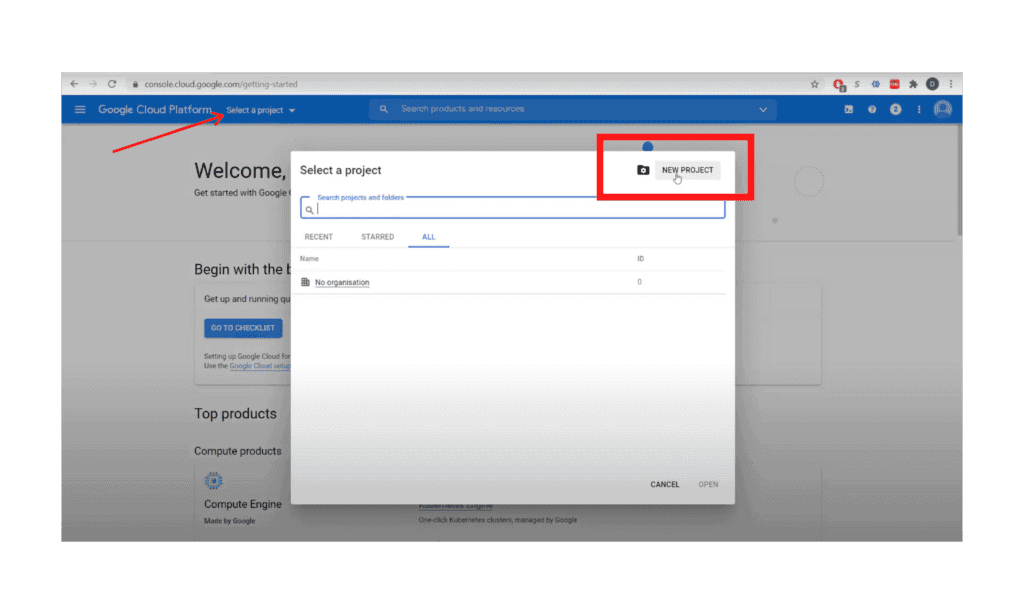
2a. Create a Project. 

2b. From “Select a Project” dropdown, click “New Project”

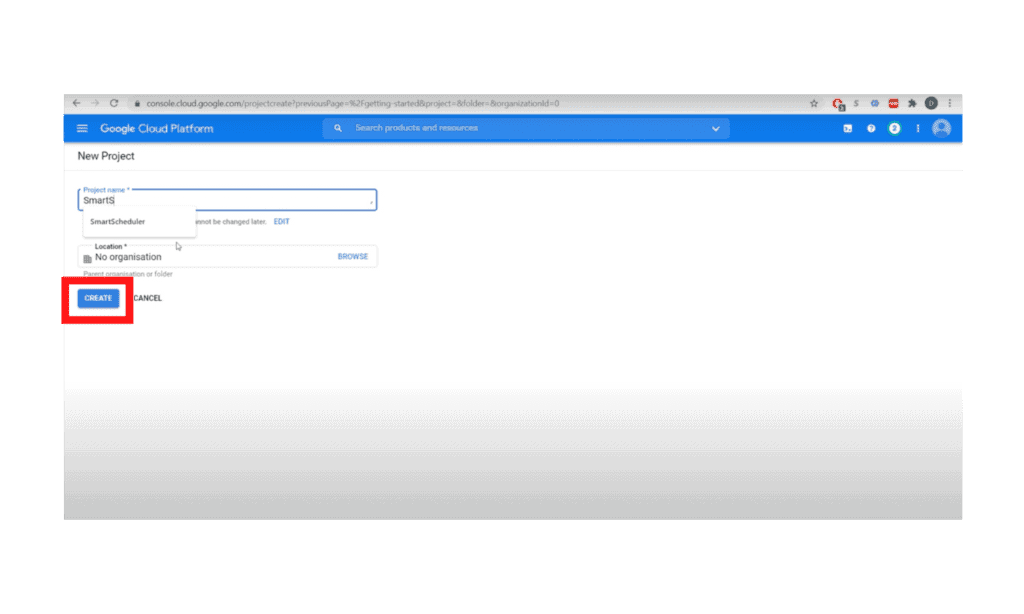
2c. Name it “SmartScheduler,” click “Create”

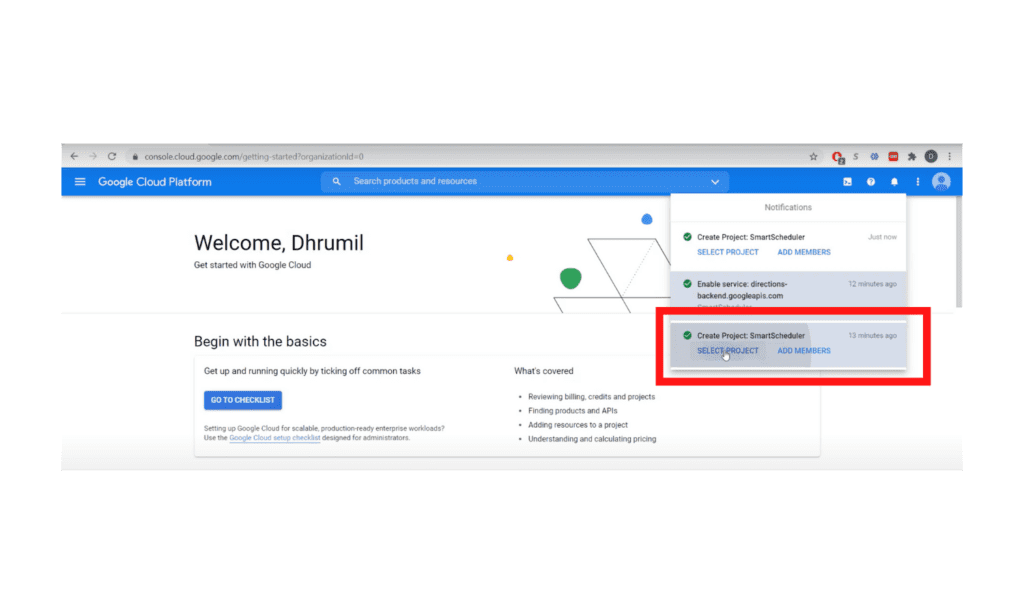
2d. Wait for the project to be created, then select the project from “Notifications”

Step 3:

3a. Then select your recently created project from the “Select a Project” list

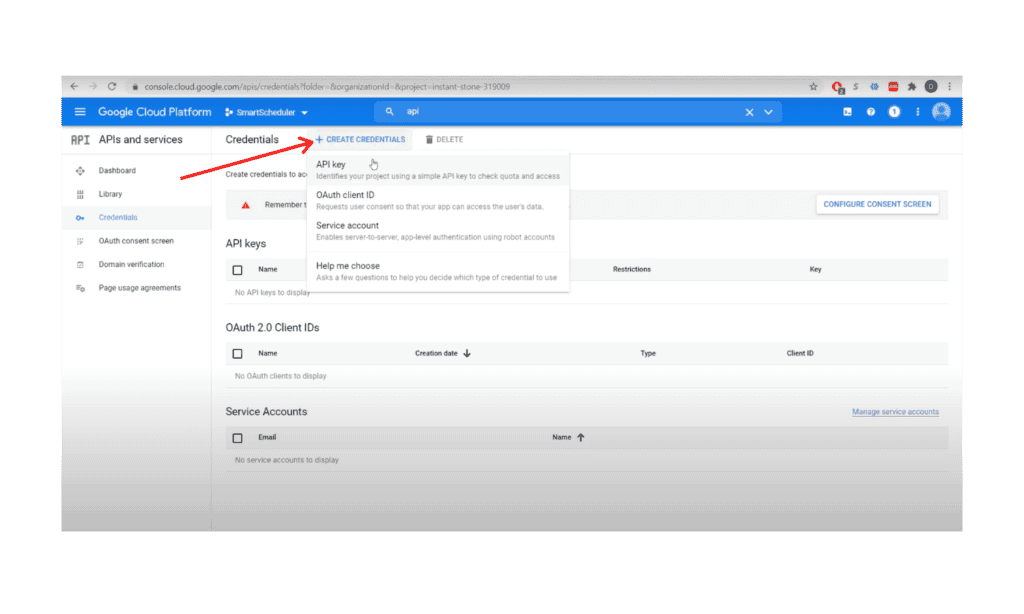
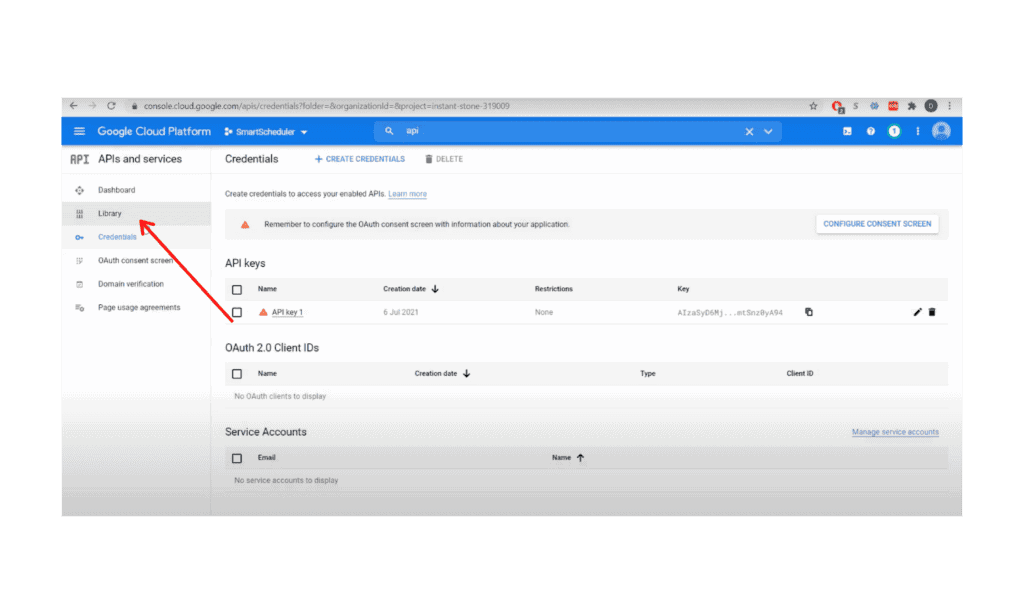
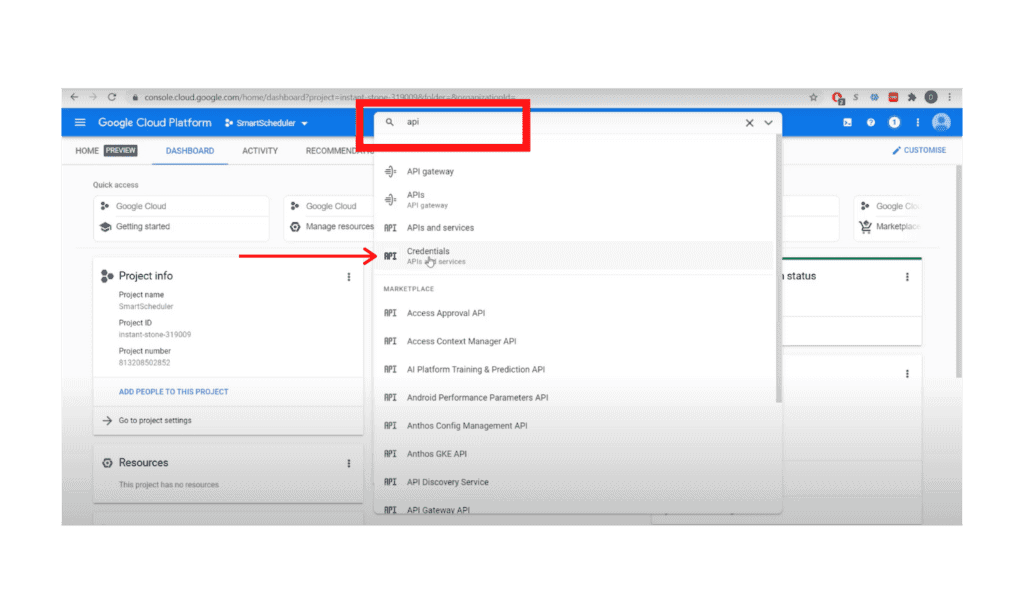
3b. Search for “API” and click on “Credentials”

3c. In Credentials, Click on “+ New Credential” and Create API Key

3d. Then close the API Key window

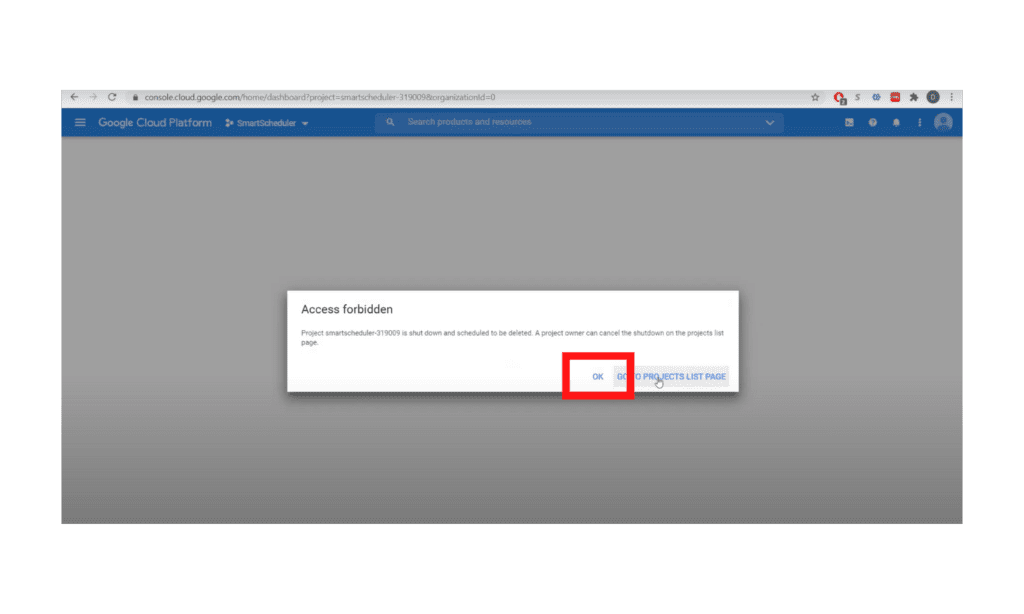
 3e. *click OK if you see Access Forbidden message

Step 4:

4a. Go to the Library 

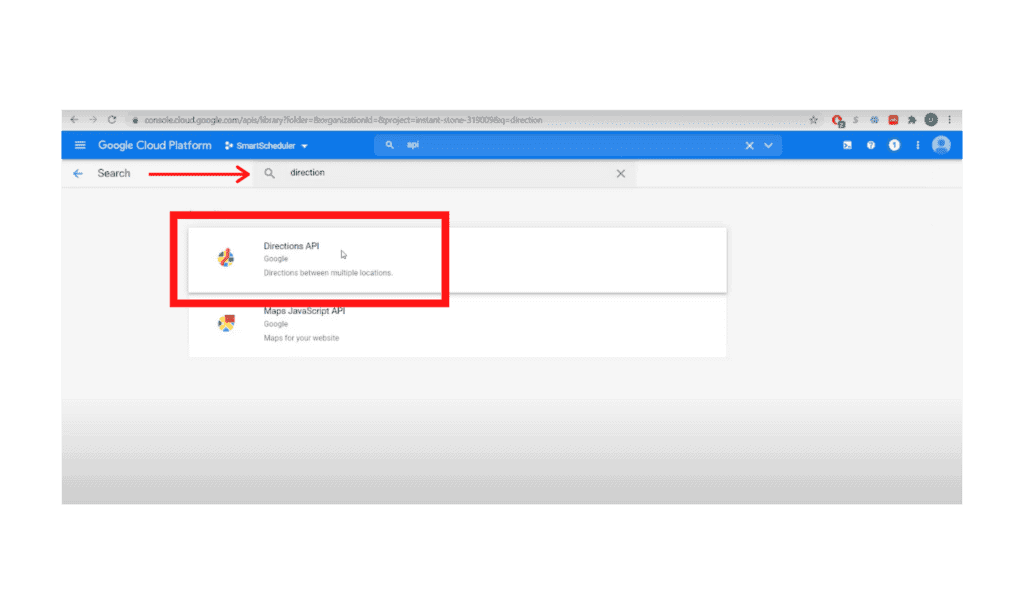
4b. Search for “Direction”

4c. Click “Directions API” and Enable

Step 5:

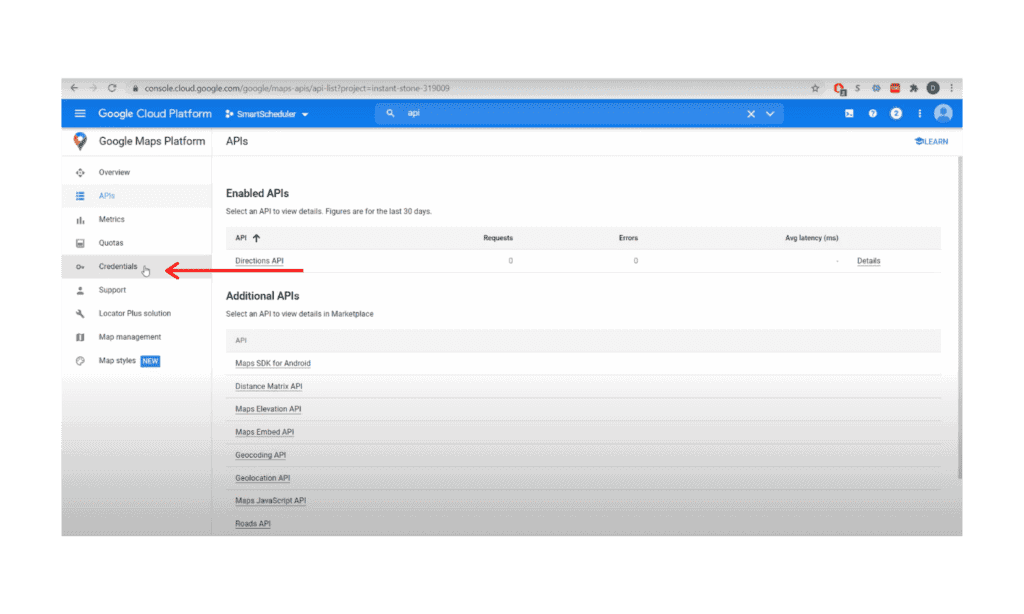
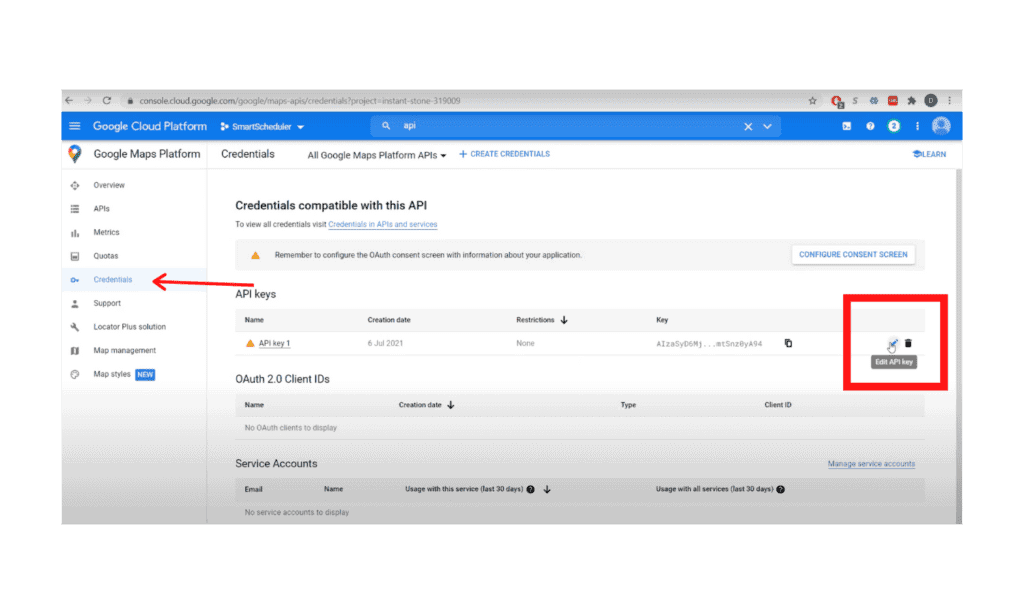
5a. Go to Credentials

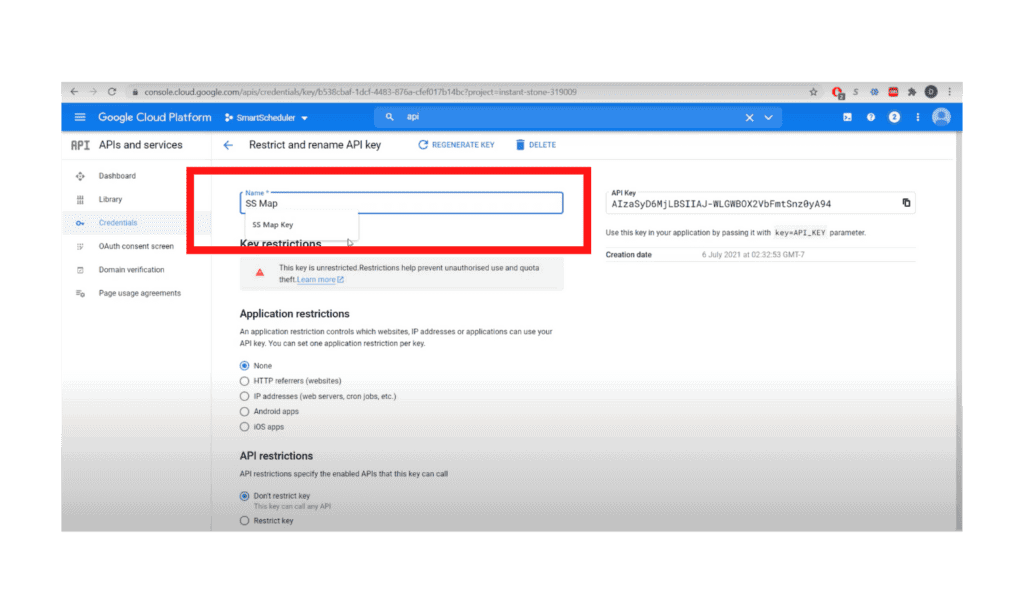
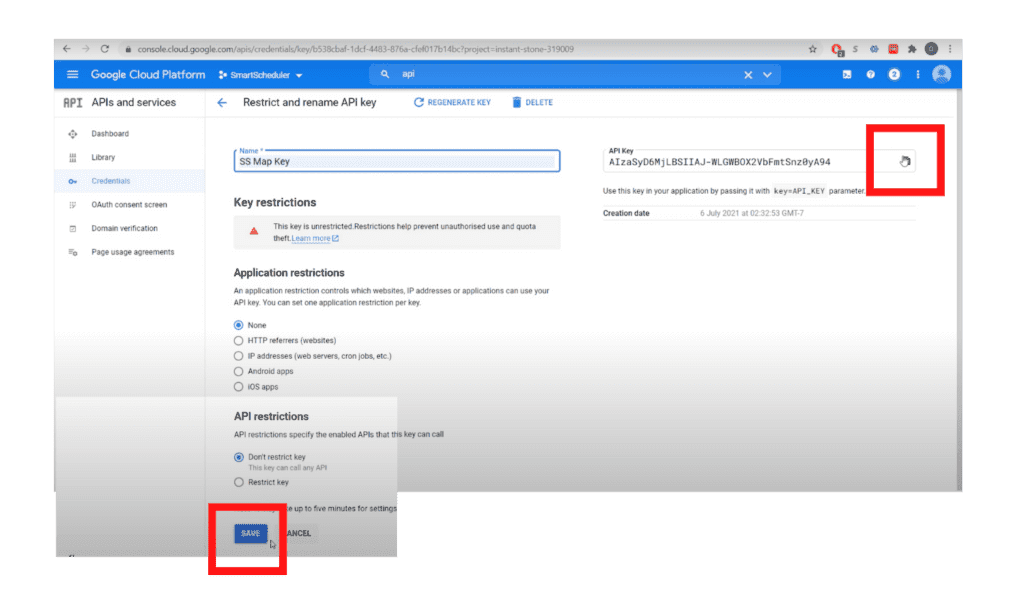
5b. Select edit, then rename API name to”SS Map Key”

5c. Copy key and click Save

End

For additional documentation, please see the Using API Keys article from Google


Other questions? Give us a call at (888) 207-4111 or contact us.

Contact Us


SmartScheduler™

from

zoho smartscheduler

Free Guide to Zoho CRM Implementation

Free Guide to Zoho CRM Implementation

In this info-packed guide, you’ll find a full spectrum of our advice from the point of researching a new Zoho CRM implementation, through planning and selecting a vendor, all the way through to implementation support options.

ZBrains has been building end-to-end solutions using Zoho since 2012, and today we’re one of Zoho’s top Premium Partners. Now you can get our advice for free!

Request our comprehensive guide to CRM implementations!