Need Zoho information or help due to COVID-19? Let us know.

Search results for : zoho app

The New Zoho Campaigns UI

The Zoho Campaigns UI Has A Fresh New Look

Experience the New Look of Zoho Campaigns UI: Enhanced Design for Improved User Experience

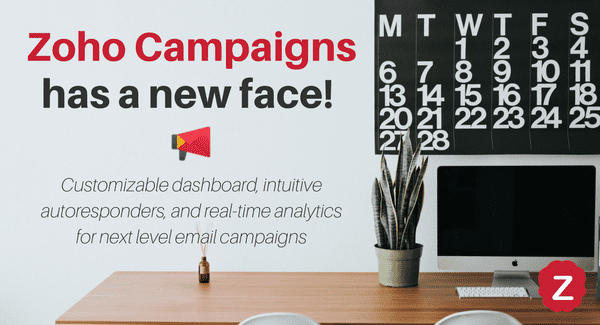
Keeping your customers and clients-to-be engaged when they have so many other things going on in their lives is one of the most valuable things one can do when managing a business – otherwise, what are you to them?  Will they even remember you after your most recent conversation?  Zoho Campaigns is Zoho’s email marketing tool, and although it’s historically been a fine tool for sending emails and tracking statistics, it’s just added a load of customizable options and a good dose of marketing automation –  so you can engage your audience even more easily, and do it in style through the new Zoho Campaigns UI.

Here are 6 great ways the new Zoho Campaigns UI helps keep your marketing machine in gear and can help keep you at the top of your audience’s minds.
1. Updated interface designed your way.

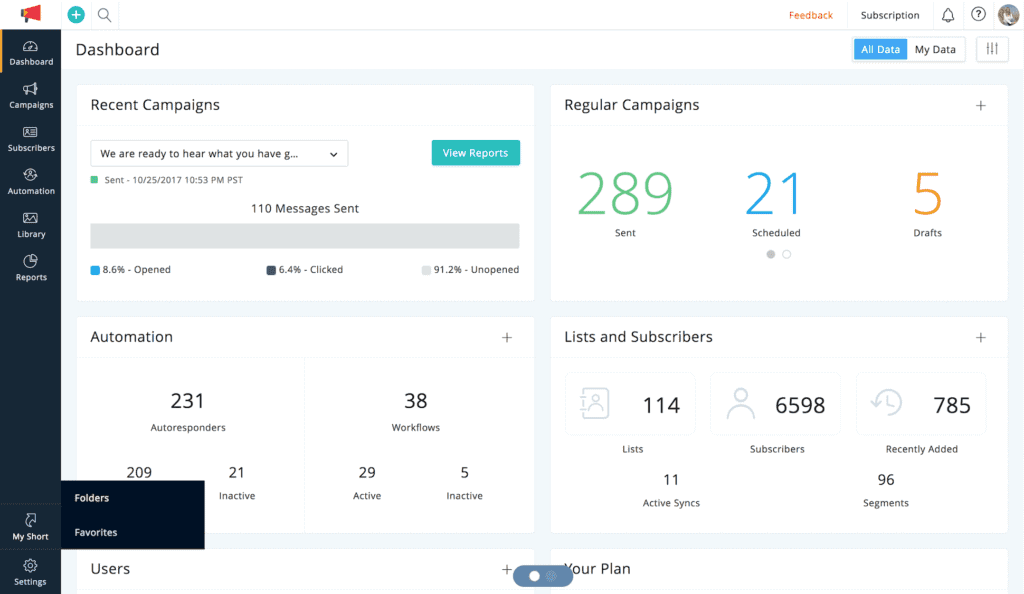
The new Zoho Campaigns UI allows you to work smarter with a new, customizable dashboard, to maximize your efficiency. With this dashboard you can get an overview of your email campaigns, and add only the widgets that you want to see, so you aren’t wasting valuable space on your screen. With the My Short tab, you can achieve smooth transitions with tabs that group your favorite features together, allowing for effortless focus on just the tasks that make up your workday.
2. Advanced Email Design Capabilities

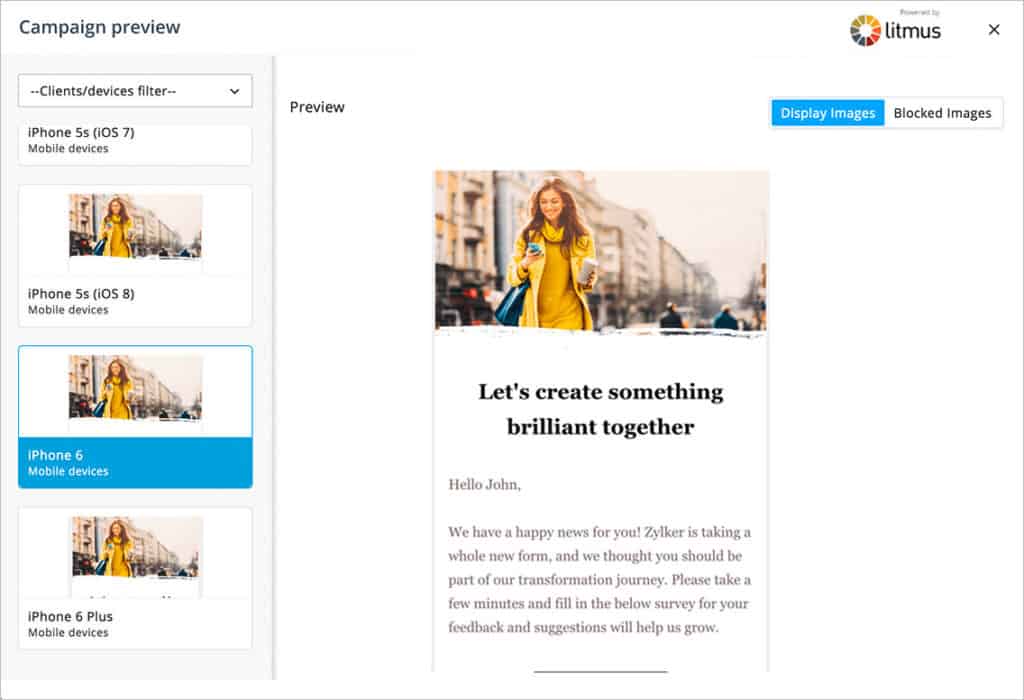
Creating email campaigns has now become even easier. The new Zoho Campaigns UI allows you to create responsive and more complex email templates. The new drag-and-drop editor makes building email templates easy, and the new UI also makes it much easier for you to add pre-header text, attachments, and links to your social media pages. You can even preview what your campaigns will look like on any device using the built-in Litmus test. Want to go back to a previous version of your email? Well, Campaigns now saves all past iterations so you can!

3. New Image Editing Precision.
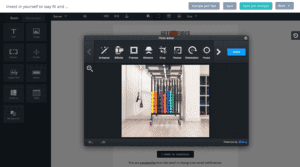
In the previous version of Campaigns, you could only upload and resize an image.  Now, you can combine your creativity and knowledge with added tools that allow for editing images from within Zoho Campaigns. That means you can crop, retouch, and even add text to the images that you upload! You can extend your creative capabilities with more image editing options. And increase your ability to connect with your audience by using engaging images.
zoho campaigns ui dynamic-content-updated4. Automation Puts More Flow Into Your Workflows.

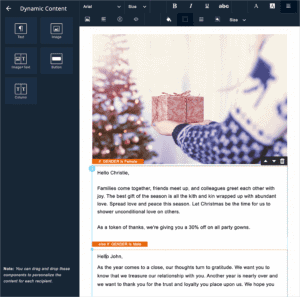
Gain back valuable time in your day with expanded automation. With a number of added customizable autoresponders, triggers, and workflows, you can target your audience based on their behavior, clicks, and actions. Take automation a step further with the introduction of dynamic content, which can change the content of your emails based on subscriber or list segmentation. Ensure that your clients aren’t bombarded by emails by setting up your own rules.

5. Define User Roles and Permissions.zoho campaigns ui roles-and-privileges
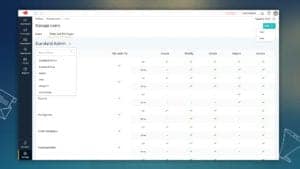
Ever worry that a new Zoho Campaigns user will accidentally delete one of your email campaigns? Well, the new Zoho Campaigns UI even takes care of this problem with new settings for team member permissions and roles, just like in the CRM. You can also set managerial approvals so no campaign ever goes out without being approved first!
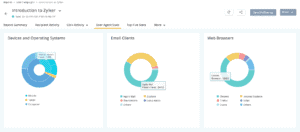
6. Reporting Features to Campaign Smarter.

Knowing how your campaigns are performing is integral in the structuring and design of future campaigns. The new UI allows you to track your campaign’s success with comprehensive analytics on a customizable dashboard. You can drill down into your campaign data even further than before with reporting on specific devices, email clients, and browsers that your clients used to view your campaigns. Add Google Analytics to Campaigns and track activity back to your website, and suddenly you have access to much more data – and ways to bridge gaps to connecting with your clients – than ever before.

The new Zoho Campaigns UI is available for all users! Pricing for Zoho Campaigns begins at $6/mo for unlimited emails and up to 500 subscriptions. Interested in learning more, implementing Zoho Campaigns, or starting on another Zoho app like Marketing Automation? Contact a member of our team! We are Zoho Certified Consultants here to help. Give us a call at (888) 207-4111 or click the button below and we will reach out to you!

Connect with Us

Zoho vault keeps your secrets safe and passwords protected

Zoho Vault Review – Keep Your Passwords, and Your Secrets, Safe

Zoho Vault Review: Is This Password Manager Right for Your Business?

If you’re looking for a reliable password manager that can provide top-notch security for your sensitive data, then Zoho Vault is definitely worth considering. As evident from their strong security protocols, Zoho takes security very seriously and their commitment to data protection extends to Zoho Vault, an app specifically designed for managing and securing sensitive information. With ISP/IEC 27001 global level security standards and SOC compliance, Zoho Vault provides a robust solution for businesses looking to safeguard their passwords and confidential information.

Experience Enhanced Business Security with Zoho Vault

First Off, What is Zoho Vault?

Passwords have become pretty elaborate these days, and if you count the number of online password-protected accounts you have, it’s no coincidence that our inboxes become flooded with password retrieval emails, especially if you’re using unique passwords for each individual account that you have (which you should!). Password management is a great step you can take to organize and protect your passwords and solve the aforementioned problems. Zoho Vault helps you manage all of your passwords in one place – and, it doesn’t just store passwords: it protects your other secrets as well!

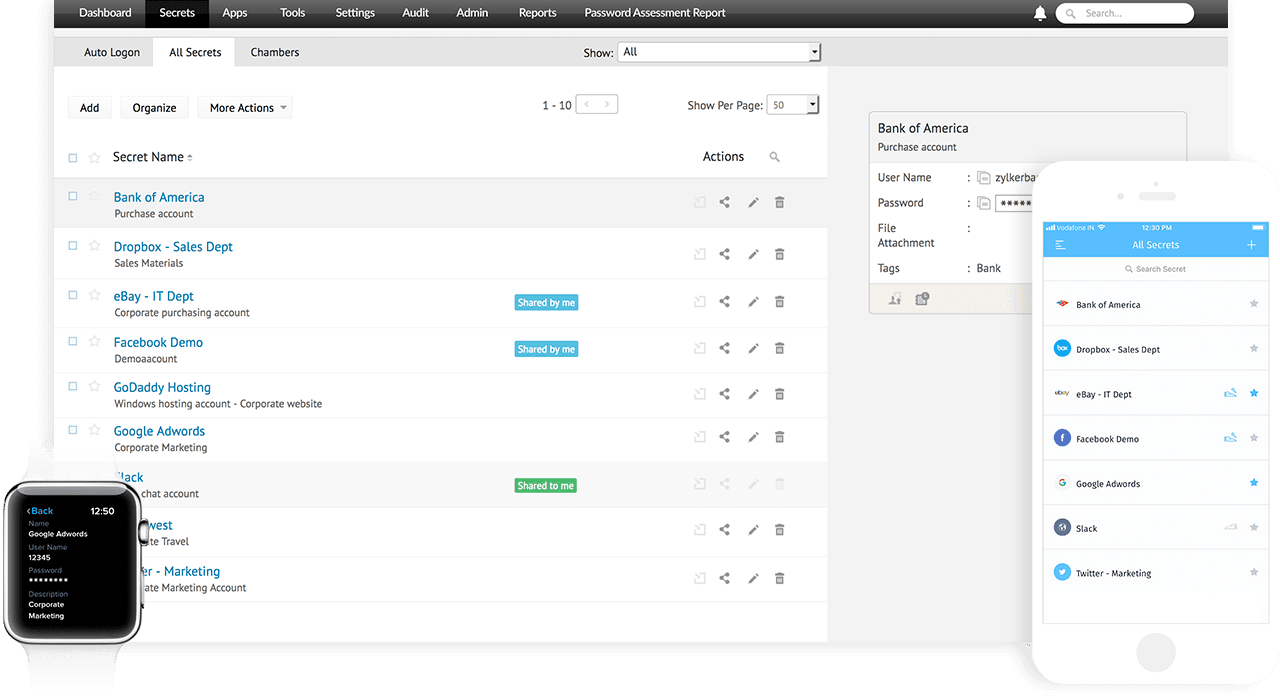
Zoho vault home screen and mobile apps

Zoho Vault Features

Organization

Keep your secrets stored and organized in Zoho Vault! While primarily used for password storage, Vault can also be used to store other important information. This includes bank account details or sensitive employee data. You can create your own digital chambers or use Zoho’s provided chambers to organize your data (called secrets in Zoho Vault parlance) by type or by other factors you set. A few of the default chambers include: bank accounts, email accounts, web accounts, operating systems, and other secrets such as social security numbers.

Share with Your Team

Have members of your team that need access to the same passwords? With Zoho Vault, you have complete control over who can access your secrets. You can assign roles or owners of the contents in your vault and create user groups. This means you can ensure that your team can access the secrets or chambers they need. Secure Zoho Vault secrets with easy access removal, ownership transfer, and emergency contact designation.

Main passphrase

For an added level of security, Zoho Vault requires a master passphrase to access your secrets. To use Vault effectively, users create a master passphrase that only they know. Zoho never stores this as an encryption key, so remembering this passphrase is essential for accessing Zoho Vault – period.

Extensions and Single Sign-On (SSO)

If you’re on a secure computer, you may consider using the Zoho Vault browser extension.  This allows Vault users to easily use stored secret login credentials. They can access their respective accounts without manually enter usernames and passwords. With one-click auto-logon, you can manage passwords, automatically log onto websites or applications, access passwords, and add new secrets without leaving the site or tab you’re in.

Mobile and Offline Access

For another layer of security, Zoho Vault allows for cold data storage – that is, users are allowed to download stored secrets to their desktop computers or mobile devices.  Secrets downloaded this way are stored as HTML. As a result, they can be completely disconnected from the internet, but are still protected by the master passphrase.

Zoho Vault Review: Pros & Cons


Regarding password security, Zoho Vault stands out with its impressive features. Thanks to robust security measures like strong encryption, multi-factor authentication (MFA), and role-based access control, your passwords protect against unauthorized access.

Navigating Zoho Vault is a breeze, thanks to its user-friendly interface. Whether you’re tech-savvy or not, managing your passwords becomes a seamless experience with Zoho Vault across various platforms like web browsers, desktop applications, and mobile devices.

Collaboration and security go hand in hand with Zoho Vault’s secure password-sharing feature. Team members and colleagues can access shared passwords without seeing the actual password, ensuring sensitive information remains protected.

Monitoring password access and spotting suspicious activities is easy with Zoho Vault’s detailed audit trails and reports, adding an extra layer of security to your account.

On the downside, the accessible version of Zoho Vault has its limitations. For users with extensive password management needs, upgrading to a paid plan might be necessary.

While Zoho Vault integrates well with other Zoho products, there could be some limitations regarding integration with specific third-party applications.

The tool’s advanced features require some time and effort to grasp fully, making it challenging for some users to utilize its full potential.


Zoho Vault FAQ:


  • Q1. Can I use Zoho Vault for personal purposes?
  • A1. Absolutely! Zoho Vault caters to both individual users and businesses. The free version is perfect for personal use and offers essential password management features.
  • Q2. Can I securely share passwords with my team?
  • A2. Yes, Zoho Vault allows you to share passwords securely with your team using role-based access controls and permissions, ensuring only authorized individuals have access.
  • Q3. How does Zoho Vault ensure password security?
  • A3. Zoho Vault ensures the security of your passwords through strong encryption protocols and multi-factor authentication. Additionally, it provides audit trails and reporting for monitoring and tracking password activity.
  • Q4. Can I access Zoho Vault on my mobile devices?
  • A4. Absolutely! Zoho Vault provides dedicated mobile applications for iOS and Android devices, enabling secure access to your passwords on the go.
  • Q5. Are there any limitations in the free version of Zoho Vault?
  • A5. While the free version is an excellent starting point, it does have some limitations on the number of passwords and sharing options available. Upgrading to a paid plan unlocks more advanced features and capabilities.


Conclusion:

In summary, Zoho Vault is a trustworthy and secure password protection solution that offers robust features and ease of use. Its advanced security measures, cross-platform compatibility, and secure password sharing make it an ideal choice for individuals and businesses. However, it’s essential to be aware of the limitations of the free version and consider an upgrade to access the tool’s full potential. Zoho Vault provides a solid password management solution to keep your digital credentials safe and organized.


It’s no Secret – Your Secrets Need Protection These Days

As you may recall, 2015 was the year of the data breaches (Target, Home Depot), but hackers seemingly grow more sophisticated by the minute. Now, even credit reporting agencies like Equifax aren’t impervious to breaches.  Let Zoho Vault add an extra layer of security to the place you need it most – your business and your personal information.

Pricing for Zoho Vault begins at free for personal use and $1 per user a month for the standard version. Interested in learning more? Contact a member of our team! We are Zoho Certified Consultants here to help. Give us a call at (888) 207-4111 or click the button below and we will call you!
Connect with Us

Zoho VS GoldMine and the cloud

Zoho VS GoldMine CRM Review – How They Stack Up!

CRM Review: Zoho vs GoldMine – A Comprehensive Comparison

In the days of cryptomining, is all that glitters really gold? Cryptocurrency may just be a buzzword to some, but it shows just how inclusive the internet is when looking for solutions to different problems! Zoho’s millions of users rely on them to maintain their software, so you can trust them to handle website bugs. In fact, before we bring you onto our team as partners, we want you to explore various solutions; we’re so confident in Zoho, we know that they’ll offer the best solution to you every single time.  We are setting our biases aside to compare Zoho VS GoldMine CRM and give you an honest comparison between the two regarding safety & security, integrations, performance, and of course costs.

Zoho vs GoldMine CRM: Which Cloud Solution Soars?

Zoho vs GoldMineSafety & Security

When comparing Zoho VS GoldMine CRM, or any CRM for that matter, security is key. Zoho is stacked with nearly 30 million users worldwide, from small to large organizations, so security is paramount.  If you run one of the oldest versions of GoldMine CRM, you’re aware of administrator “master rights” and how admin rights protect your precious information on your server. GoldMine’s newer, cloud-based iteration doesn’t provide many details on its security – but, it is clear that you are not actually reliant on GoldMine CRM for that data security, but on another provider. Zoho holds ISP/IEC 27001 global level security standards (tested independently) as well as SOC compliance. Not to mention, they outline their security measures to assure you that your information is well protected.

The Winner: Zoho

Zoho vs GoldMineIntegrations and Compatability

Zoho partners are positively flooded with requests to integrate outside applications with Zoho, or even create new apps within the Zoho environment, and there’s no end to that in sight. Zoho’s comprehensive package of apps called Zoho One offers 40+ integrations to start! That includes nearly anything you can imagine for a business, from accounting and inventory to sales and human resources. Conversely, for GoldMine CRM, integrations are somewhat limited: QuickBooks and Windows (presumably the environment on which you’d install GoldMine) are your top options. However, as a cloud solution, Zoho is able to run on many common browsers, including Safari 4 and above, Chrome 17 and above, Mozilla Firefox 17 and above, and Internet Explorer 9 and above. All of Zoho is also mobile- and tablet-ready, whereas GoldMine CRM has to rely on middleware, called Dejacloud, to add this capability.

The Winner: Zoho

Zoho vs GoldMinePerformance

GoldMine CRM may have been top-of-the-line at one point, but today its outdated interface requires more server-related maintenance just to upkeep – which is typical of on-premise systems – and this is work that most businesses find they just don’t have time to do any longer.  On the other hand, Zoho and its suite of apps are completely cloud-based, which means all server maintenance is handled by Zoho themselves (hence the monthly fees you pay to use the software).  Accessing Zoho CRM via the web means you need only have a working internet connection to have all the capability you need – no costly dedicated servers, or dedicated IT professionals (at least in this regard).  Of course, every website has bugs from time to time, and hardly any are up 100% of the time – but, putting liability in the hands of someone else – and knowing that the company liable for maintaining your software also does it for millions of other users at the same time – should instill a fair bit of confidence in Zoho.

The Winner: Zoho

goldmine crm reviewPrice

Small business or large enterprise? Find out which CRM is right for you: Zoho or GoldMine. However, to put it succinctly:

  • Choose your CRM model: GoldMine’s “Own It” or cloud-based option starting at $60/mo per user.
  • Zoho One’s all-inclusive subscription begins at $45/mo per user, and a very basic Standard CRM package beginning at $20/mo per user.

The Winner: Zoho

goldmine crm review

We understand this isn’t enough to answer all your CRM questions. If you’ve been using GoldMine CRM for some time, switching it up entirely may seem especially daunting. But, learning about other options as a first step before diving in headlong doesn’t have to be.

Contact us to learn more about Zoho or discuss Zoho vs GoldMine: (888) 207-4111 or click below. We are proud to be a Zoho Premium Partner and are ready to help you make the move to this CRM that will be an ideal fit for your business.

Connect with Us

Zoho ShowTime is a virtual training solution made for the digital age to bring presentations online

Zoho Showtime: Virtual Training for the Digital Age

Passing knowledge from one party to another can encompass a wide range of emotions, from the banal to the bang-up. But often – especially as collective attention spans dwindle to an average of 8 seconds – these tend towards the first option, and this makes it difficult to get anything worthwhile done during a presentation at all. Zoho knows about these struggles, and they’ve come up with a handy way of not only delivering engaging presentation content to your audience, but letting you know exactly how to improve so you never miss a beat again. Zoho ShowTime is a virtual training solution made for the digital age.

Here’s how Zoho ShowTime will change the way you present!

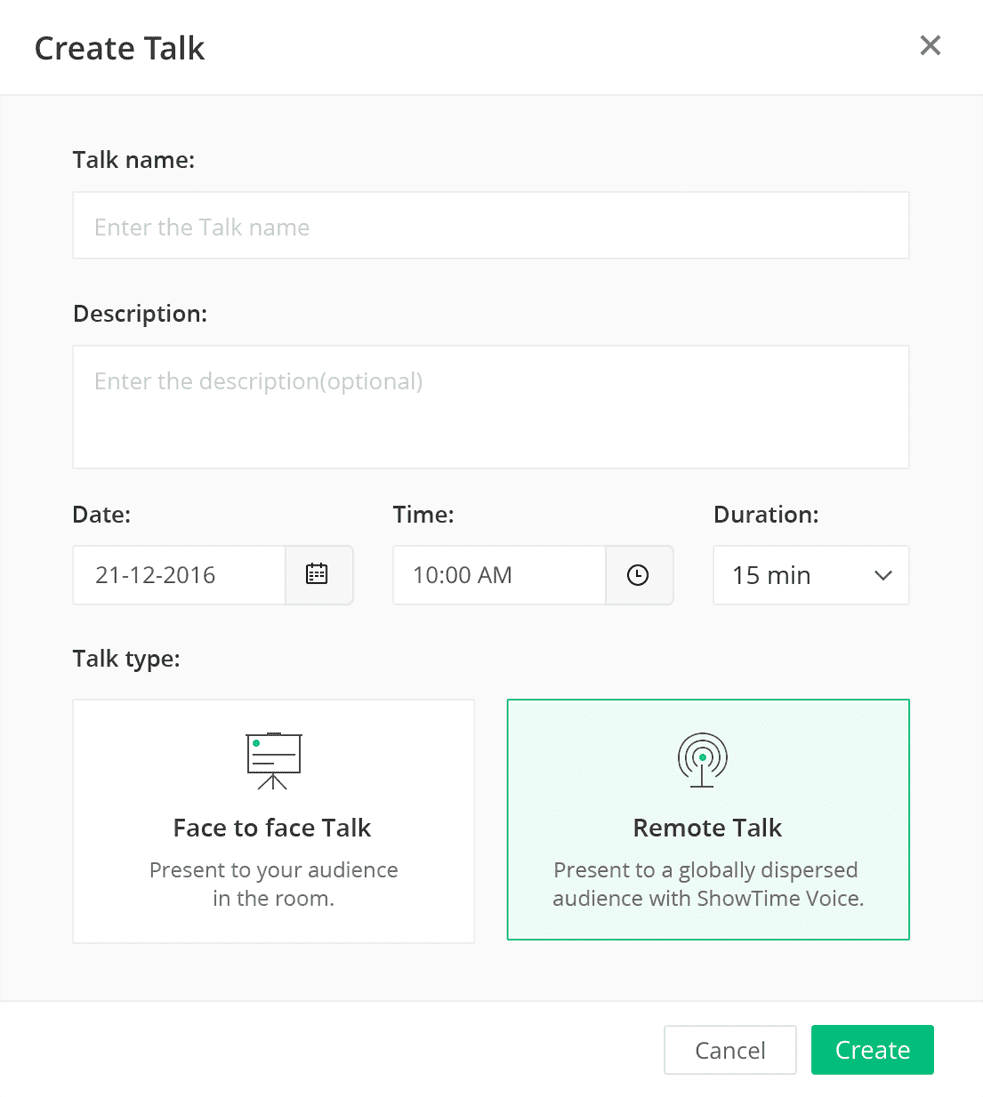
showtime scheduling screenshotReach Out to Anyone, Anywhere

Whether you are an educator, trainer, or presenter, planning training sessions and presentations of any kind can be strenuous, especially so if you have attendees from different corners of the globe. Last-minute travel and meeting space arrangements can be costly and ultimately unproductive. However, with Zoho ShowTime you can include everyone you need present through both audio and video conferencing. You can bring your presentation to the fingertips of your attendees through their personal computers or their mobile devices, making it easy to engage them wherever they – and you – are.

Standardize Training

If you have a large audience or many team members working remotely, it can be difficult to get everyone in the same room for a training session. Zoho ShowTime solves this problem! Whether it be for large groups or face-to-face sessions, ShowTime allows you to get everyone on board and give the same attention and information to your entire audience, ensuring you don’t have any knowledge gaps from one attendee to the next.

Customize For Your Needs

ShowTime simplifies the scheduling and registration process, allowing you to invite all trainees virtually and making it much easier for those who aren’t present physically. Zoho ShowTime allows you to customize and name your sessions as needed, as well as gain valuable insight on your attendees with specialized registration forms. You can further customize your experience by using the ShowTime plug-in for PowerPoint, which allows for creating entire presentations outside the standard ShowTime platform.

showtime active engagement pollsInteractive Training Environment

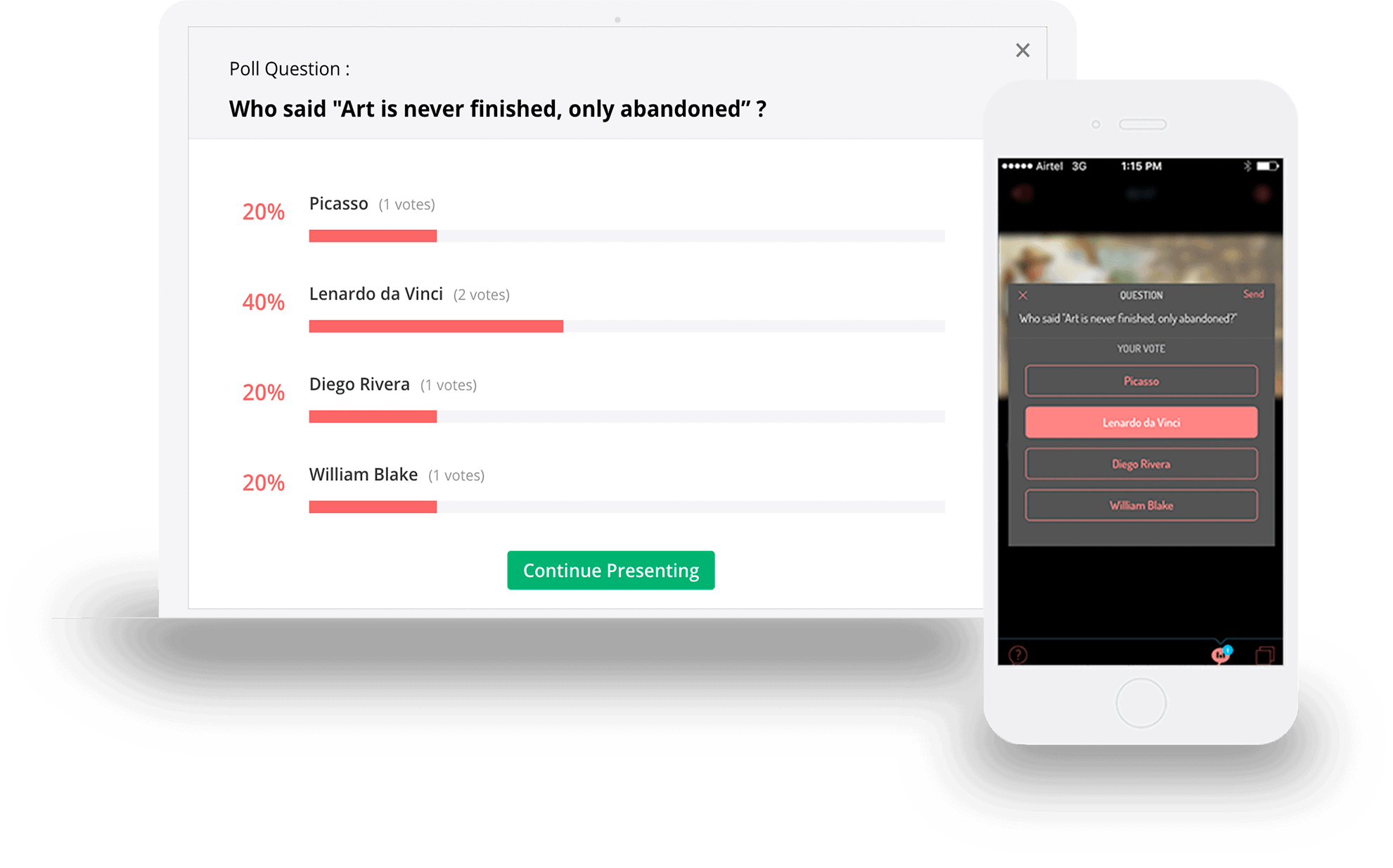
Worried about losing your attendees’ attention during your session? ShowTime’s interactive environment makes everything much more interesting for your audience. Presentation attendees can virtually “like” slides within a presentation, use the in-app chat, or respond to you directly with a virtual Q&A. You can also create live audience polls with multiple choice questions, ratings, and text-box responses. With screen sharing, attendees can review prior slides to clarify ideas, make connections, and enhance their learning.

Content Library and Knowledge Base

Once your presentation is over, it can be difficult to recall what you learned afterward. To remedy this, you can save presentations to the ShowTime course library or knowledge base for future use, along with any polls you administered – or, you can make past content available on your personal profile. Shareable links make it easy to pass content around on social media, so you can use it to further relationships with new clients who may be interested in your work!

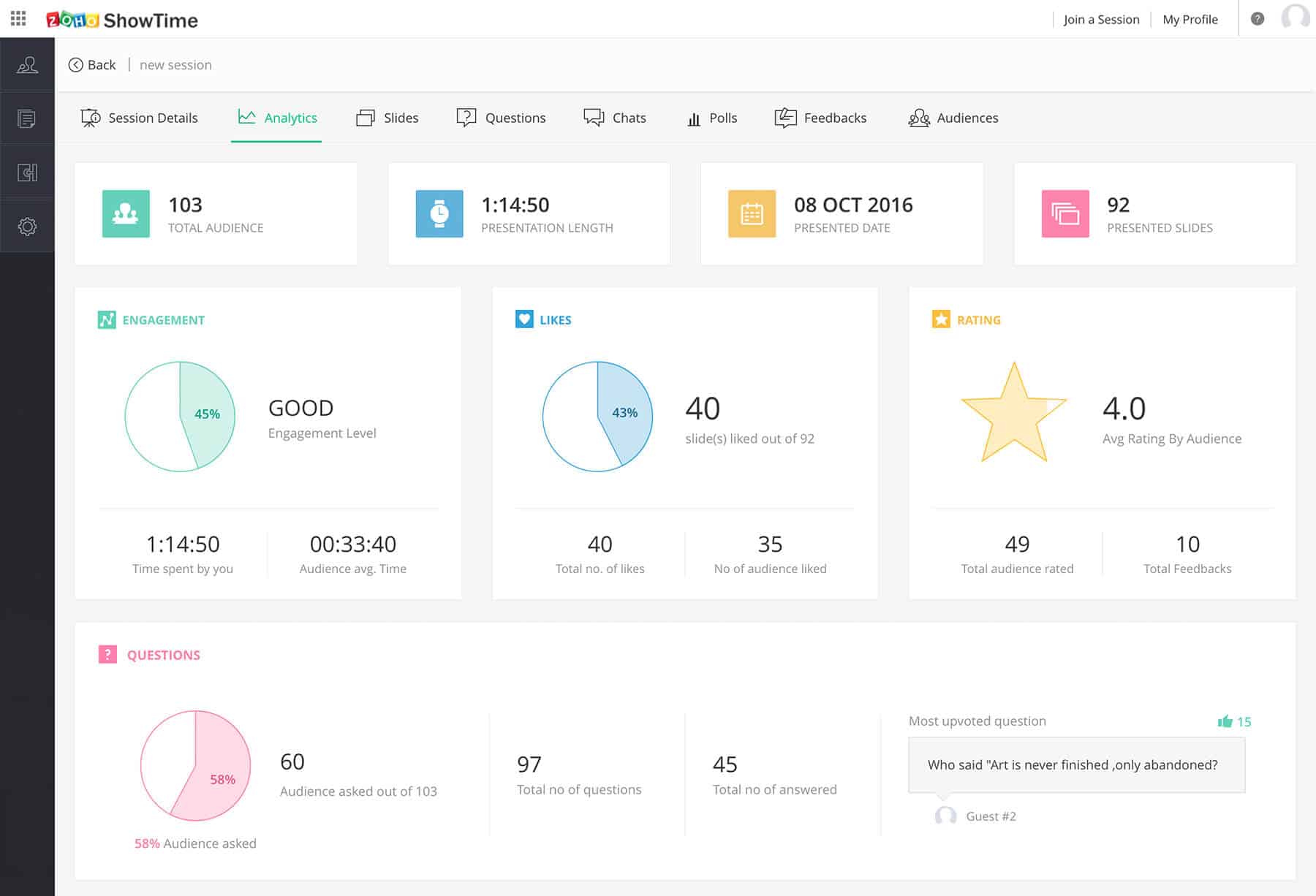
Analytics and Feedbackshow time analytics dashoboard

And for the grand finale, analytics on engagement! ShowTime will track any session details to give you more insight into where you did, or did not, connect with your audience. Detailed analytics and reports are based on poll and chat engagement, likes, and ratings. Analytics and feedback will help you gauge the effectiveness of your training efforts to help you to improve future sessions!

There is a free version of Zoho Showtime available, with paid plans starting at $7 per user per month. Interested in learning in learning more? We are Zoho certified consultants here to help. Give us a call at (888) 207-4111 or click the button below to have us call you!
Connect with Us

Prepare You Business for the New Year 2018 Office party

Zoho Success Guide: 10 Tips for New Year Business Preparation

As 2018 looms just ahead, the activity du jour in our personal lives is the new year’s resolution.  These resolutions usually come without much thought, and fittingly they rarely come to fruition.  However, as a business owner you think about a good deal more than simple resolutions: your needs are complex, and they depend upon the activities – and indeed, the needs – of other people and things in your organization.  So, your resolutions require the planning necessary to take all those things into account.  

Organizing the needs of your entire business can seem like a daunting task, but we’ve put the best 10 points together to get you started off on the right foot, and to make sure your new year’s resolution for your company is backed by solid processes and reasoning, a resolution you can truly keep.

Here are 10 Tips for Preparing Your Business for the New Year!

Gears1. Review Your Year

First and Foremost, take a look at your company as a whole. No matter what type of business you have, taking a look at your business performance and infrastructure is vital to creating a strategy for the new year. From sales metrics to manufacturing costs, it’s important to know where you’ve been to determine where you are going. Reviewing your year will help you create a secure infrastructure and better understand your company’s growth, scalability, and potential weaknesses.  This could mean surveying different department heads, or reviewing past performance reports in your CRM to gauge where you might be headed in 2018.

2. Review Customer Experience

Don’t be afraid to reach out to your customers and survey them about their experience with your company. It will help you determine if there are any shortcomings when it comes to customer happiness and help improve these for the coming year. This is also a great time to ask for testimonials from your happy customers, and perhaps sending out an accompanying survey from which to gather more actionable data. Featuring testimonials on your website can improve your opportunities with future customers as it instills trust, in fact, 85% of consumer trust online reviews as much as they would a recommendation from someone they know.

zoho docs3. Get Informed!

Take time to do your research on new trends for the year. Whether it be marketing or consumer trends, it’s important to stay informed and ensure that your business’ goals are in line with the rest of the market. It’s also important to do research on any new laws taking effect, and how those may affect your business. For example, in California, we have few new laws and changes regarding leave of absence, hiring practices, and workplace safety and workers’ comp. You can learn more about those laws here.

4. Start with a Clean Slate and Organize

Is your desk, or desktop, cluttered? Or maybe your emails and calendars have just gotten out of control. It’s important that you start the New Year with a clean slate. Take some time to declutter and organize! Start the New Year fresh and put your mind at ease with a clutter-free workspace, a clean calendar, and without 999+ unread emails.

5. Set Goals and Business ResolutionsZoho Campaigns

We normally set personal New Year’s resolutions, but why not set business resolutions as well? With the information and data you’ve gathered from your company review, your customers, and trends, you’re perfectly within your ability to set goals for yourself and your team. Make sure your team is aware of the importance of your business resolutions, how these will affect their day-to-day work, and how these fit in with (or change) the overall vision or goal of your organization.

6. Speak with your Team

It’s important to stay in touch with your team’s needs and processes. That way you can be sure that they have allotted the right tools and resources to complete their jobs efficiently. Be sure to take note of any bottlenecks and how those can be resolved. Your team may have great insights about working out inefficiencies in the day-to-day processes that they are a part of!

7. Refresh your Skills and Those of Your Team – Training

The New Year is a great time to refresh skills! Just as systems and applications used day to day may have several updates throughout the year, it is important that your team also receives updates so no one falls behind and everyone is on the same page. Hold training sessions for your team to ensure that everyone has a clear understanding of your processes and systems. Here at ZBrains we offer Zoho CRM training – even for our own staff, on a set basis!

zoho projects8. Evaluate your Finances

Take the time to compile financial reports from the past year. Review your growth and revenue to evaluate your company’s spending versus your company needs. This will help you to plan where your company can spend more for maximum benefit, and where you can cut costs and negotiate pricing. As well, make sure your payroll and accounting softwares are up-to-date to ensure those systems are running efficiently in the new year.

9. Marketing Optimization

Marketing trends change quickly, and it is important to start the year off with a fresh marketing plan and revamp your image. Create a content calendar for the year highlighting campaigns, important holidays, and events. Overhaul your social media accounts with new branded imagery and messaging in line with your new business resolutions. Looking back on the performance of the past year can help you shape your lean, mean, marketing machine.

10. Optimize Your Businesszoho smart scheduler

After reviewing the steps above it’s important to ask yourself a few questions. How can you improve? Are you using any outdated systems which seem to be slowing your team down? Is your CRM able to integrate with your daily apps, even on the go? Now is the time to implement changes and ensure your business is using the proper software and applications to run efficiently! Leave your outdated systems in the past and make the changes to enable your team in the new year. We here at ZBrains are Zoho Certified Consultants here to help you with Zoho implementations, integrations, or custom add-ons like our Commission Calculator or SmartScheduler.

Interested in learning more? Reach out to a member of our team! Give us a call at (888) 207-4111 or click the link below and we will call you! You can also check out a few of our past blogs listed below for more ways Zoho can optimize your potential!
Connect with Us


Learn More
Don’t Waste Your CRM Implementation – How to Adapt Your Business and Your Team

Zoho One – A Unified Solution for your Business with 35+ Applications

Zoho Campaigns – The Power of Zho Campaigns and CRM Integration

Zoho Desk – Keep the Customer First with this Context-Aware Help Desk Solution

Zoho Sprints – Agile Project Management Software

Sales to Social – How to Optimize the Customer Experience with Zoho

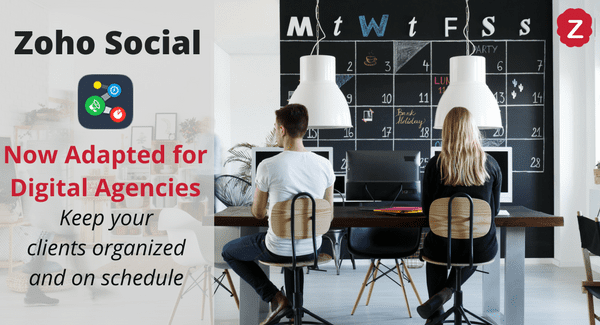
Zoho Social adapted for digital agencies calendar

Zoho Social’s latest adaptation is a game-changer for digital agencies! Elevate your social media today

To say social media has evolved dramatically since its inception would be quite an understatement.  Indeed, social networks have transformed from something secondary into something intricately interwoven into the fabric of society – and, to some, something integral to how they do business.  Digital advertising agencies, for example, work very closely with the social media presence of all sorts of companies – and, whereas Zoho’s answer to this business model would have been to implement Zoho Social for each managed brand, this isn’t such a scalable idea.  So, to remedy this, Zoho has released a new version of the Social app built especially for digital agencies to work even better with their clients.  It’s the same Zoho Social you know and love, but with a few more bells and whistles to make life much easier.

Here’s exactly how Zoho Social has adapted for Digital Agencies!

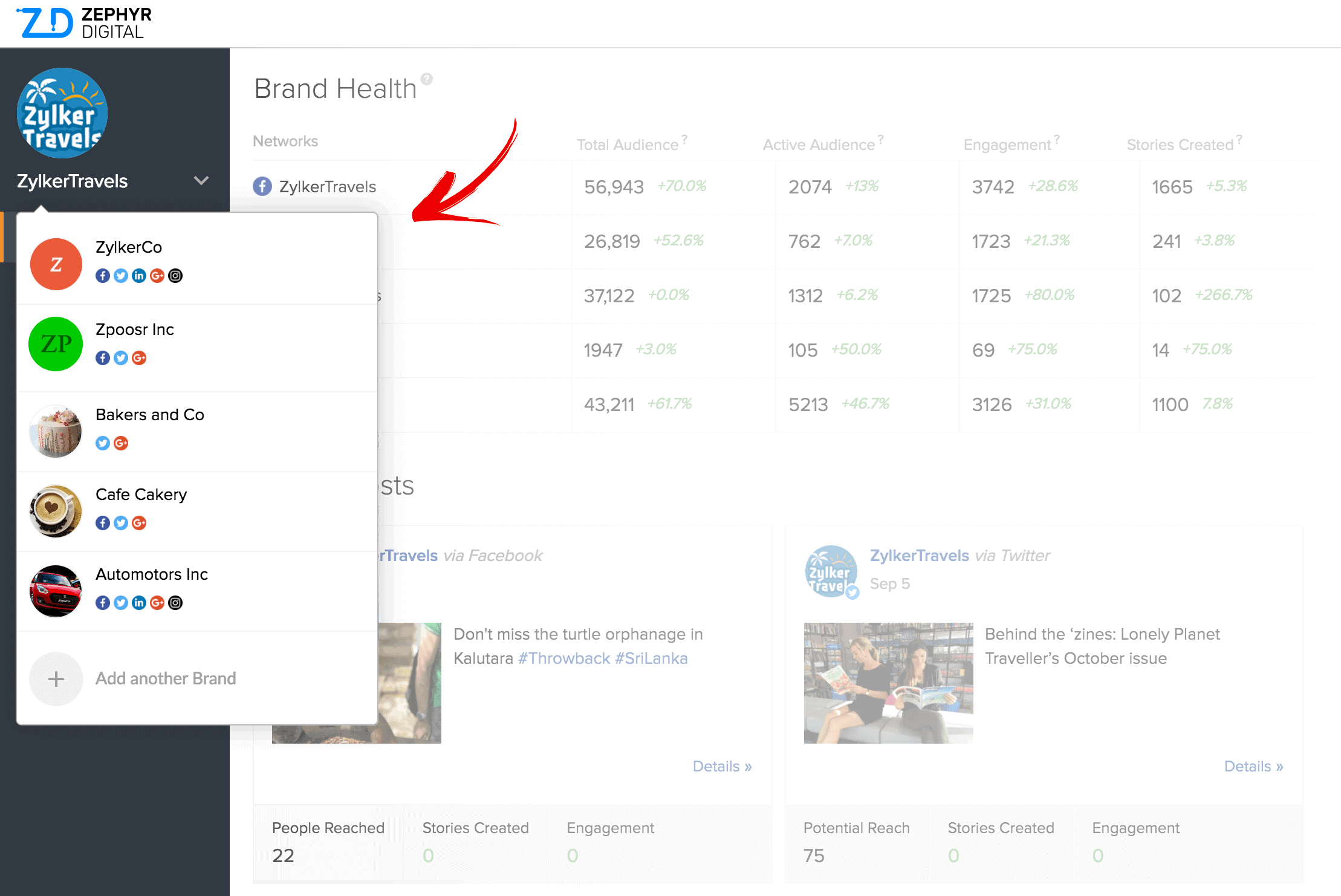
Zoho social brands screenshotManage all from one.

No more logging in and out of different accounts and platforms. Now your Digital Agency can manage all clients and brands from one place! Manage your clients and your team from the Zoho Social platform. Monitor their activity and reporting with real-time updates and analytics. Manage and schedule their posts using Social’s intuitive publishing calendar, ensuring that your clients’ content pipeline is always running smoothly.

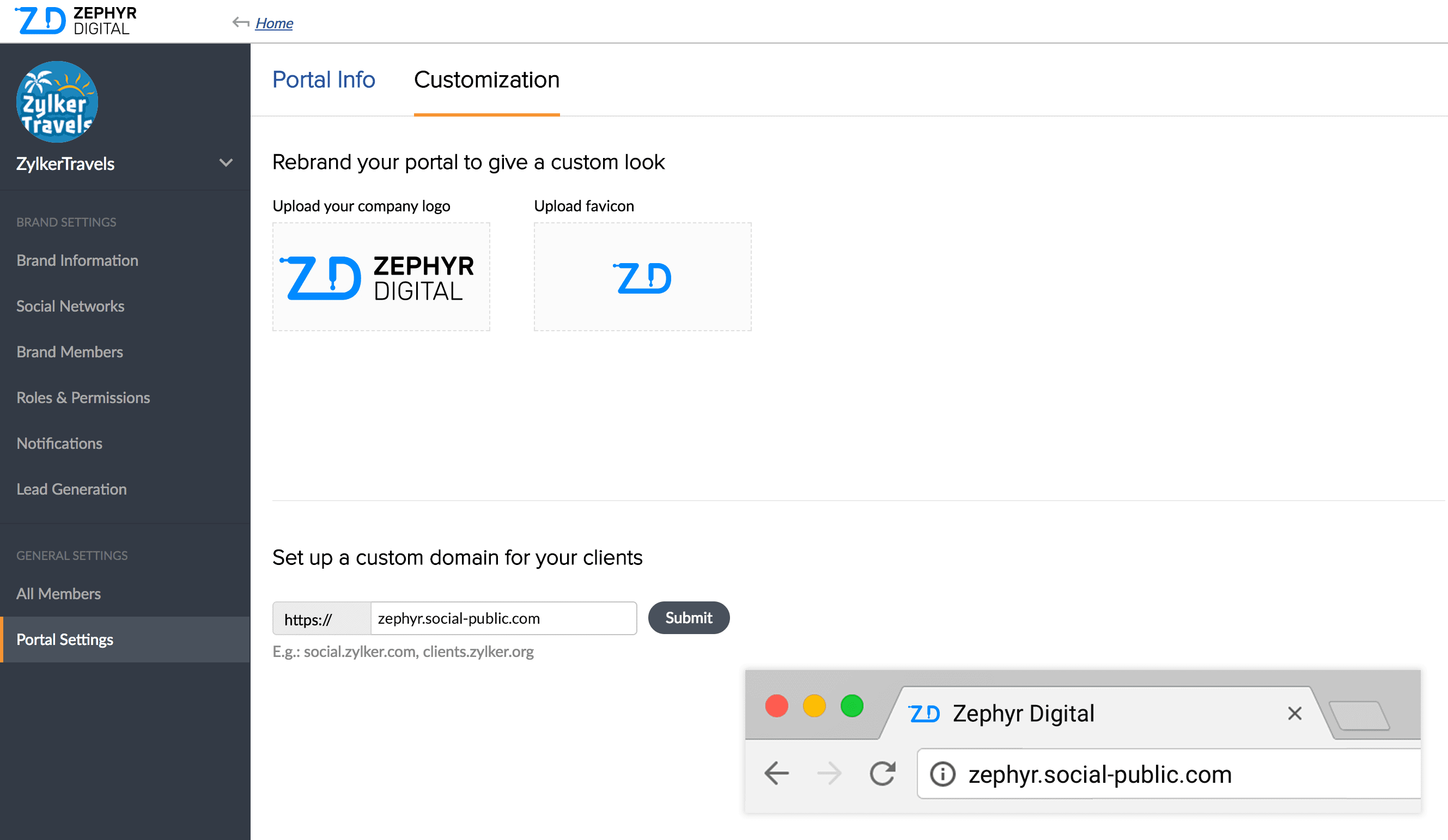
Your Agency, Your Brand.Zoho social brand customization

As a digital agency, you know how important it is for your branding to always be at the forefront. Make sure you stay at the top of your clients’ minds with custom agency branding. Customize your name, logo, and favicon from right within Zoho Social. Reinforce your brand identity with your clients by sending them custom branded emails. You can even brand all reports you generate in Social when sending them out to clients.  

Collaborate with your team and your clients with Zoho Social.

Make sure your team is always in the loop! Zoho Social for digital agencies now makes collaborating with your team even easier. Share ideas and start discussions with @mentions and invite your clients to the decision making process by @tagging them. As an agency, you also have the ability to specify roles for your team members and assign them to clients! With designated and organized roles, your client relationships will be better than ever.

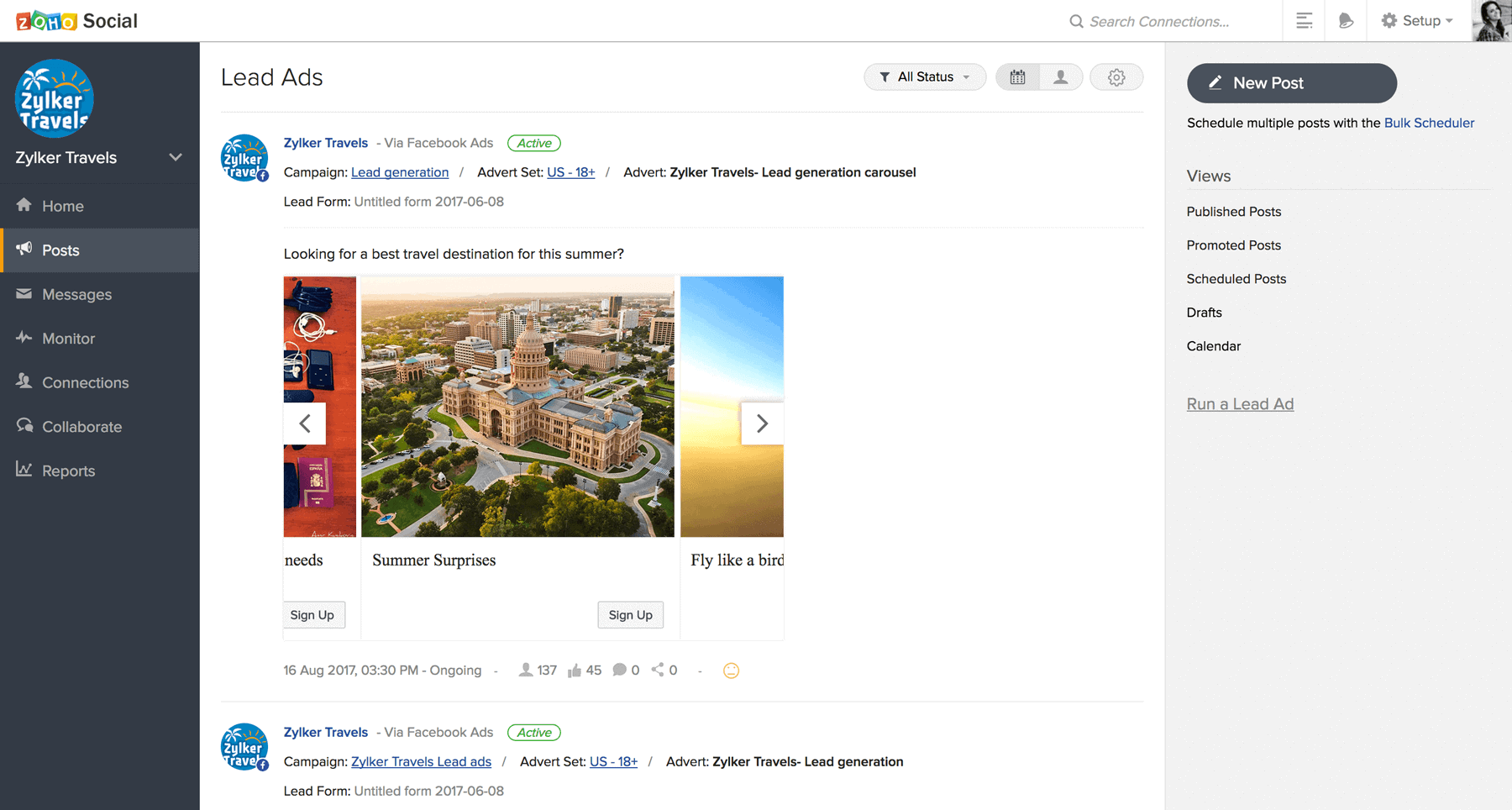
zoho social integration with facebook lead adsFacebook leads integrate to your CRM!

This new feature is one that we are most excited about! If you are using Zoho CRM, you can now integrate leads from Facebook campaigns! Running a campaign or lead ads for your clients? Well, now you can save yourself time! You no longer have to manually download leads from Facebook – instead, they will push directly into your CRM. This new integration also allows you to more closely monitor the performance of your campaigns in real time!

Pricing for Zoho Social Agencies starts at $320/month for 5 users and 10 brands*. And other agency pricing is available by request. *Pricing updated June 2021

Interested in learning more? Contact a member of our team! We are Zoho Certified Consultants here to help. Give us a call at (888) 207-4111 or click the button below and we will call you!
Connect with Us

5 way to increase field technician scheduling efficiency

Zoho SmartScheduler: 5 Tips to Boost Your Scheduling Efficiency

It’s often said the current generation is one of instant gratification.  Credit card purchases and same-day deliveries are a testament to this – but, the same can even be said of field services and installations.  Elements of the job that used to require picking up a phone, paper calendars, and a physical survey of your team now happen in an instant with email, cloud-based calendars, and automated everything else due to the advent of the internet in general.  For an industry that is expected to grow to $4.45 billion by 2022 (at a 16.5% compound annual growth rate), it means that quick service and an enhanced customer experience are key – and, thankfully, it’s never been easier to do it and benefit from it. Optimizing your scheduling process and making your business more efficient will put you ahead of the game. 

Here are 5 ways you can increase efficiency with scheduling.

1. Find a scheduling tool that integrates.scheduling calendar

A scheduling tool that can integrate with your employees’ calendars is important because it helps to ensure that none of your technicians will miss their appointments. If it integrates with your CRM, then it is even better! Your employees will be able to access customer information necessary for their appointments with the click of a button.
2. Google Maps and Drive Time Calculation.

Having to plan out routes for your employees while scheduling can be time-consuming. Let SmartScheduler be your dispatcher and calculate it for you, providing drive time calculation and optimal routes! Also, save your accounting department the hassle of working through mileage payouts by automatically tracking actual miles traveled through drive time calculation and google maps integration.

3.Your customers can schedule themselves.

Streamline your efficiency and your bottom line. Giving your customer the opportunity to book appointments on their own time is a huge benefit: they don’t have wait to call in during office hours, speak with an agent, and go back and forth looking for a time that works. Instead, they can just search for times that work for them! This also leaves your staff open to do other tasks, and takes the stress away from waiting by the phone.

4. The scheduling process is automated.

The best way to increase efficiency when it comes to scheduling is to automate it! We know that dropping numerous tasks at hand to set appointments for your employees or yourself can be a hassle, especially when you have to take multiple factors into consideration, like expertise or territory. In fact, California-based company Energy Datametrics found that their productivity increased by 15% after they started using scheduling software.

zoho smart scheduler5. Find an App that can do it all!

Our SmartScheduler can! The SmartScheduler help you, well…schedule smarter! It integrates with Zoho CRM and we’ve just added new features to allow your customers to schedule online. We are always keeping our SmartScheduler app up-to-date and we can scale it to your particular needs. Optimize your potential and become more efficient with our SmartScheduler! Check out our recent webinar for a more in-depth look at how the SmartScheduler works.

Interested in learning more about Zoho or our SmartScheduler? Or reach out to a member of our team! Our Zoho Certified Consultants are here help! Give us a call at (888) 207-4111, or click the button below and we will call you!

[button color="red" url="https://forms.zohopublic.com/zohopc17/form/ChatwithamemberoftheZBrainsTeam/formperma/m2E1_h5f5m0AHKg2K0jhA70m0/"]Chat With Us![/button]

zoho notebook

New Feature Alert: Zoho Notebook Can Do Much More

Zoho Notebook Review: New Feature Alert – Get Organized!

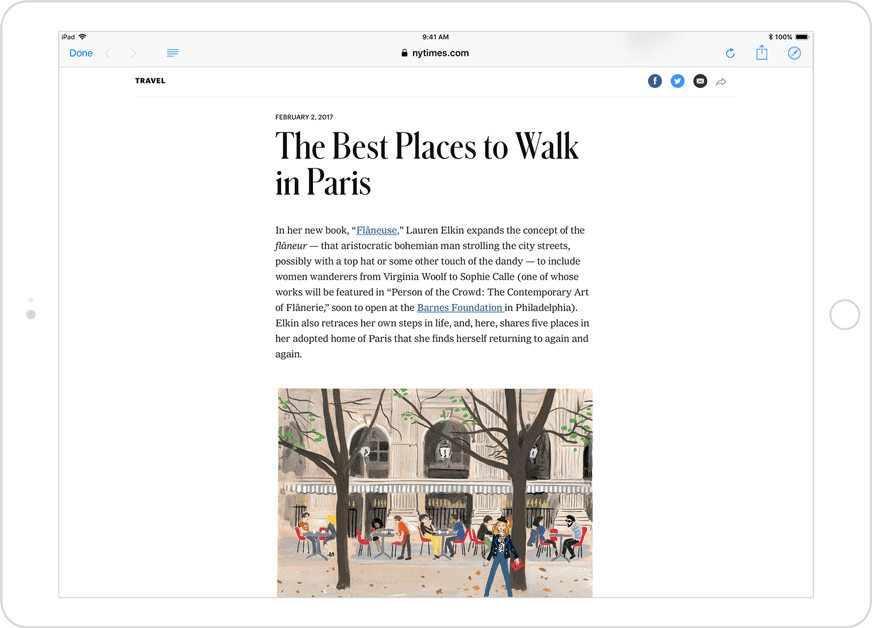
Zoho seems to be the king of expanding already complex applications into tools you can use to run entire departments of businesses – but, as it turns out, they’re also pretty adept at taking smaller, simpler tools and making those better, too. Take Zoho Notebook, for example: Zoho’s answer to apps like Evernote takes the simple act of taking notes on the fly – something most of us really benefit from doing – and combines it with some great features you may not even know you needed – or, wonder how you ever went without them before.

What is Zoho Notebook?

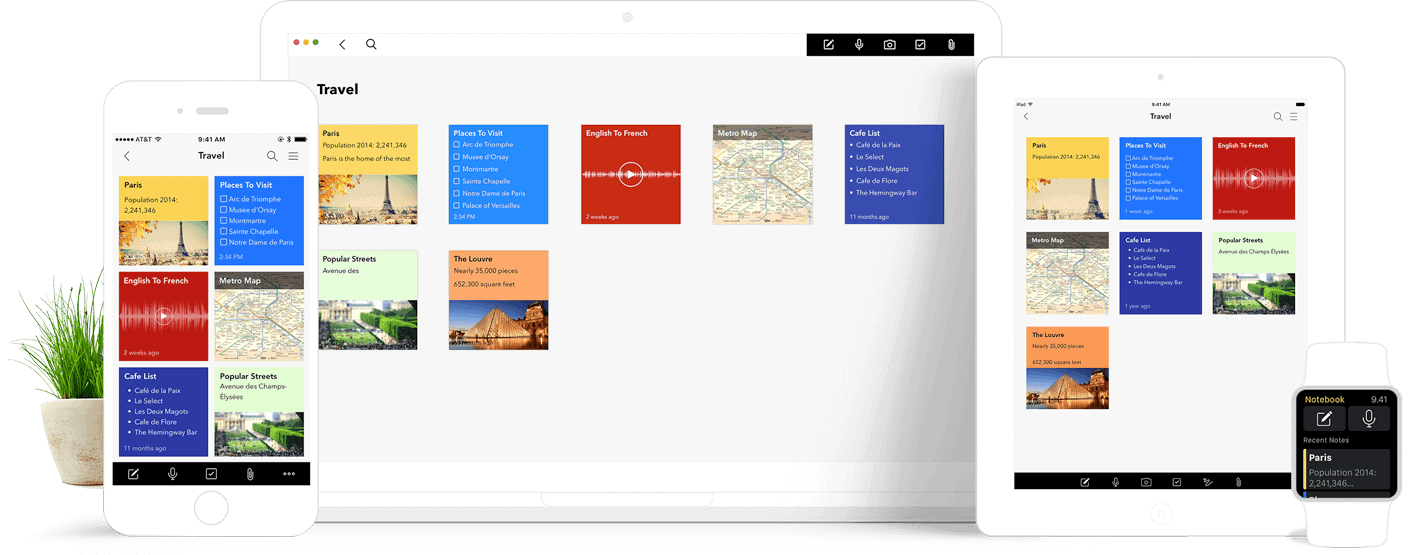
Zoho Notebook is a (free!) note taking application available across several devices. It allows users to easily take notes which are synced to the cloud so they are always up to date. You can create text notes and checklists, flesh out ideas with a dedicated notecard, and even record audio to go with your notes. You can organize your cards into different notebooks with customized titles and covers to keep yourself organized. Share your notes with others over SMS, email, iMessage, and AirDrop, or keep them private with passcodes. This free note taking app simplifies the note taking process and has been made even better with its recent updates!

Zoho Notebook Screenshot

What are the New Features?

smart-card-iPadIntelligent Formatting

Worried that your notes will become distorted or lost when switching between devices? Well, worry no more! With Zoho’s new Smart Cards, the content of your notes is formatted intelligently into simple and clean notecards. Saving a link to an article or webpage? Zoho Notebook will put the headline and main image at the forefront, instead of just a long link. It also makes saving video links to your notes easy: when you save a link from Youtube or Vimeo, Notebook will show a video preview on the card and play it in a distraction-free area when opened. You can now even scan documents to Notebook! With text, audio, sketch, and recipe cards, Notebook’s smart cards take note-taking to the next level!

Notebook for Webclip-the-web-notebook

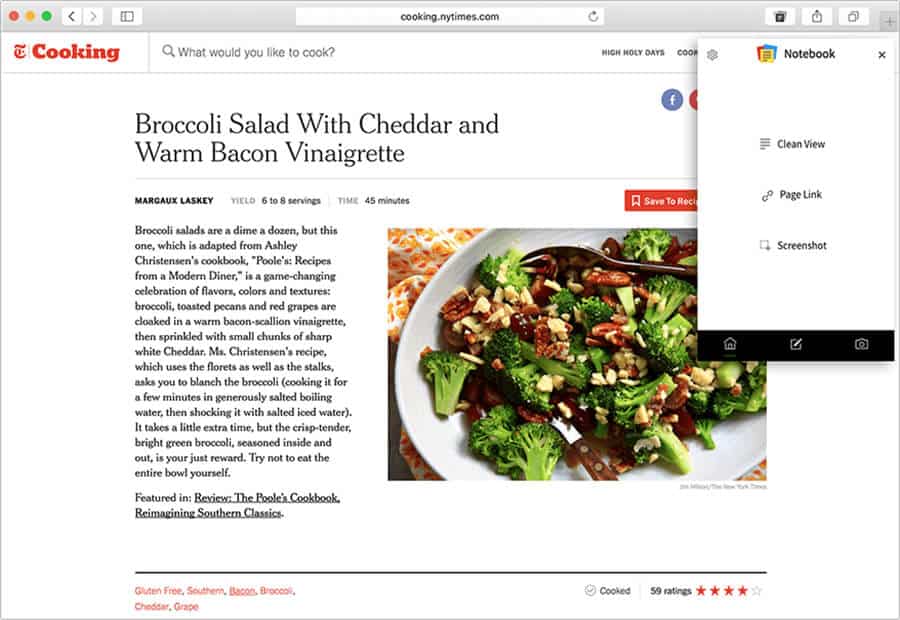
Zoho Notebook originally began as a mobile app but has now expanded into a true online repository! Notebook for web syncs seamlessly from your mobile devices to your desktop. Want to take notes while browsing the web? You can now use extensions which are available for Chrome, Safari, and Firefox to simply drag and drop content and cards across apps. You can save articles (without ads) using Clean view, and clip text and images to save to cards. Protect some of your notes, or extend protection to all of them, using passcodes to ensure your privacy. The simplicity of Notebook will help you stay organized with ease.

mac notebook

Notebook for Mac and iOS 11 Support

You can now do more with Notebook for Mac! Zoho has optimized the experience for Mac users by expanding the drag-and-drop features. Need to save a checklist to your iOS reminders? Well, you can! Zoho has also added support for the drag and drop feature to the iPad Pro, allowing you to multitask and easily manage your notes from even more devices. Other improvements include the ability to unlock your notes using FaceID or Touch ID (depending on the device), making security even better.

Interested in learning more about Zoho Notebook or Zoho in general? Contact a member of our team today! At ZBrains, we provide tailor-made Zoho solutions for your business. Give us a call at (888) 207-4111. R click the link below and we will call you!

[button color="red" url="https://forms.zohopublic.com/zohopc17/form/ChatwithaZohoConsultant/formperma/31BEF517GB1GEh3m721Eg3K8m"]Chat With Us![/button]

Zoho Creator custom solutions for your business

Zoho Creator – Build Custom Business Solutions

One of the most exciting things about the world of software today is how easy it is to do, well… anything. Computers are doing things today that we previously wouldn’t have even dreamed of, and, in doing so, opening our minds up to even more possibilities and, thankfully, giving us the tools to see those possibilities come to fruition before our very eyes – and keyboards. Tech giants like Amazon, Apple, and Microsoft are typically thought of as the forerunners in software innovation, but… what about you? You probably have all kinds of ideas about how to make your own business run more smoothly, and, if you’re reading this blog post, you’ve likely started your foray into Zoho and its suite of apps. So, what about all the things you want to do that Zoho’s standard apps just can’t do for you? Zoho Creator, as Zoho Corporation’s platform as a service (similar to force.com), is Zoho’s answer to nearly any gap you might come across, and then some.

Empower Innovation with Zoho Creator

How exactly will those tools help? To get you (or your Zoho consultant of choice) started, here are 4 ways Zoho Creator fills gaps in your business processes and generally makes life better.

Zoho Creator

Functionality and Mobility

Creator makes it easy for you to build custom applications for your business to automate your business process and reduce your workload. With its drag-and-drop interface, you don’t need to a be a programmer to build applications. Manage your data and collaborate with your colleagues using app-level and form-level sharing, and even give clients access to certain records or data with the client portal add-on. You can also stay connected with Creator’s native mobile apps, which allow you to take your data everywhere.

Gain actionable insights with custom reporting

With Zoho Creator you can create custom charts and generate reports with variables as you see fit for your business. Gain actionable insights through Creator by easily identifying trends or by setting benchmarks. These insights can be followed up by automated actions which can be easily set up. You can trigger these actions to occur based on different contexts – for example, send out an email to customers based on where they are in your order process. Reporting in Zoho Creator allows you to see business information with context and optimize your potential with meaningful data.

Simplify your day with automation

Save time with built-in workflows. Trigger actions based on customer information or actions, and map the information in the database. Using conditional statements and built-in functions you can configure approval systems and define rules for processes, allowing you full control over it all. You can also set up notifications, reminders, and schedule tasks through Creator to avoid delays and ensure your customers are happy.

Integration is key

Zoho Creator connects with standard Zoho apps with relative ease; it also connects to other Creator apps.  This opens up realms of possibilities like connecting various ERP apps into an ERP suite on Zoho, then connecting that to your Zoho CRM.

When it comes to building an application for your business, it is important that it can integrate with your other business apps to ensure that you are receiving all the necessary data. Zoho Creator integrates with several apps including Zoho apps, Google apps, QuickBooks Desktop and Online, and PayPal. Creator makes data collection easy, and you don’t have to worry about manually inputting data.

Zoho Creator starts at $15 per user per month*, which is a great deal. Save time and money by creating a custom application for your business needs. *Pricing updated June 2021

Did that get the innovation juices flowing? Or, just interested in learning more? Contact a member of our team today!

Connect with Us

Zoho desk keeps you connected with customers

All You Need to Know About Zoho Desk: The Ultimate Customer Support Solution

As any good service company knows, happy customers make life so much easier and make your business run much more smoothly.  Your success relies on keeping customers happy. And it can be a daunting task if you’re faced with handfuls of customer help requests daily, or if you don’t have a way of properly funneling those requests to the right people in your company.

And then, even if you can assign requests well enough, how can you make sure the same problems don’t come up again? How will you know which agents are best at handling issues so you can be sure to utilize them more often?

Zoho Desk is your solution.

Zoho Desk is that all-encompassing solution for your business in need of a ticketing system. Desk is context-aware and designed so your service teams never miss a beat.

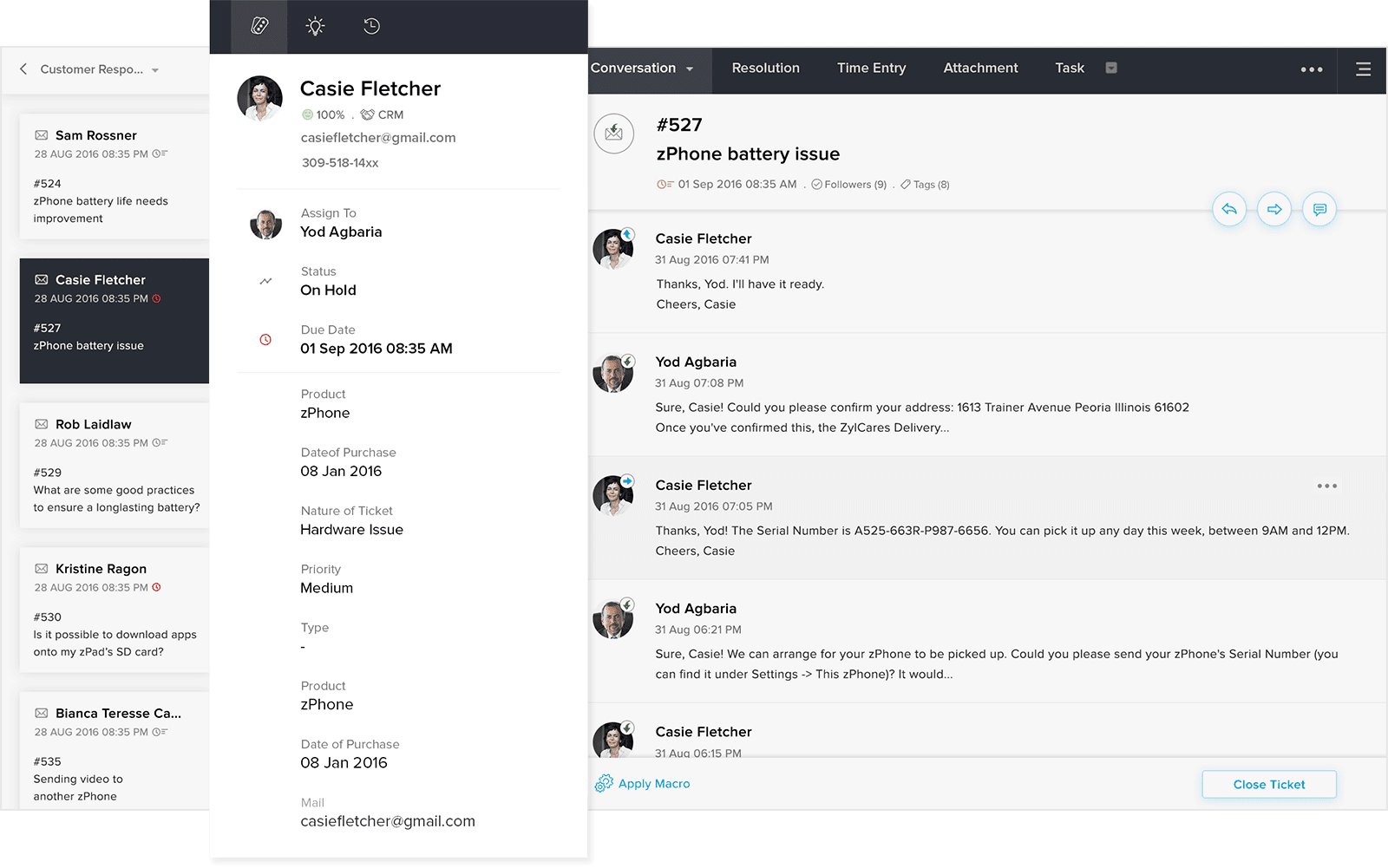
Zoho Desk Customer Context Tickets

Here are 6 ways Zoho Desk helps you cover every level of customer service.

Zoho Desk customer connections email social ticketing1. Keep your customers covered.

First and foremost, Zoho Desk keeps allows your customers to contact you easily through various methods, such as:

      • phone, live chat, email, and social media!
      • You can also create custom web forms for your customers to quickly submit tickets which they can track.
      • The option to create a searchable Knowledge Base so that your customer can find answers to common questions without having to contact support is also available. The knowledge base is customizable to fit your brand (or brands).
      • Desk also allows you to build a community forum, in which your customers can have discussions with your team or even with each other in order to solve problems, making it possible for some problems to simply solve themselves, using none of your valuable resources.

2. Improve the productivity of your agents.

As an agent, having all possible details is vital when responding to your tickets and being able to provide a quick solution. Zoho Desk provides you with the customer ticket but also gives customer details within your ticket so you know who you are talking to. Want to know if they have reached out before? No problem! Zoho Desk allows you to see past tickets and interactions on the contact details page. If a customer has submitted a ticket for a common question, Desk will auto-suggest solutions from your knowledge base.

3. Save time managing your team with automation.Zoho Desk reporting dashboard

As a manager, your day can be hectic, so Zoho Desk is made to help you save time. Desk can help ensure that customer service is running smoothly with automation and reporting.

Wasting too much time assigning tickets or tracking your team’s metrics? With Desk you can automate tickets assignments with criteria that you can specify, automatically escalate tickets based on rules you set, and automate workflow processes, all saving you tons of time. Both your customers and your agents will receive notifications when a ticket is updated, increasing your team’s productivity.

4. Key metrics and reports to optimize customer service.

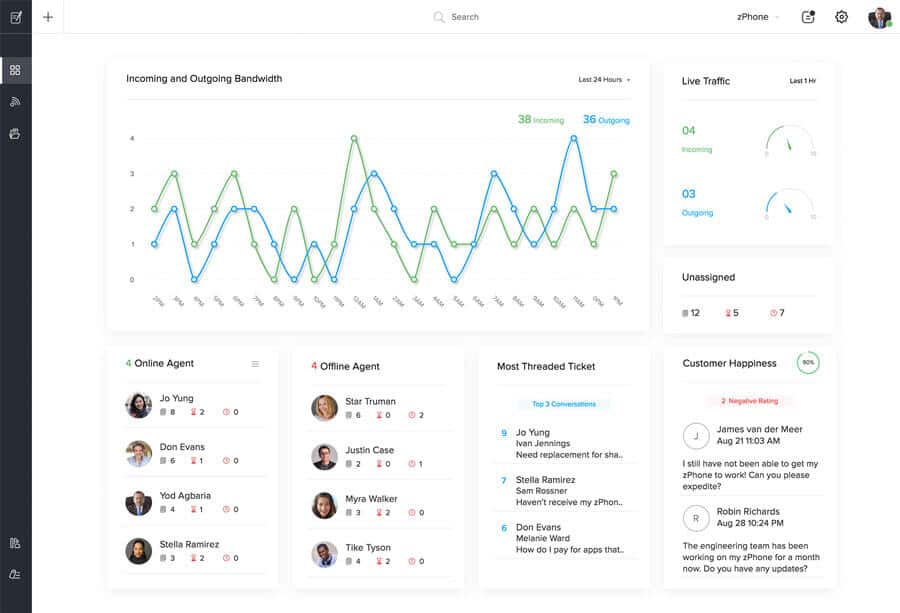
With an easy-to-read dashboard, you can track customer happiness and your team’s key metrics in one window. You can see individual reports and monitor agents’ performance, response time, and even current availability. Or, you can view your team’s overall performance to monitor bandwidth, identify bottlenecks, and find patterns. All of these things will help you to optimize and organize your customer service.

5. Collaborate across departments.

When it comes to customer support, no one person will have all of the answers. Sometimes an agent will be stumped by a question, or not have access to the answer, and will have to reach out to another department for a solution to a problem.

Let’s say a customer asks about the status of a certain product, but you need to reach out to the shipping department for an answer. In Zoho Desk, you can simply tag or @ a colleague from the shipping department and they will be notified! With Desk you don’t need to be worried about unknowingly working on the same ticket as another agent. It will notify you who is working on the ticket in real time, whether it is another agent or the customer. Work efficiently across departments without ever colliding.

6. The option to go mobile with Zoho Desk app!

The Zoho Desk mobile app allows agents to receive instant notifications about the tickets they’re following. this includes details about accounts and contacts. Conversation responses and internal comments are available here, too.

The app automatically organizes Desk tickets, prioritizing the urgency for you. CRM customer information is available within, as well, so agents can quickly reference those contact details and past interaction details. Another level of functionality available from Zoho Desk!

Zoho Desk Consulting is available from ZBrains

Aside from its standalone functionality, Zoho Desk packs a number of different integrations to really take your customer service to the next level, and with paid plans starting at $20* per user per month for the Standard Edition, it’s a hard deal to pass up! (*prices updated June 2021)

Interested in learning more? Reach out to a member of the ZBrains team today! Give us a call at (888)207-4111 or click the button below to connect with our consultants!


Connect with Us


How EBizCharge enables businesses to accept payments in Zoho CRM, Books, Inventory, and Invoice

In the ever-changing digital payments landscape, businesses must constantly use innovative and efficient software solutions to keep up with competitors and yield long-term success. 

Fortunately, EBizCharge and Zoho provide two powerful systems with robust A/R options for businesses to streamline their payment processing and stay at the forefront of their industry.

What is EBizCharge?

EBizCharge is an all-in-one payment platform equipped with a payment gateway, software integrations, and merchant services, so businesses can securely accept various forms of payments like credit cards, debit cards, and ACH payments. 

With EBizCharge, businesses can take advantage of these features, including:

  • Seamless payment processing
  • Real-time transaction reporting
  • Recurring billing options
  • Level 3 payment processing 
  • Secure tokenization and encryption for enhanced data security
  • 24/7, in-house customer support

In addition to the Zoho suite, EBizCharge integrates with over 100 other accounting, ERP, CRM, and eCommerce software systems, including QuickBooks, Salesforce, Sage, and Magento.

EBizCharge’s Integrations with Zoho

EBizCharge’s integrations with various Zoho apps greatly simplify how businesses handle payment processing and customer relationship management. 

EBizCharge’s integration into Zoho CRM allows sales teams to easily accept customer payments on sales calls, directly inside the Zoho CRM software. 

EBizCharge provides three separate integrations with the Zoho Finance platform: Zoho Books, Zoho Inventory, and even Zoho Invoice.  These integrations allow for finance and fulfillment staff to collect and process payments at any point in your process.

With these integrations, merchants can quickly process transactions, allow customers to pay by email, automate payment collections, and more. 

EBizCharge’s Zoho integrations allow businesses the flexibility to enhance their operations to promote more cash flow and long-term success. 

Aside from the features mentioned in this section, EBizCharge and Zoho provide innovative software that significantly benefits merchants.

What problems do these integrations solve?  3 benefits of integrating EBizCharge with Zoho

The integration between your business software and payment processing system eliminates double-entry, but it also brings departments closer together by speeding operations, and even improves customer service:

  • Improved customer experience. EBizCharge allows Zoho users to provide their customers with a secure and user-friendly online payment portal. Customers can easily pay invoices, view their transaction history, and manage billing preferences, leading to a positive and convenient payment experience.
  • Enhanced payment reconciliation. EBizCharge and Zoho automate the payment reconciliation process by automatically matching payments with corresponding invoices, reducing human error and discrepancies.
  • Increased efficiency. EBizCharge for Zoho eliminates manual data entry and repetitive tasks, saving time and effort for business teams. This increased efficiency allows them to focus on core business activities.

Streamline your business with EBizCharge and Zoho

Integrating EBizCharge with Zoho provides a robust payment solution for merchants to stay ahead of the competition and meet the evolving demands of their customers. 

If you want to alleviate the stress felt from tedious financial tasks, increase overall efficiency, and even make your customers happier, integrating EBizCharge with Zoho will help save you time, energy, and valuable resources.

Measure Lead Response Time Extension

Introduction

Thank you for choosing the “Measure Lead Response Time” extension for Zoho CRM. This powerful tool is designed to help you accurately track and measure the response time for leads in your CRM system. By monitoring your team’s response time, you can improve customer satisfaction, streamline sales processes, and enhance overall efficiency. This help document will guide you through the installation, configuration, and usage of the extension.

1. Installation

1.1 Prerequisites

Before installing the “Measure Lead Response Time” extension, ensure that you meet the following requirements:

  • Active Zoho CRM subscription.
  • Administrative access to your Zoho CRM account.
  • Supported web browser (Chrome, Firefox, or Safari).

1.2 Installing the Extension

To install the extension, follow these steps:

  1. Log in to your Zoho CRM account.
  2. Navigate to the Zoho Marketplace at https://www.zoho.com/marketplace.
  3. Search for “Measure Lead Response Time” in the marketplace search bar.
  4. Locate the extension and click on it to view the details.
  5. Click on the “Install Now” button.
  6. Review the permissions requested by the extension and click “Accept.”
  7. The extension will be installed in your Zoho CRM account.

2. Configuration

2.1 Accessing Extension Settings

To access the settings of the “Measure Lead Response Time” extension, follow these steps:

  1. Log in to your Zoho CRM account.
  2. Navigate to the CRM home page.
  3. Click on the gear icon in the top-right corner to access the settings menu.
  4. From the dropdown menu, select “Setup” to open the Zoho CRM setup page.
  5. In the setup page, locate and click on the “Extensions & Customizations” section.
  6. Under the “Extensions” tab, find and select “Measure Lead Response Time.”

2.2 Setting Response Time Criteria

Within the extension settings, you can define the response time criteria based on your business requirements. Follow these steps to configure the response time criteria:

  1. Access the extension settings using the instructions provided in section 2.1.
  2. In the “Response Time Criteria” section, click on the “Add Criteria” button.
  3. Specify the criteria details, such as the response time limit, measurement units, and notification preferences.
  4. Save the settings to apply the response time criteria.

3. Usage

3.1 Monitoring Lead Response Time

The “Measure Lead Response Time” extension provides real-time monitoring of lead response time. To track the lead response time, follow these steps:

  1. Log in to your Zoho CRM account.
  2. Navigate to the CRM home page.
  3. Locate and click on the “Leads” module in the left sidebar.
  4. Within the Leads module, you will find a new column labeled “Response Time.”
  5. The “Response Time” column displays the time elapsed since the lead was assigned or created.
  6. You can sort the leads based on response time to prioritize follow-ups.

3.2 Generating Reports

The extension allows you to generate reports on lead response time for better analysis and performance tracking. To generate reports, follow these steps:

  1. Log in to your Zoho CRM account.
  2. Navigate to the CRM home page.
  3. Click on the “Reports” tab in the top navigation menu.
  4. Select the “Lead Response Time” report category.
  5. Choose the desired report type, such as summary or detailed.
  6. Customize the report filters and date range as needed.
  7. Click on the “Generate Report” button to generate the lead response time report.
  8. The report will be displayed, and you can export it in various formats for further analysis.

4. Troubleshooting

4.1 Common Issues

Issue: Extension not visible in the Zoho CRM setup page.

  • Ensure that the extension installation was successful. Check the installation steps in section 1.2.
  • If the extension is installed but not visible, try clearing your browser cache and refreshing the page.

Issue: Incorrect response time calculations.

  • Double-check the response time criteria configured in the extension settings.
  • Verify that the lead creation/assignment timestamps are accurate in your CRM system.

4.2 FAQs

Q: Can I customize the response time criteria for different lead types? A: Yes, the extension allows you to set specific response time criteria based on lead types. Refer to section 2.2 for instructions on configuring criteria.

Q: Can I receive notifications for leads that exceed the response time limit? A: Yes, you can set up email notifications for leads that exceed the response time limit. In the extension settings, specify the email addresses to receive notifications.

Understanding Distribution Data Flow Systems by ZBrains

DISTRIBUTION DATA FLOW

Zoho helps you streamline and automate tasks in your business. ZBrains will show you how to get to the next level to with a digital transformation with Zoho!

Tech & SaaS Data Flow

TECH & SaaS DATA FLOW

Zoho helps you streamline and automate tasks in your business. We’ll show you how to get to the next level to with a digital transformation with Zoho!

SmartScheduler™ & Google Maps

How to Create Your
Google Maps API for SmartScheduler Integration

SmartScheduler extension for Zoho CRM allows for easy appointment-setting, dispositioning, and route optimization, all while writing everything back to your CRM. This integration with Google Maps allows you to schedule and perform routing tasks with ease.

Due to changes within Google, it is now required for ZBrains clients to provide the API key for this integration to us. Please see this video and written instructions below for a quick and straightforward how-to.

How To Generate Google Map API key

Step 1 :

1a. Go To – https://console.cloud.google.com/

Step 2:

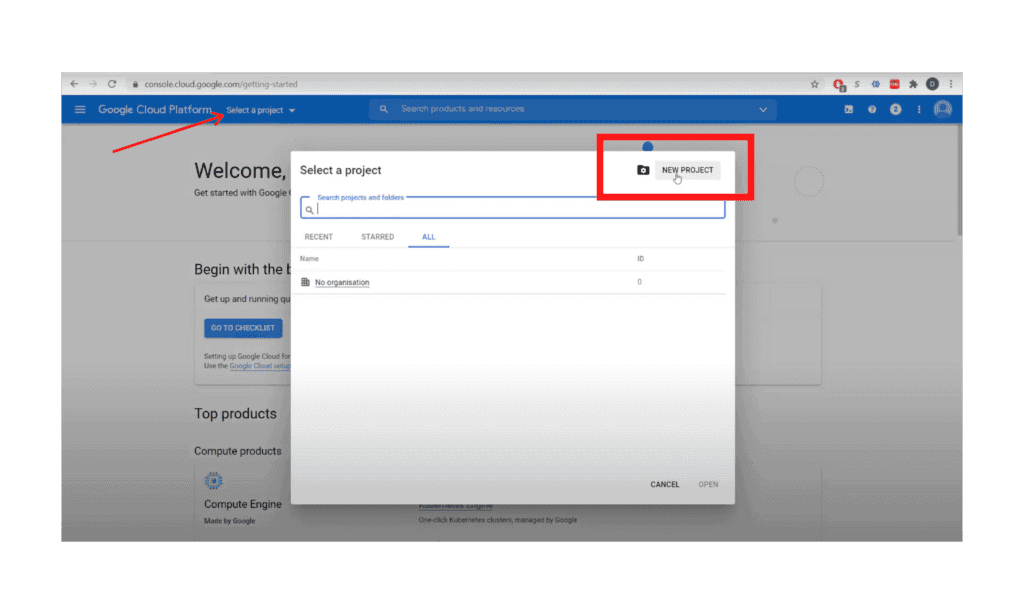
2a. Create a Project. 

2b. From “Select a Project” dropdown, click “New Project”

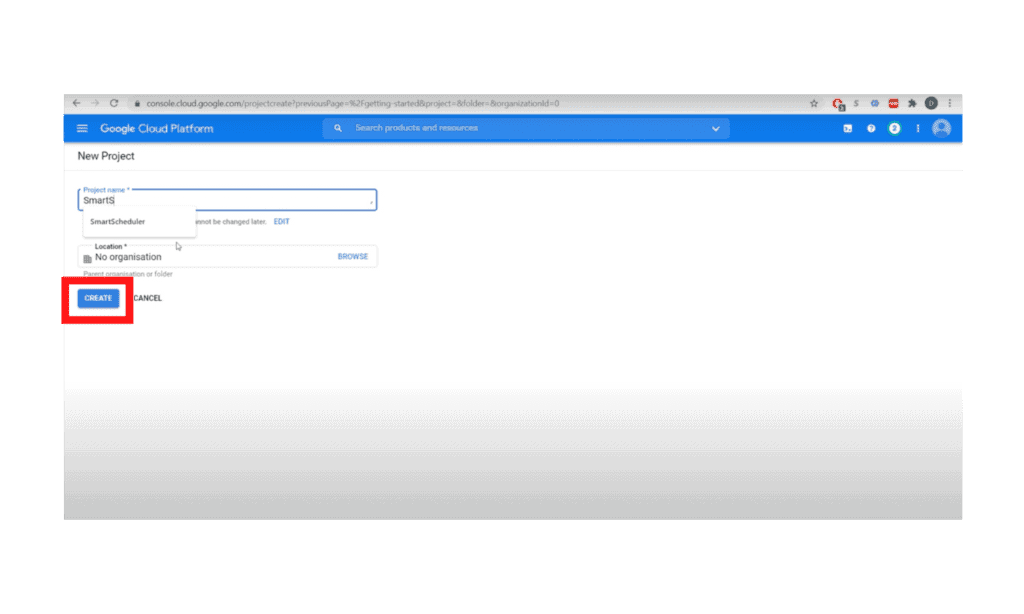
2c. Name it “SmartScheduler,” click “Create”

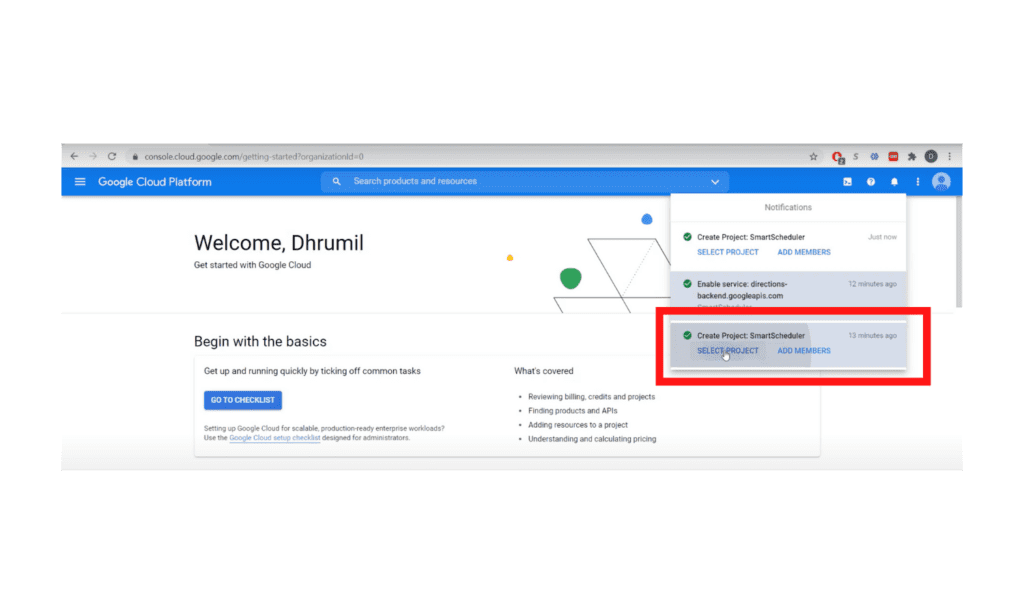
2d. Wait for the project to be created, then select the project from “Notifications”

Step 3:

3a. Then select your recently created project from the “Select a Project” list

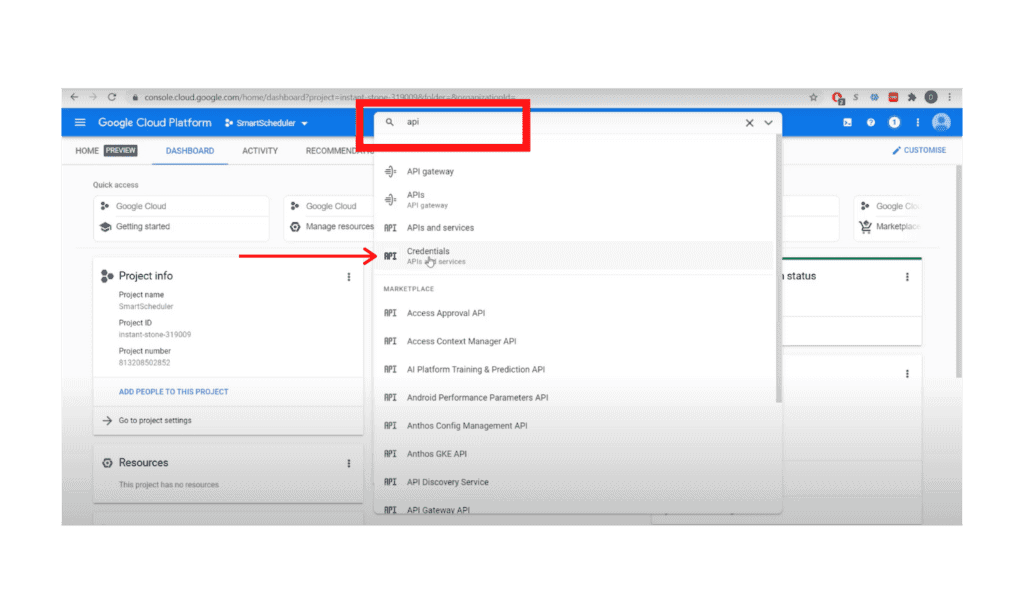
3b. Search for “API” and click on “Credentials”

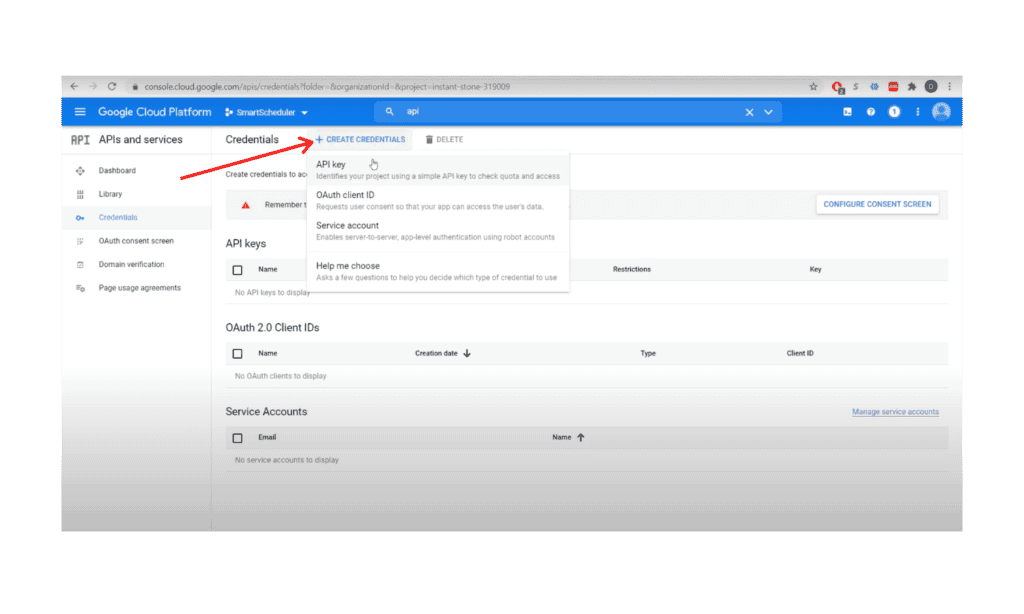
3c. In Credentials, Click on “+ New Credential” and Create API Key

3d. Then close the API Key window

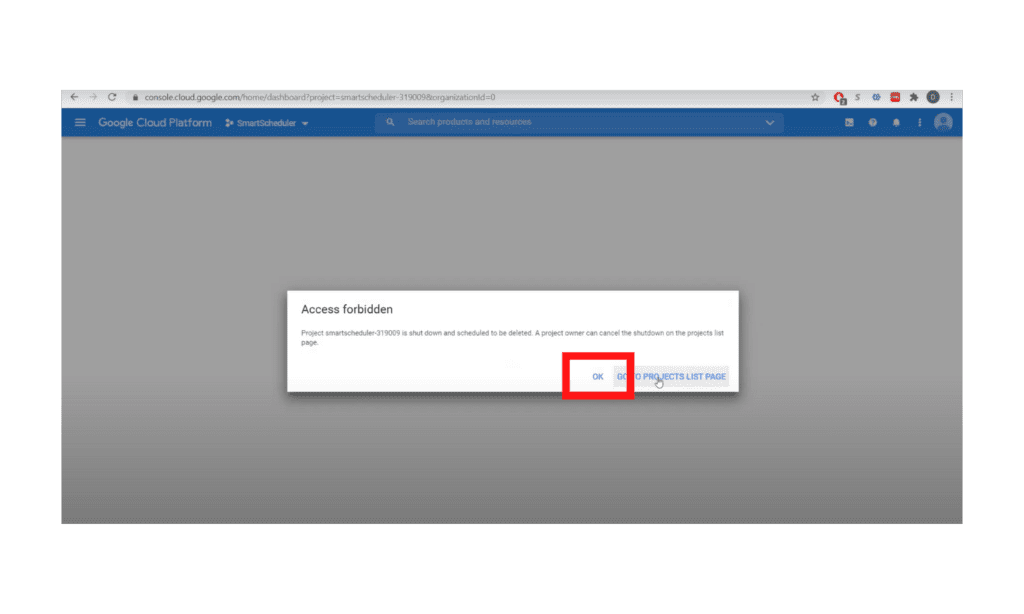
 3e. *click OK if you see Access Forbidden message

Step 4:

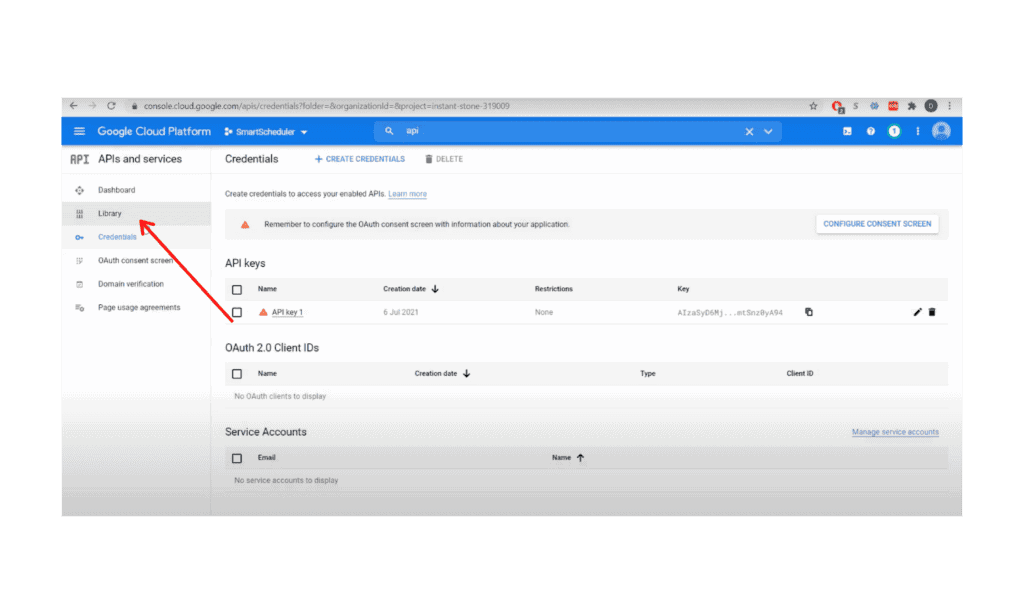
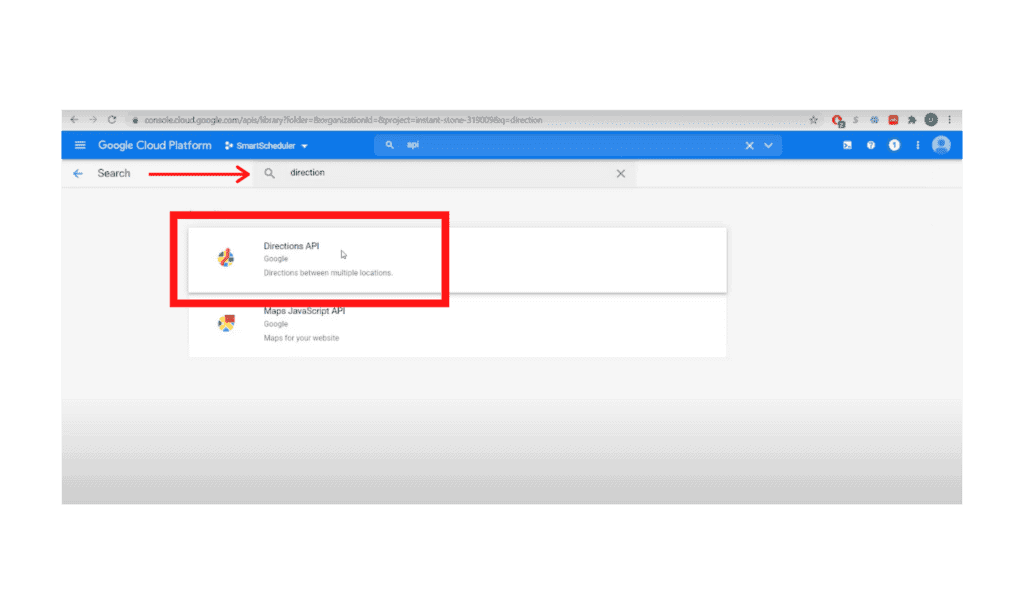
4a. Go to the Library 

4b. Search for “Direction”

4c. Click “Directions API” and Enable

Step 5:

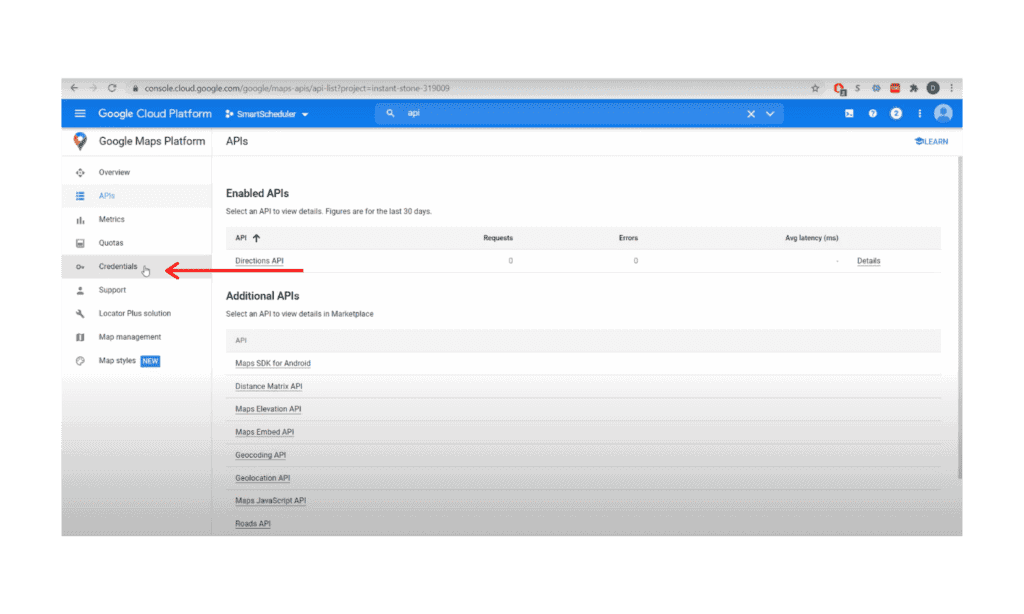
5a. Go to Credentials

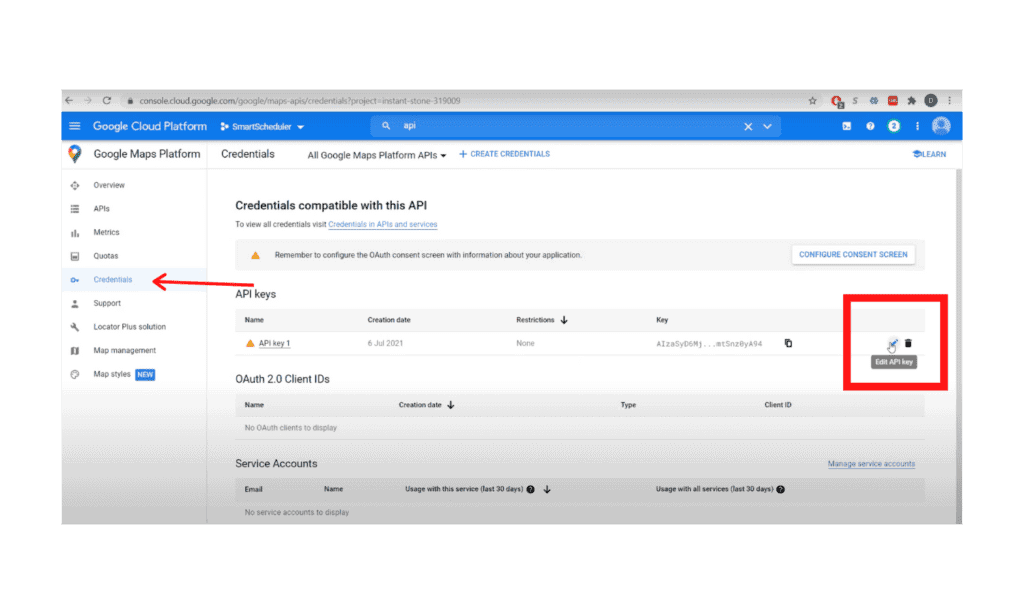
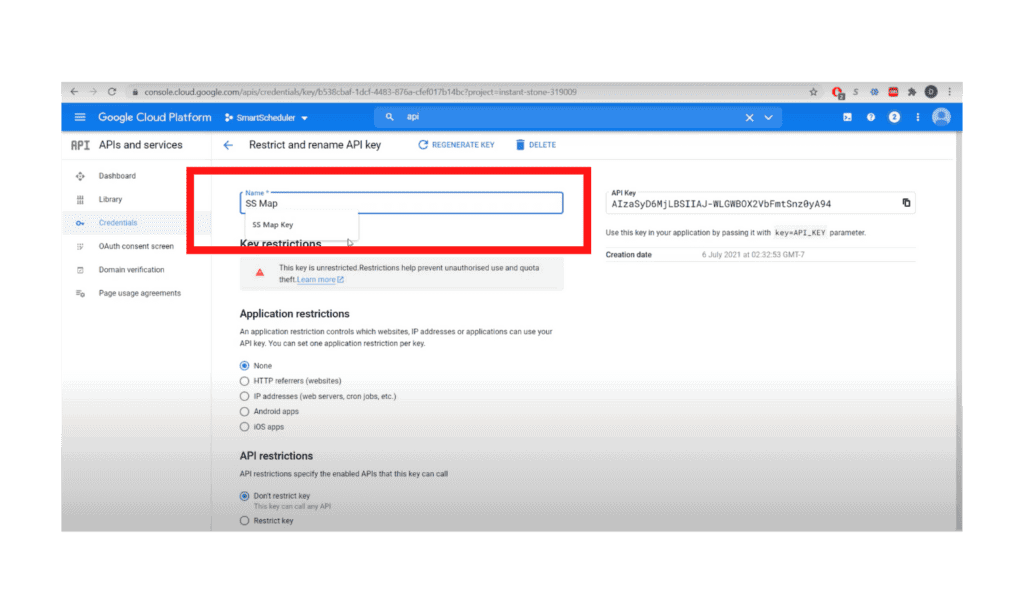
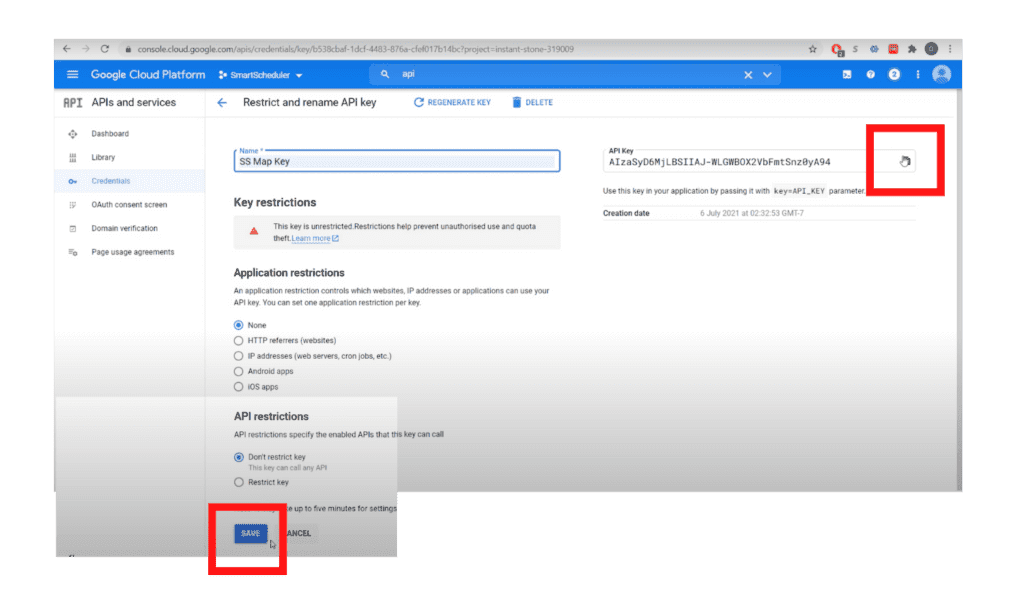
5b. Select edit, then rename API name to”SS Map Key”

5c. Copy key and click Save

End

For additional documentation, please see the Using API Keys article from Google


Other questions? Give us a call at (888) 207-4111 or contact us.

Contact Us


SmartScheduler™

from

zoho smartscheduler

Free Guide to Zoho CRM Implementation

Free Guide to Zoho CRM Implementation

In this info-packed guide, you’ll find a full spectrum of our advice from the point of researching a new Zoho CRM implementation, through planning and selecting a vendor, all the way through to implementation support options.

ZBrains has been building end-to-end solutions using Zoho since 2012, and today we’re one of Zoho’s top Premium Partners. Now you can get our advice for free!

Request our comprehensive guide to CRM implementations!